EasyManua.ls Logo

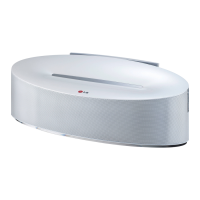
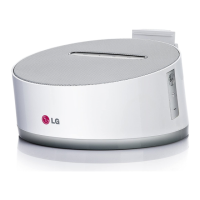
LG ND1531 - User Manual

LG ND1531
20 pages
Print Icon
To Next Page IconTo Next Page
Loading...
ND1531
OWNER’S MANUAL
Wireless Speaker for
Android Dock
MUSIC IN STYLE
Please read this manual carefully before operating
your set and retain it for future reference.
ENGLISH
DEUTSCH
FRANÇAIS
SLOVENŠČINA
ITALIANO
NEDERLANDS
ND1531-BE_ADEULLK_ENG.indd 1 2013-08-23  5:58:11

Questions and Answers

  • J
    Jason MartinezAug 10, 2025
    Why is Bluetooth pairing not working on my LG Speakers?
    • C
      Christine WrightAug 10, 2025
      If Bluetooth pairing isn't working on your LG Speakers, try these steps: * Turn Bluetooth off and then on again on your device, and try pairing again. * Make sure your Bluetooth device is turned on. * Remove any obstacles between your Bluetooth device and the LG Speakers. * Note that pairing success can depend on the type of Bluetooth device and the surrounding environment.
  • N
    nkimAug 20, 2025
    What to do if there is no sound from my LG ND1531?
    • J
      Justin ParkerAug 20, 2025
      If there's no sound from your LG Speakers, try the following: * Press 1/F and check the selected function. * Ensure your device's operating system is version 4.1 or later. * Verify your device is supported by AOA 2.0. * Adjust the volume on your portable device.
  • K
    keithcraigAug 31, 2025
    How to troubleshoot no power on LG ND1531 Speakers?
    • K
      Kimberly PerryAug 31, 2025
      If your LG Speakers have no power: * Plug in the power cord. * Test the outlet by plugging in another electronic device to see if it works.

LG ND1531 Specifications

General IconGeneral
BrandLG
ModelND1531
TypeSound Bar
Water ResistanceNo
Channels2.0
SubwooferNo
Wireless SubwooferNo
BluetoothYes
HDMI InputNo
Optical InputYes
USB PortYes
Remote ControlYes
Wall MountableYes
ConnectivityBluetooth, USB
Power SourceAC adapter

Related product manuals