8
LG MultiSITE
TM
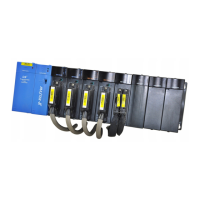
E10 Controller
Due to our policy of continuous product innovation, some specifications may change without notification.
©LG Electronics U.S.A., Inc., Englewood Cliffs, NJ. All rights reserved. “LG” is a registered trademark of LG Corp.
INTRODUCTION
Description
DIN-mount, 24 Vac/dc (50/60Hz) powered, Niagara® controller with 10 I/O points including:
• Five Universal Inputs (UIs) compatible with 0-10 Vdc, 0-20 mA, dry contacts, 0-100K ohm resistive, or
Type 3 thermistor temperature sensors.
• Three digital triac outputs (non-powered) for on/off control of 24 Vac loads up to 1/2 Amp.
• Two 0-10 Vdc Analog Outputs (AOs) for 0-10 Vdc analog control of loads up to 2.5K ohm minimum or
4 mA drain maximum.
See product data sheet and MS-E10 Install and Startup Guide for complete specifications and product
details.
Included in this Package
• MS-E10 controller
• Three-position RS485 connector plug
• Six-position connector for triac output
• Four-position connector for analog outputs
• Eight-position connector for Universal inputs
• Two-position power connector, and a grounding wire
• 499 Ohm resistors (Qty. 5) for universal input use
• This MS-E10 Controller Installation Manual
Material & Tools Required
• One of the following:
• UL listed, Class 2, 24 Vac transformer, rated at minimum of 7 VA. A dedicated transformer is re-
quired (cannot power additional equipment), or
• User supplied UL Listed Class 2 or LPS AC power adapter: 24 Vdc, capable of supplying at least
7 W (24 Vdc at 292 mA).
• DIN rail, type NS35/7.5 (35mm x 7.5mm) and DIN rail end-clips (stop clips), recommended for installa-
tion. Controller is also panel-mountable.
• Suitable tools and fasteners for mounting the unit and any accessories.
Default Login Credentials
Platform login requires Admin-level platform credentials. Factory default username and password for
platform and station are listed below.
Platform credentials: username: “tridium”, password: “niagara”, passphrase: “niagara”.
Station credentials: username: “admin”, password: “Admin12345”
When you initially commission the controller you will have to change all default credentials (username,
password, passphrase)



 To Next Page