Getting Started 7
Getting Started
1
Main Unit
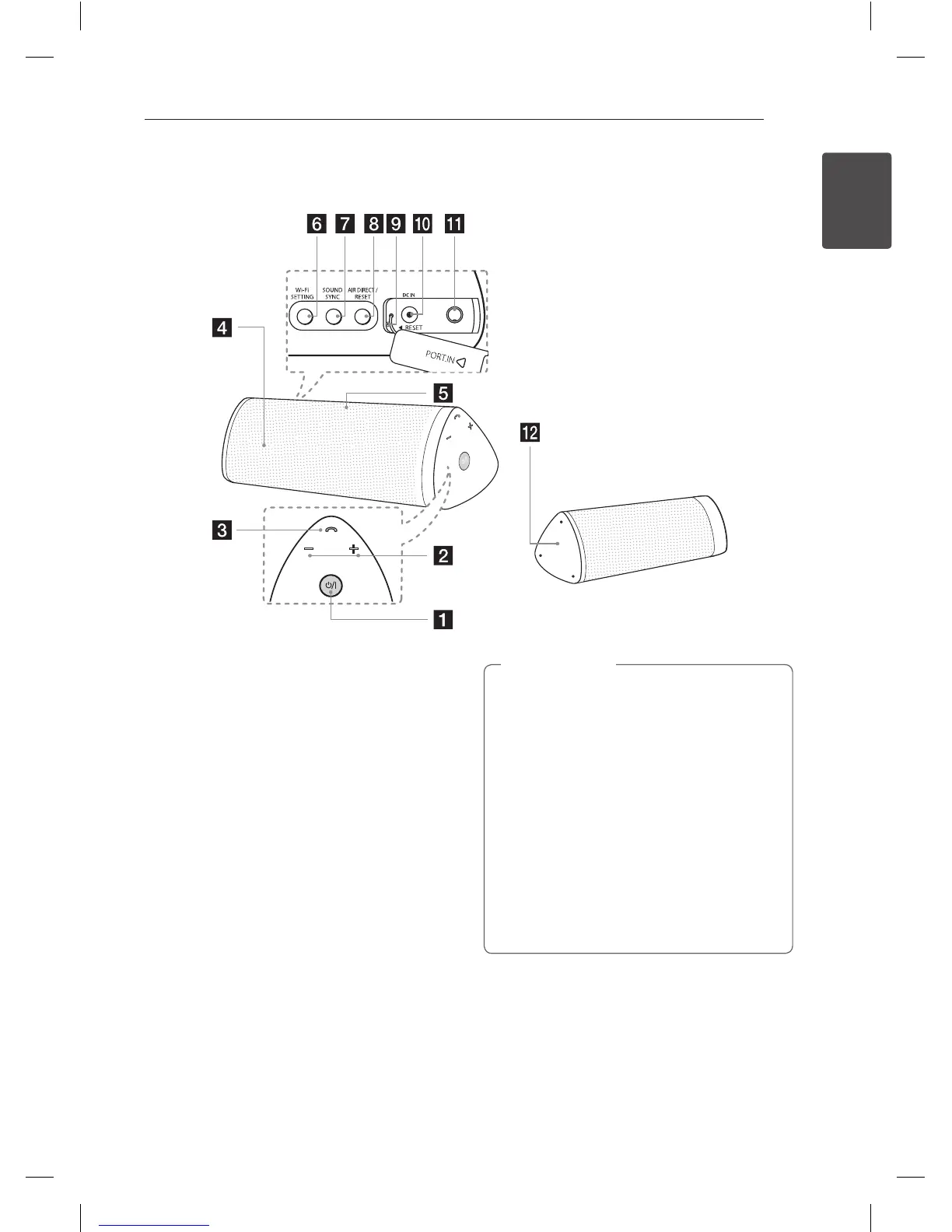
a
1/!
- Turns on / off : Press and hold
1/!
- Selects the function and input source.
b
+/- (Volume) : Adjusts speaker volume.
c
Phone button
d
Speaker
e
Microphone
f
Wi-Fi SETTING: Connects your unit to the
existing Wi-Fi network.
g
SOUND SYNC
Synchronizes this unit and your LG TV.
h
AIR DIRECT / RESET
- Creates new Wi-Fi network with your unit.
- Initializes Wi-Fi network’s security mode.
i
Reset hole
j
DC IN (AC adapter input)
k
PORT.IN (3.5 mm)
Listen to music from your portable device.
l
NFC Tag (page 19)
Precautions in using the touch buttons
y
Use the touch buttons with clean and dry
hands.
- In a humid environment, wipe out any
moisture on the touch buttons before using.
y
Do not apply excessive pressure to the
touch buttons. Excessive force can damage
the sensor of the touch buttons.
y
Touch the button that you want to work in
order to operate the function correctly.
y
Be careful not to have any conductive
material such as metallic object on the
touch buttons. It can cause malfunctions.
>
Caution
NP6630-A0.BGBRLLK_MFL67789408.indd 7 2013-05-27 12:25:45



 To Next Page