p
KEY CHANGER (
/ )
Changes the key to suit your vocal range.
VOICE CANCELLER
You can reduce the vocal tones during music playback from
various input sources.
VOCAL EFFECTS
Selects VOCAL EFFECTS mode.
MIC ECHO
Selects ECHO mode.
q
MIC VOL. (Microphone Volume) -/+
Adjust microphone volume.
Download the Music Flow Bluetooth App to your
device. (Android only)
For more information, download the online owner’s
manual. http://www.lg.com
LG Sound Sync (Wireless)
Controller App
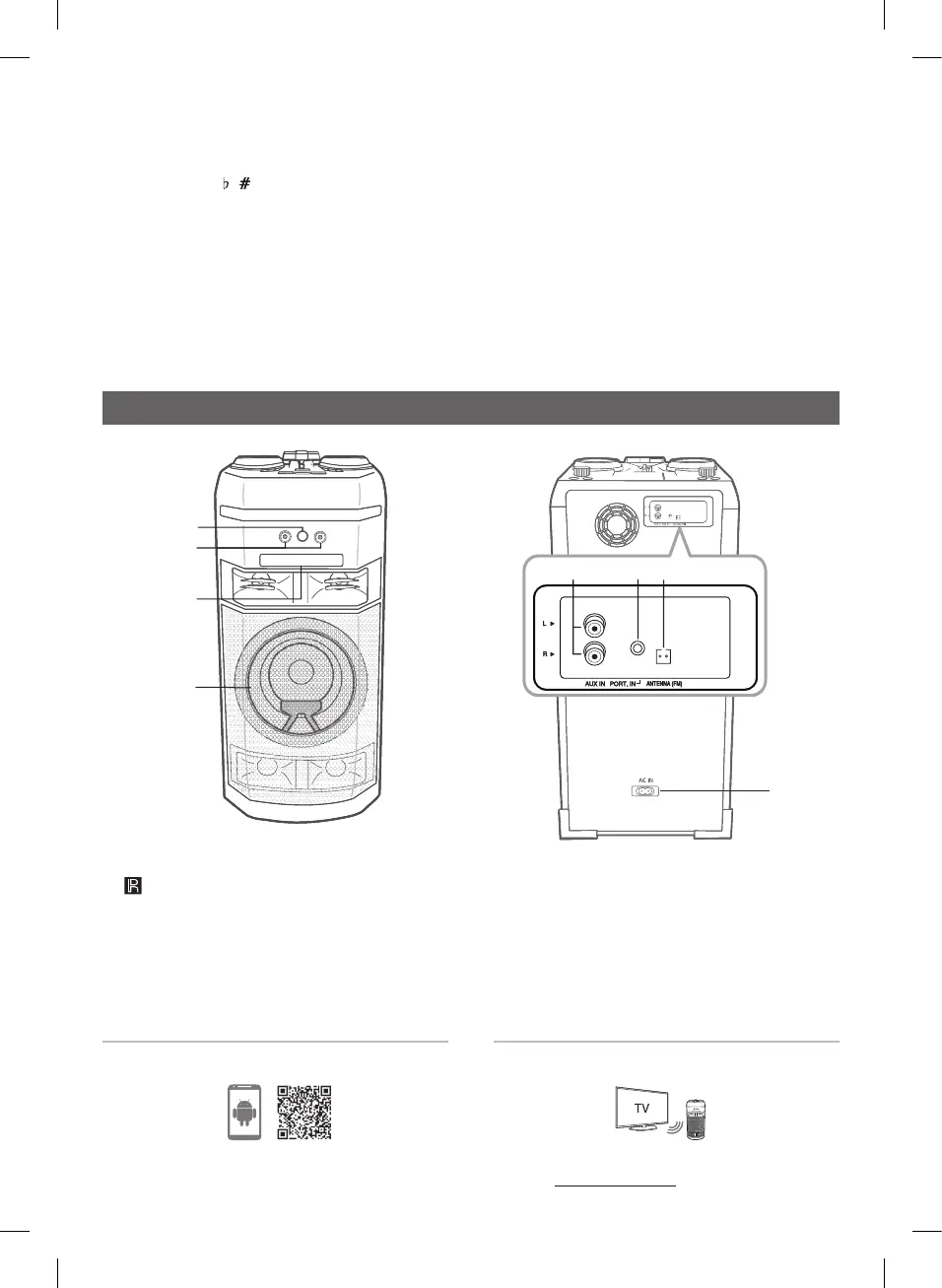
Front panel / Rear panel
a
(Remote sensor)
b
MIC(Microphone) 1/2 jack
c
Disc tray
d
Lighting
e
AUX IN (L/R) : Connect an auxiliary device.
f
PORT.(Portable ) IN : Connect a portable device.
g
ANTENNA (FM)
h
AC IN socket
a
b
c
d
h
f
g
e
OK55-FB.DCISLLB_SIM_ENG_MFL69451270.indd 3 2021-08-23 8:17:29


 To Next Page