webOS6.0
(2021)
webOS22
(2022)
Improved
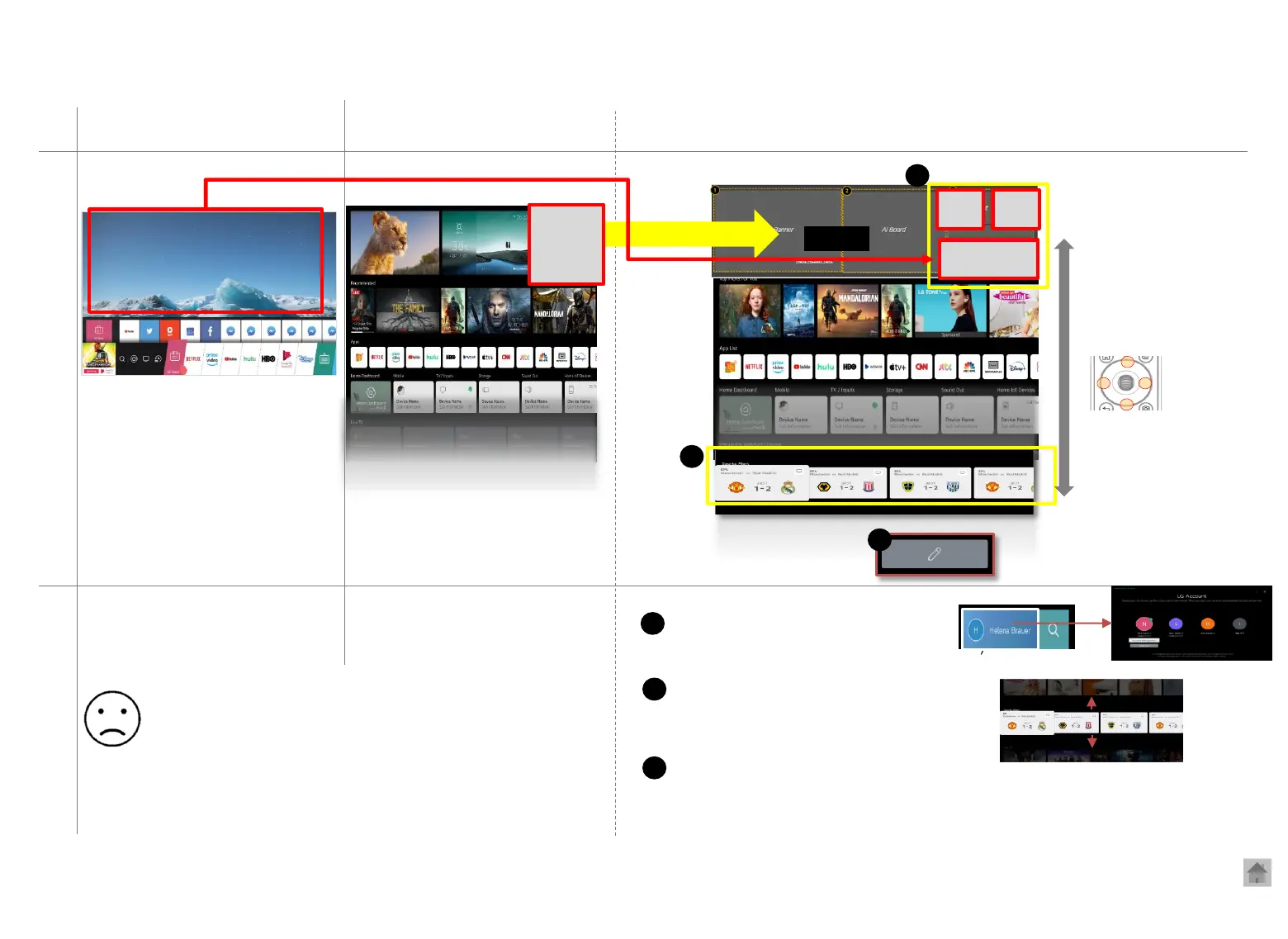
[Home screen] webOS6.0 (2021 ) vs. webOS22
.
.
.
Home
screen
Search
Sign into
account
Search
Recently watched screen
Quick verification and account switching
Easy access to Recent Input (including live TV)
1
1
2
The selected row is located at the center of
the screen and other rows becomes blurred.
2
3
Added the category list editing function
→ The order of the top/ bottom of the list has been changed
3
◀Bottom of the screen
<Account>
Choose an account
Magic remote control wheel ↕
▲
▼
◀ ▶
webOS5.0
(2020)
Created Home Bar at the bottom
of the screen
Magic remote control
arrow keys Top/bottom/left/right
Easy to find OTT content/ programs
- The category can’t be edited.
- The layout is full of content.
- I can’t watch live TV while using Home.
- There is not much useful content in the top category.


 To Next Page