Getting Started8
Getting Started
1
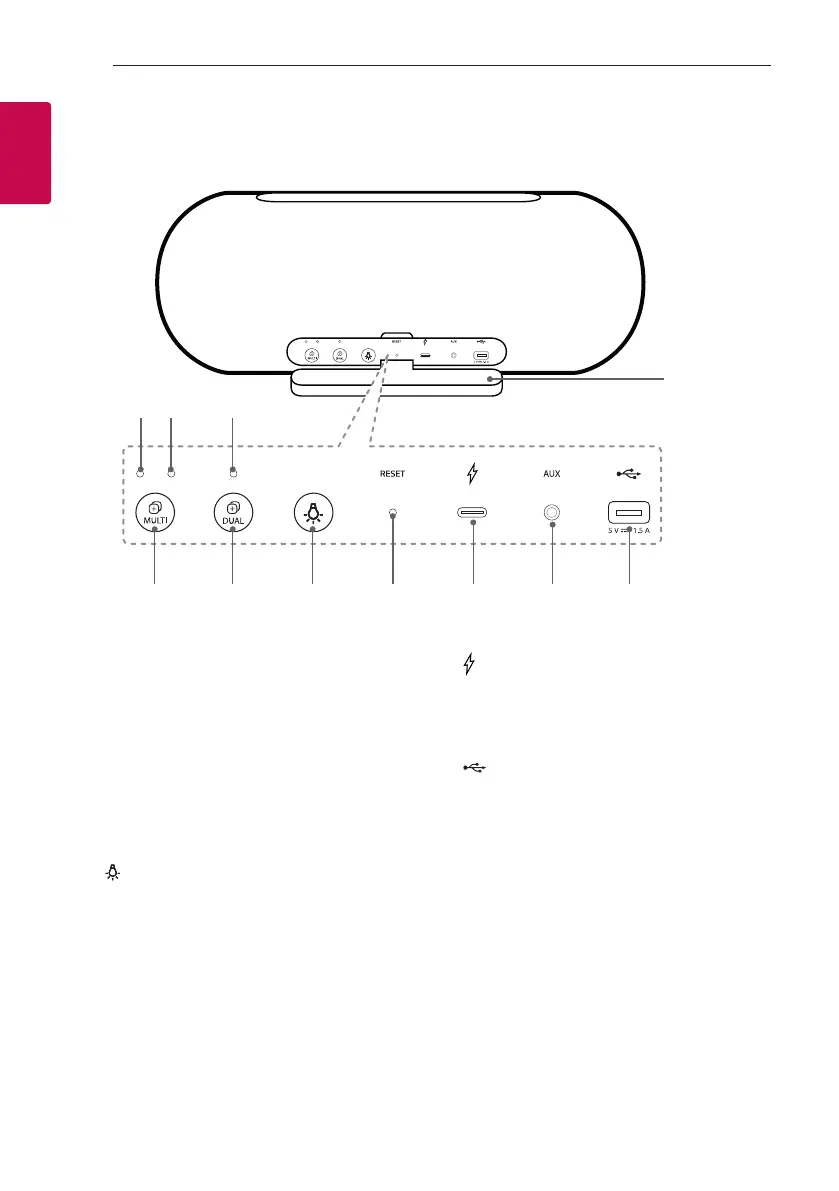
Rear
a
e
b
f
dc
g h i j k
a
Port cover
b
Multi Mode LED (MAIN)
c
Multi Mode LED (OTHER)
d
Dual Mode LED
e
3
MULTI
Connects multiple speakers for Multi Mode.
(Page 28-29)
f
3
DUAL
Connects two speakers for Dual Mode.
(Page 26-27)
g
Changes mood light. (Page 16)
h
RESET button
i
(DC IN)
USB (C type) port for charging
j
AUX
Listens to music from your portable device.
k
(DC OUT 5 V
0
1.5 A)
(USB port only for charging mobile devices)
* Charging mobile device is available only when the
speaker is turned on.
* Charging mobile device via USB port is available
while using Bluetooth mode.



 To Next Page