EasyManua.ls Logo

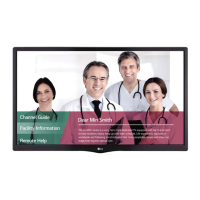
LG Pro Centric 32LP645H - User Manual

LG Pro Centric 32LP645H
77 pages
Print Icon
To Next Page IconTo Next Page
Loading...
EZ-Manager Wizard
pages 11 17
Custom Master TV Setup
pages 29 32
FTG Mode of Operation
pages 43 44
EXPERIENCED INSTALLER
Commercial Mode Setup Guide
Note: Selected features shown in this guide may not be available on all models.
Lodging Guest Interactive Pro:Centric
®
TVs
© Copyright 2013 LG Electronics U.S.A., Inc.
P/N: 206-4232 (Rev B)
32LP645H
39LP645H
42LP645H
47LP645H
55LP645H
60LP645H

Table of Contents

Questions and Answers

  • Y
    yparsonsJul 31, 2025
    Why does my LG Pro Centric 32LP645H TV have a picture but no sound?
    • G
      glendavisJul 31, 2025
      If your LG TV has a normal picture but poor or no sound, consider the following: * Check if the audio is muted. Press the MUTE button or use the Volume Up key to increase the sound level. * There may be a broadcast problem. Try tuning to a different channel to see if the sound improves.
  • A
    April ChenAug 8, 2025
    How to fix an LG Pro Centric 32LP645H TV remote that is not working?
    • S
      Sara HarrisAug 8, 2025
      If your LG TV remote is not working, try these steps: 1. Ensure the remote is in TV Mode by pressing the MODE key to select 'TV'. 2. Point the remote directly at the IR receiver on the TV. 3. Move closer to the TV, or dim the room if there's too much light. 4. If applicable, ensure the MPI cable is connected to the MPI device. 5. Remove any obstructions blocking the path to the TV’s receiver. 6. Replace the batteries. 7. Check the battery polarity to ensure the '+' and '-' match in the battery compartment. 8. Dim the room light, as too much light can interfere with the remote's signal.
  • C
    Christopher GrantAug 14, 2025
    What to do if there is no picture on my LG Pro Centric 32LP645H TV?
    • C
      Colleen GarciaAug 14, 2025
      If your LG TV shows no picture, here are a few things to check: * Ensure the TV is turned ON. * Verify the antenna or cable is properly connected to the TV. * Check all connections to the TV to make sure they are correct. * If applicable, ensure the MPI cable is connected to the MPI device. * The program might be encrypted, so try another channel. * The tuning band might be wrong, in which case you should adjust the Installer Menu settings.
  • D
    David OrtegaAug 22, 2025
    Why can't I directly enter a channel number on my LG Pro Centric 32LP645H TV?
    • J
      jeffery98Aug 22, 2025
      If you cannot directly enter a channel number on your LG TV, it could be due to one of the following reasons: * If the TV is in Pass-through Mode, the Installer Menu item 028 CH. OVERIDE may be set to 0 (disabled). To allow direct keypad entry, set CH. OVERIDE to 1. * If the TV is in FTG Mode, the channel you entered may not be part of the FTG Channel Map. In this case, make changes to the FTG Channel Map using the FTG File Manager or the FTG Device Configuration Application.

Summary

Commercial Mode Setup Guide

Experienced Installer Guide Sections

Highlights key setup sections like EZ-Manager Wizard, Custom Master TV Setup, and FTG Mode.

Important Safety Instructions

General Safety Guidelines

Covers essential safety precautions for apparatus usage and installation.

Specific Safety Precautions

Details on grounding, cleaning, ventilation, and product care.

Commercial Mode Overview

Setup, Modes, and Wizards

Covers initial setup, pass-through, FTG mode, EZ-Manager, and Custom Master TV setup.

Installer Menu and Cloning Process

Explains accessing the Installer Menu and the TV cloning process.

FTG Mode Operation Details

Details FTG mode operation and remote management capabilities.

Pro:Centric Operation

Interactive Menu Features and Navigation

Describes interactive features and navigation for Pro:Centric TV.

Pro:Centric Setup Methods

Explains methods for configuring Pro:Centric settings on the TV.

EZ-Manager Wizard

Wizard Overview and Preparation

Introduction to the wizard and preparatory steps before configuration.

Wizard Initiation and Exit Options

Guides on starting, exiting, or disabling the EZ-Manager Wizard.

TV Configuration Options

Presents options for TV configuration within the wizard.

Zone and Room Number Assignments

Details on assigning zone, label, and room number for TV identification.

Automated Pro:Centric Configuration

Steps for automated Pro:Centric setup and server search.

Manual Pro:Centric Configuration

Procedure for manual configuration of Pro:Centric settings.

USB Configuration Procedures

Guides for using USB devices for TV configuration and software upgrades.

LG Smart Install Utility

Using the LG Smart Install Utility

Instructions for using the LG Smart Install utility for TV configuration.

Installer Menu Operations

Accessing the Installer Menu

Steps to access and navigate the TV's installer menu.

Installer Menu Navigation and Settings

Details on navigating, changing settings, and exiting the Installer Menu.

Detailed Installer Menu Item Descriptions

Provides detailed explanations for specific Installer Menu items.

Custom Master TV Setup

Cloning Methods and Preparation

Outlines cloning requirements, methods, and features.

Master TV Setup Procedure

Step-by-step guide to creating a master TV setup for cloning.

Channel Icons and Custom Text Labels

Editing Channel and Source Labels

Instructions for customizing channel icons and text labels.

Cloning Overview

Important Cloning Information

Key information and prerequisites for successful TV cloning.

USB Cloning Procedures

Learning Setup from Master TV (.tlx)

Process for learning TV setup from a master using a USB .tlx file.

Teaching Master TV Setup to Target TV (.tlx)

Process for teaching master setup to a target TV using a USB .tlx file.

Learning Setup from Master TV (.tll)

Process for learning TV setup from a master using a USB .tll file.

Teaching Master TV Setup to Target TV (.tll)

Process for teaching master setup to a target TV using a USB .tll file.

Clone Programmer Cloning Procedures

Learning Setup with TLL-1100 A Programmer

Steps to learn master TV setup using a TLL-1100A clone programmer.

Teaching Setup with TLL-1100 A Programmer

Steps to teach master TV setup using a TLL-1100A clone programmer.

Learning Setup with LT2002 Programmer

Steps to learn master TV setup using an LT2002 clone programmer.

Teaching Setup with LT2002 Programmer

Steps to teach master TV setup using an LT2002 clone programmer.

FTG Mode of Operation Overview

FTG Mode Configuration Methods (CPU vs. EBL)

Explains the two methods for FTG mode configuration: CPU and EBL.

Determining TV Operating Mode

How to identify the TV's current operating mode (FTG or Pass-through).

FTG Mode via CPU Configuration

Creating FTG Configuration Files

Guide to creating FTG configuration files using FTG File Manager software.

Teaching FTG Configuration to a TV

Process for transferring FTG configuration files to a TV via USB.

Learning FTG Configuration from a TV

Method to save existing TV configuration settings to a USB device.

Optional Manual TV Setup

Manual steps for TV setup and channel tuning if RF channels are unknown.

FTG File Manager Utilities Overview

FTG File Manager Main Screen

Overview of the main interface for managing FTG configuration files.

FTG Channel Map Configuration Utility

Utility for creating, viewing, editing, and printing logical channel maps.

FTG Channel Map Editor

Tool for editing logical channel data, custom labels, and attributes.

FTG Installer Menu Configuration Utility

Utility for configuring Installer Menu settings within FTG files.

Reference: Remote Jack Pack and TV Connections

TV Connection Details

Details on connecting external devices and setting up the Remote Jack Pack.

Reference: Upgrading TV;PTC Software via USB

Software Upgrade Procedure

Steps to update TV or PTC software via a USB memory device.

Reference: Downloading Splash Screen via USB

Splash Screen Image Download Process

Procedure for downloading custom splash screen images to the TV.

Reference: Power Consumption Settings

Power Consumption Data Tables

Tables showing power consumption in Watts and percent savings for various backlight levels.

Reference: RJP Model List & Auto-sensing Hierarchy

RJP Input Auto-sensing Hierarchy

Defines the priority order for auto-sensing different video and audio input sources.

Reference: Restoring Factory Defaults

Factory Default Options

Methods for restoring TVs to factory default settings, including Pass-through mode.

Reference: Using the TV Zoning Feature

Zoning with FTG Mode via CPU

Enables localized configurations for TVs by assigning Zone designations.

Zoning with Cloning Configuration

How to apply zone assignments during cloning and set TV Zone #.

Reference: LP645 H Rear and Side Jack Panels

TV Port Descriptions

Details and connections for rear and side panel ports on the LP645H TV.

Reference: Installer Remote Key Functions

Installer Remote Key Functions

Explains the functions of various keys on the LG Installer Remote.

Troubleshooting Common Issues

General Troubleshooting Tips

Common issues and solutions for installation, picture, sound, and remote problems.

Commercial Mode & FTG Operation Troubleshooting

Troubleshooting specific issues related to Commercial Mode and FTG operation.

Clone Programmer Troubleshooting

Solutions for problems encountered with clone programmers and cloning.

Glossary of Terms

Document Revision History and Open Source Notice

Document Revision History

Records changes made to the document over time.

Open Source Software Notice

Information regarding open source licenses used in the product.

LG Pro Centric 32LP645H Specifications

General IconGeneral
Screen Size32 inches
Display TypeLED
Resolution1366 x 768
HDMI Ports2
USB Ports1
Built-in Wi-FiYes
Pro:CentricYes
HDTV CompatibilityYes
Operating SystemPro:Centric
Weight4.9 kg

Related product manuals