EasyManua.ls Logo

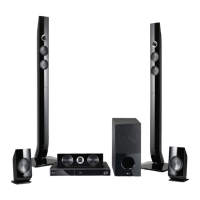
LG SH96TZ-C - User Manual

LG SH96TZ-C
80 pages
Print Icon
To Next Page IconTo Next Page
Loading...
OWNER’S MANUAL
Network 3D Blu-ray
Home Theater
Please read this manual carefully before operating
your set and retain it for future reference.
HX976TZW (HX976TZW, SH96TZ-S/C, SH96TZW-D, W96)
P/NO : SAC35213610

Table of Contents

Other manuals for LG SH96TZ-C

Questions and Answers

  • S
    Stephanie WeaverSep 8, 2025
    What to do if LG SH96TZ-C is plugged in but the power will not turn on or off?
    • M
      Marvin CarsonSep 9, 2025
      If your LG Home Theater System is plugged in but won't power on or off, try these steps: * Press and hold the POWER button for at least five seconds to force a power off, then turn it back on. * Unplug the power cord, wait at least five seconds, and then plug it back in.
  • T
    Tina MartinAug 23, 2025
    How to reset my LG SH96TZ-C Home Theater System if the power won't turn on or off?
    • M
      Mike LopezAug 23, 2025
      To reset your LG Home Theater System: 1. Press and hold the POWER button for at least five seconds to force the unit to power off, then turn it back on. 2. Unplug the power cord, wait at least five seconds, and then plug it in again.
  • S
    Samuel HarveyAug 25, 2025
    What to do if my LG Home Theater System does not start playback?
    • J
      jesselaneAug 26, 2025
      If your LG Home Theater System isn't playing, ensure you've inserted a playable disc, checking its type, color system, and regional code. Place the disc with the playback side down, correctly inside the guide on the disc tray. Clean the disc if needed. You may also need to cancel the Rating function or change the rating level.
  • M
    Melissa RodriguezAug 27, 2025
    What to do if the LG SH96TZ-C Home Theater System remote control does not work properly?
    • J
      Jennifer RamirezAug 27, 2025
      If the LG Home Theater System's remote control isn't working, make sure that: * The remote is pointed at the unit's remote sensor. * You are not too far from the unit. * There are no obstacles blocking the path between the remote and the unit. * The batteries in the remote are not exhausted.
  • G
    Gregory PhamAug 27, 2025
    What to do if my LG Home Theater System unit does not start playback?
    • C
      Carl GarciaAug 28, 2025
      If your LG Home Theater System isn't playing, ensure you've inserted a playable disc, checking its type, color system, and regional code. Place the disc with the playback side down, correctly on the tray inside the guide, and ensure it is clean. Also, cancel the Rating function or adjust the rating level.
  • I
    isaiahsmithSep 23, 2025
    How to fix LG SH96TZ-C Home Theater System if the angle cannot be changed?
    • G
      garychaseSep 23, 2025
      The angle cannot be changed on your LG Home Theater System because multi-angles are not recorded on the DVD Video being played.
  • C
    curtispayneSep 16, 2025
    How to enable 3D view on LG SH96TZ-C?
    • T
      Travis BallSep 16, 2025
      If Blu-ray 3D disc playback on your LG Home Theater System doesn't output 3D views: * Connect the player to your TV with an HDMI cable (Type A, High Speed HDMI™ Cable with Ethernet). * Set the [3D Mode] option in the [Setup] menu to [On].
  • T
    Tara CastilloSep 18, 2025
    Why can't my LG SH96TZ-C play movie, photo, or music files?
    • J
      Jesus WilsonSep 18, 2025
      If your LG Home Theater System can't play movie, photo, or music files, the files are not recorded in a format that the unit can play or the unit does not support the codec of the movie file.
  • J
    Jessica SmithSep 7, 2025
    Why the angle cannot be changed on LG Home Theater System?
    • J
      jeremyfitzgeraldSep 7, 2025
      The angle cannot be changed on your LG Home Theater System because multi-angles are not recorded on the DVD Video being played.
  • R
    Richard SalasSep 4, 2025
    Why the angle cannot be changed on my LG Home Theater System?
    • T
      Teresa CampbellSep 4, 2025
      Multi-angles are not recorded on the DVD Video being played.

Summary

Getting Started

Safety Information

Crucial safety precautions and warnings for operating the device.

Disposal of your old appliance

Instructions for properly disposing of the old appliance and its components.

Notes on Copyrights

Explains copyright restrictions and legal information related to content playback.

Connecting

Installing the player

Guide on setting up the player, either on a stand or wall.

Assembling the speaker (Front;Rear)

Instructions for assembling the front and rear speaker units.

Connecting the System

Details on connecting speakers to the subwoofer and wireless receiver.

Connecting to Your TV

How to connect the player to your television using various methods.

Connecting to your Home Network

Steps to establish a wired or wireless connection to your home network.

USB device connection

How to connect and play files from USB storage devices.

System Setting

[DISPLAY] Menu

Adjusts display settings like aspect ratio, resolution, and wallpaper.

[LANGUAGE] Menu

Configures language for menus, audio tracks, and subtitles.

[NETWORK] Menu

Manages network settings for updates, BD-Live, and online services.

Sound Effect

Selects and customizes audio modes like Natural, Bass Blast, and User EQ.

Operating

General Playback

Basic playback operations using the HOME menu.

Playing a Disc

Instructions for inserting and playing Blu-ray, DVD, and Audio CD discs.

Playing Blu-ray 3 D disc

Instructions for playing stereoscopic 3D Blu-ray discs.

Radio Operations

Tuning, saving, and managing FM radio stations.

Troubleshooting

General

Solutions for common issues like power, playback errors, and remote control problems.

Network

Addresses problems with BD-LIVE, streaming, and network connectivity.

Appendix

Specifications

Detailed technical specifications of the Blu-ray player and its components.

Trademarks and Licenses

Information regarding logos, trademarks, and licensing agreements.

LG SH96TZ-C Specifications

General IconGeneral
BrandLG
TypeHome Theater System
BluetoothYes
Wi-FiYes
4K Pass-ThroughYes
3D Blu-ray PlaybackYes
Smart TVYes
EthernetYes
USBYes
HDMI Output1
USB Port1
Optical Input1
Wireless Rear SpeakersYes
ModelSH96TZ-C

Related product manuals