EasyManua.ls Logo

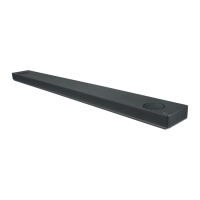
LG SK10Y - User Manual

LG SK10Y
66 pages
Print Icon
To Next Page IconTo Next Page
Loading...
MODEL
SK10Y (SK10Y, SPK8-W)
Please read this manual carefully before operating your set and retain it for
future reference.
www.lg.com
Copyright © 2018 LG Electronics Inc. All Rights Reserved.
OWNER’S MANUAL
LG Wi-Fi
Sound Bar

Table of Contents

Questions and Answers

  • T
    Travis FergusonAug 13, 2025
    What to do if my LG SK10Y Speaker System has no sound?
    • P
      perezdonaldAug 13, 2025
      If your LG Speaker System isn't producing any sound, first, check the volume level and make sure it isn't set to the minimum. Also, check if the mute function is activated and deactivate it. Finally, verify that you've selected the correct input source.
  • A
    Amber IbarraAug 17, 2025
    How to troubleshoot no woofer sound on LG Speaker System?
    • M
      Mr. Steven WuAug 17, 2025
      If you're not getting any sound from the woofer of your LG Speaker System, ensure that the subwoofer's power cord is securely plugged into the wall outlet. If it is, check if the pairing between the unit and the subwoofer has been disconnected.
  • M
    Mr. Jeffrey ThomasAug 20, 2025
    Why is the output sound of my LG SK10Y Speaker System low?
    • T
      Thomas GarciaAug 20, 2025
      If the output sound of your LG Speaker System seems low, switch the DRC function to OFF using the “LG Wi-Fi Speaker” app. If connected to a TV, change the AUDIO DIGITAL OUT setting on the TV Setup Menu from PCM to AUTO or BITSTREAM. If connected to a Player, change the AUDIO DIGITAL OUT setting on the Player Setup Menu from PCM to PRIMARY PASS-THROUGH or BITSTREAM. Also, change the Audio DRC setting on the connected device setup menu to the OFF state, and ensure Night Mode is turned OFF.
  • G
    glennmichaelAug 25, 2025
    Why doesn't the AUTO POWER function work on my LG SK10Y Speaker System?
    • S
      Sandra HodgesAug 25, 2025
      If the AUTO POWER function on your LG Speaker System isn't working, check the connection of the external device such as TV, DVD/Blu-Ray player or Bluetooth device. If you have an LG TV, check the SIMPLINK settings and try turning SIMPLINK off. Note that depending on the connected device, this function may not operate.
  • W
    wstewartAug 27, 2025
    Why is LG Sound Sync not working on my LG SK10Y Speaker System?
    • D
      Dr. Mary KingAug 28, 2025
      If your LG Sound Sync isn't working, first check if your LG TV supports LG Sound Sync. Then, check the connection of LG Sound Sync. Finally, check the sound settings on both your TV and the LG Speaker System.
  • S
    Steve SchmidtSep 1, 2025
    What to do if my LG SK10Y is not working properly?
    • D
      Daniel RobertsSep 1, 2025
      If your LG Speaker System isn't working properly, try turning off the power to both the unit and any connected external devices like TVs, woofers, DVD players, or amplifiers, and then turn them back on. Alternatively, disconnect the power cords of both the unit and connected devices before reconnecting them. Also, previous settings may not be saved when device power is shut off.
  • K
    Kevin FreemanSep 4, 2025
    What to do if I can't change input source on my LG SK10Y?
    • K
      kelleyrhondaSep 4, 2025
      If you can't change the input source with the F button on your LG Speaker System and only see [DEMO] on the front display, unplug the power cord and plug it back in. If that doesn’t work, press and hold the / button on the sound bar until you hear a beep sound, and you see “RESET” on the display window.
  • M
    Mark Little PhDSep 8, 2025
    Why are media servers not displayed on my LG Speaker System?
    • J
      Jennifer JohnsonSep 8, 2025
      If media servers are not displayed on the device list of your LG Speaker System, turn off the firewall or anti-virus software running on your media server. Also, make sure that the speaker is connected to the same network that your media server is connected to.

LG SK10Y Specifications

General IconGeneral
Package depth284 mm
Package width1516 mm
Package height472 mm
Package weight19300 g
Audio decodersDolby Atmos, Dolby Digital, Dolby Digital Plus, Dolby TrueHD
RMS rated power550 W
Audio output channels5.1.2 channels
Audio Return Channel (ARC)Yes
Subwoofer connectivityWireless
Apple docking compatibility-
Tweeter diameter20 mm
HDMI in2
Bluetooth version4.0
HDMI ports quantity3
Number of HDMI outputs1
Connectivity technologyWired & Wireless
Product colorBlack
Audio formats supportedAAC, AAC+, AIFF, FLAC, LPCM, MP3, OGG, WAV, WMA
Consumer Electronics Control (CEC)SimpLink
AC input voltage100 - 240 V
AC input frequency50 - 60 Hz
Power consumption (typical)61 W
Cables includedOptical
Weight and Dimensions IconWeight and Dimensions
Depth146 mm
Width1443 mm
Height63 mm
Soundbar weight7500 g
Subwoofer depth312.8 mm
Subwoofer width221 mm
Subwoofer height390 mm
Subwoofer weight7600 g
Main unit dimensions (WxDxH)1433 x 146 x 63 mm

Related product manuals