EasyManua.ls Logo

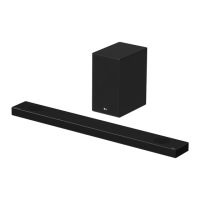
LG SPL5B-W - User Manual

LG SPL5B-W
55 pages
Print Icon
To Next Page IconTo Next Page
Loading...
OWNER’S MANUAL
LG Wi-Fi
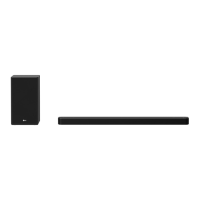
SOUND BAR
www.lg.com
Copyright © 2019 LG Electronics Inc. All Rights Reserved.
Please read this manual carefully before operating your set and retain it for future
reference.
MODEL
SL7Y (SL7Y, SPL5B-W)
1901_Rev01

Questions and Answers

  • J
    Julie GibsonSep 23, 2025
    Why won't my LG Sound Sync work with my LG Speaker System?
    • T
      Tara MurphySep 23, 2025
      Check whether your LG TV supports LG Sound Sync. Also, check the connection of LG Sound Sync (Optical or wireless). Finally, check the sound setting of your TV and this unit.
  • S
    Steven PotterAug 23, 2025
    What to do if my LG Speaker System has no power?
    • M
      Matthew CastroAug 23, 2025
      First, ensure that the power cord is securely plugged into the outlet. If it is, check whether there's a general power failure by testing other electronic devices.
  • R
    Rebecca WrightAug 25, 2025
    Why is there no woofer sound on my LG Speaker System?
    • D
      Debbie AllenAug 25, 2025
      First, check that the subwoofer's power cord is securely plugged into the wall outlet. If it is, the pairing between the unit and the subwoofer may have been disconnected; in this case, you should connect the unit and the subwoofer.
  • C
    cohenshawnAug 26, 2025
    Why doesn't the AUTO POWER function work on my LG Speaker System?
    • H
      huertacandiceAug 27, 2025
      Check the connection of the external device such as a TV, DVD/Blu-Ray player, or Bluetooth device. Also, check the SIMPLINK settings on your LG TV and try turning SIMPLINK off. Depending on the connected device, this function may not operate.
  • Q
    qmcclainAug 27, 2025
    What to do if the LG Speaker System remote control is not working?
    • M
      Monica AlvarezAug 27, 2025
      If the remote control for your LG Speaker System isn't working, make sure you're within 7 meters (23 feet) of the unit and that there are no obstacles blocking the path between the remote and the unit. Also, check the batteries and replace them if they are exhausted.
  • M
    martinhannahSep 18, 2025
    What to do if the AUTO POWER function doesn't work on my LG SPL5B-W?
    • W
      Wanda MillerSep 18, 2025
      Check the connection of the external device such as TV, DVD/Blu-Ray player or Bluetooth device. Also, check the state of SIMPLINK on your LG TV and turn off SIMPLINK. Depending on the connected device, this function may not operate.
  • E
    Emily RobbinsSep 15, 2025
    How to troubleshoot LG Speaker System when the unit does not work properly?
    • C
      careymichaelSep 15, 2025
      If your LG Speaker System isn't working properly, try turning off the power of both the unit and any connected external devices like TVs, woofers, DVD players, or amplifiers, and then turn them back on. If that doesn't work, disconnect the power cord of the unit and connected devices before reconnecting them. Also, previous settings may not be saved when the device power is shut off.
  • W
    wrightjulieSep 16, 2025
    What to do if LG Sound Sync does not work with LG Speaker System?
    • S
      Samuel RichardsonSep 16, 2025
      If LG Sound Sync is not working with your LG Speaker System, verify that your LG TV supports LG Sound Sync. Also, check the LG Sound Sync connection. Finally, check the sound settings on both your TV and the speaker system.
  • S
    shelley98Sep 6, 2025
    Why is there no sound coming from my LG SPL5B-W?
    • B
      Brandy WilsonSep 6, 2025
      Several factors could be at play. Ensure that the correct input source is selected. Also, check if the mute function is activated; if it is, press the Mute button or adjust the volume. If you're using an external device like a set-top box or Bluetooth device, make sure its volume is also adjusted appropriately.
  • J
    jocollinsSep 3, 2025
    What to do if there is no woofer sound on LG Speaker System?
    • N
      Nicholas SandersSep 4, 2025
      If there is no woofer sound from your LG Speaker System, first ensure the subwoofer power cord is securely plugged into the wall outlet. If it is, check if the pairing between the unit and the subwoofer is disconnected.

Summary

Getting Started

Safety Information

Covers essential safety precautions and warnings for the product.

Front panel

Details the components and functions of the front panel of the soundbar.

Rear panel

Identifies and explains the various ports located on the rear panel of the soundbar.

Remote control

Explains the buttons and functions of the remote control for operating the soundbar.

Installing the sound bar

Guides on how to install and position the soundbar for optimal performance.

Connecting

Connecting the AC Adapter

Details the process of connecting the soundbar to a power source using the AC adapter.

Connecting to your TV

Explains how to connect the soundbar to a TV using various cable types.

Using an OPTICAL cable

Details the steps for connecting the soundbar to a TV using an optical cable.

Using an HDMI cable

Guides on connecting the soundbar to a TV using an HDMI cable for audio output.

Network connection

Details how to connect the soundbar to a home network for enhanced features.

Operating

Using a Bluetooth Wireless Technology

Introduces Bluetooth technology and its basic usage with the soundbar.

Listening to Music of a Bluetooth Device

Guides on how to pair and play music from a Bluetooth-enabled device.

Reset the Speaker

Provides instructions on how to reset the speaker to its default settings.

Troubleshooting

General

Offers general troubleshooting tips and solutions for common unit issues.

When you feel the output sound of the unit is low.

Provides solutions for low output sound issues, including DRC and audio settings.

Bluetooth pairing does not work well.

Offers solutions for problems encountered during Bluetooth pairing.

The unit does not connect with Bluetooth device.

Steps to resolve issues when the unit fails to connect to a Bluetooth device.

Network

Addresses issues related to connecting the speaker to a home network.

Application

Solutions for problems encountered when using the LG Wi-Fi Speaker application.

LG SPL5B-W Specifications

General IconGeneral
BrandLG
ModelSPL5B-W
TypeSound Bar
Speaker type2.1 Channel
Total Power Output300W
Total power300W
Power Output300W
SubwooferWireless
BluetoothYes
HDMI ARCYes
USB PlaybackYes
ColorBlack
ConnectivityBluetooth, USB
Channels2.1 ch

Related product manuals