Self Diagnosis
This monitor has a SELF DIAGNOSIS OSD feature that is
pops up when the signal cable is not connected between a
PC and a monitor. The message will be highlighted
as below.
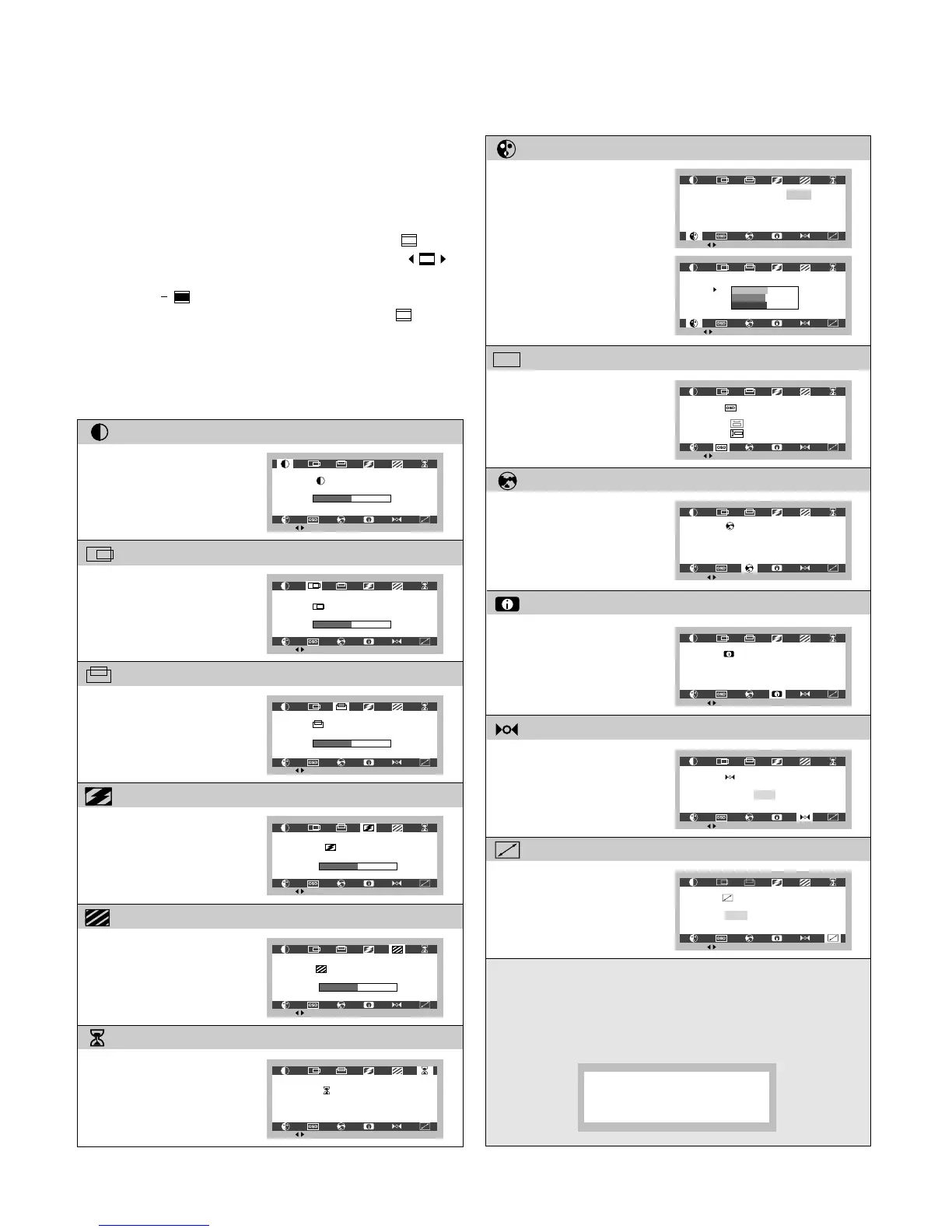
Mode Recall
Image Size
Information
Color Select
OSD Position
Language Select
Contrast
V Position
Clock
OSD Time
Clock Phase
H Position
On-Screen-Display (OSD) Control
To adjust an image size, position and operating
parameters are quick and easy with the On-Screen-
Display control system.
1. To start the OSD, press OSD ON/OFF button. ( )
2.
Select an OSD icon with OSD Selection buttons. ( )
3.
Adjust the level of the selected item with OSD Adjustment
buttons. ( )
4. To exit the OSD, press OSD ON/OFF button ( ) once
again.
Listed below are icons, icon names and icon descriptions
of the OSD menu.
- 6 -
This control will reset the
image to factory preset
mode.
This function displays
the image in its original
size or enlarged size so
as to fit in the full screen
of the LCD Panel.





 To Next Page