33
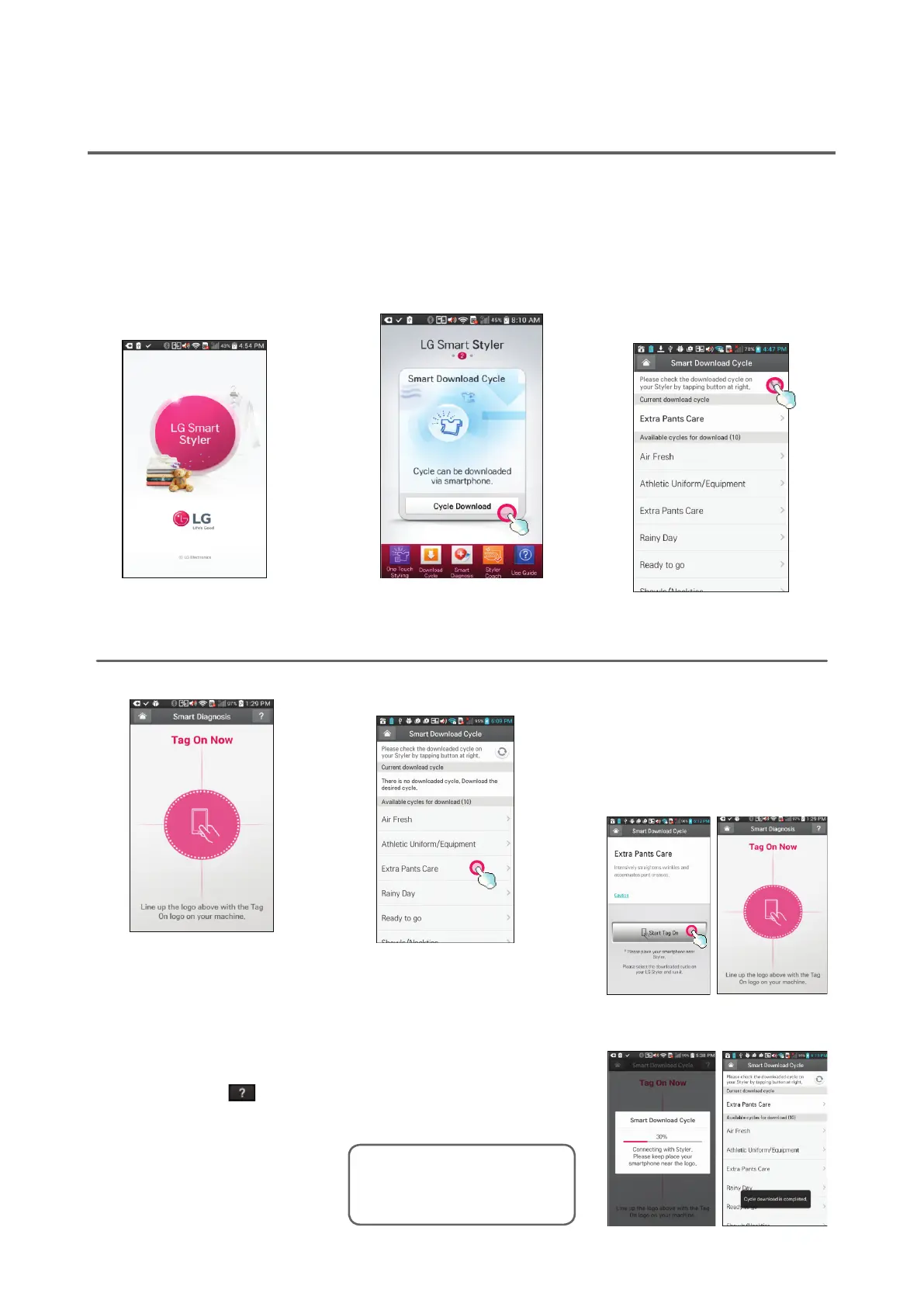
5TouchtheTag On logo.
y When a Tag On screen ap-
pears (see above), tap your
smart phone on the Tag On
icon on the right side of the
Styler’s control panel.
y If the phone isn’t recog-
nized, touch [
] on the
upper right of the Tag On
screen on your LG Smart
Styler application to see the
detailed guide, or see Using
the Tag On Function, page
36.
6Selectacycleto
download.
Thecurrentdownloaded
cycleisatthetopofthe
screenandtheavailable
cyclesarebelowthat.
Youcanalsoconrmthe
existingdownloadedcycle.
7TouchtheTag On logo.
y When a Tag On screen ap-
pears (see below), tap your
smart phone on the Tag On
icon on the right side of the
Styler’s control panel.
8Thenewcycleis
downloadedsuccessfully!
Downloading Styler Cycles
LG Smart Styler’s Smart Download Cycle app allows you to download a cycle for later use. The cycle
is available at the Downloaded cycle position on the control panel until another cycle is downloaded.
1InstalltheLG Smart
Stylerapplicationonan
NFC-equippedsmart
phone.
Downloadtheapplication
fromthePlayStore,install
itandrunit.
2SelecttheSmart Download
Cycle app.
SelectCycle Download on
theopeningscreen.
3ClickthroughtheNFCinfo.
4Conrmthecurrent
downloadedcycle.
Imagesareforreferenceonly.The
actualLGSmartStylerapplication
issubjecttochangeforproduct
improvementpurposes.


 To Next Page