
 To Next Page
O
Olivia AllenAug 5, 2025
What to do if my LG Headsets power does not turn on?
- JJohn Riley IIAug 5, 2025
If the LG Headsets do not turn on, check the battery level and charge it.

What to do if my LG Headsets power does not turn on?
If the LG Headsets do not turn on, check the battery level and charge it.
What to do if I am unable to register my LG TONE Free TONE-FP9 Headsets earbuds to mobile phone?
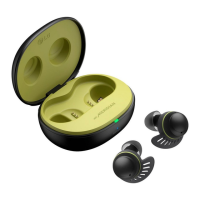
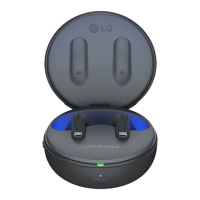
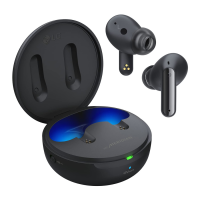
If you're unable to register your LG Headsets earbuds to your mobile phone: * Check whether the earbuds are turned on. * Check if the earbuds have entered the search mode. To do this, while the earbuds are inserted in the charging case, press and hold the touch pad on the left or right earbud for 3 to 5 seconds to switch to the search mode.
How to factory reset LG TONE Free TONE-FP9 Headsets?
To factory reset your LG Headsets, follow these steps: While the earbuds are inserted in the charging case, press and hold the touch pad on the left or right earbud for 10 seconds or more. The battery status indicator of the charging case flashes red, indicating that the initialization to the factory status is carried out. After initialization, reconnect the earbuds.
How to fix LG TONE Free TONE-FP9 Headsets when the power does not turn on?
If the power does not turn on, check the battery level and charge it.
How to factory reset my LG TONE Free TONE-FP9 Headsets?
To factory reset, while the earbuds are inserted in the charging case, press and hold the touch pad on the left or right earbud for 10 seconds or more. The battery status indicator of the charging case will flash red, indicating that the initialization to the factory status is being carried out. After initialization, reconnect the earbuds.
What to do if I am unable to make a call with my LG TONE Free TONE-FP9 Headsets?
If your mobile phone does not support headset and hands-free functions, you cannot use the calling features. Also, check the battery level and charge it.
The earbuds connect automatically when the charging case is opened and disconnect when closed.
Instructions for connecting the charging case to external audio devices using the USB-C ectangular_bullet to AUX cable.
Steps to disconnect the charging case from the external audio source.
Compliance statement regarding FCC rules and user operation conditions.
Details on FCC limits for Class B digital devices and interference mitigation.
Information on RF exposure guidelines and compliance for the headset.
Environments affecting Bluetooth signal range and reception.
Safety advice for operating electronic devices in potentially explosive environments.
Guidance on preventing permanent hearing loss from high volume usage.
 General
| Model | TONE-FP9 |
|---|---|
| Category | Headsets |
| Type | True Wireless |
| Active Noise Cancellation | Yes |
| Water Resistance | IPX4 |
| Bluetooth Version | 5.2 |
| Microphone | Yes |
| Charging Case | Yes |
| USB-C | Yes |
| UVnano Charging Case | Yes |
| Meridian Audio Technology | Yes |
| Touch Controls | Yes |
| Compatibility | Android, iOS |
| Battery Life | 24 hours with charging case |
| Battery Life (Earbuds) | 10 hours |
| Fast Charging | 5-minute charge for 1 hour of playtime |
| Weight (Earbuds) | 5.2 g per earbud |