17
Status indicators
Ch3. System information
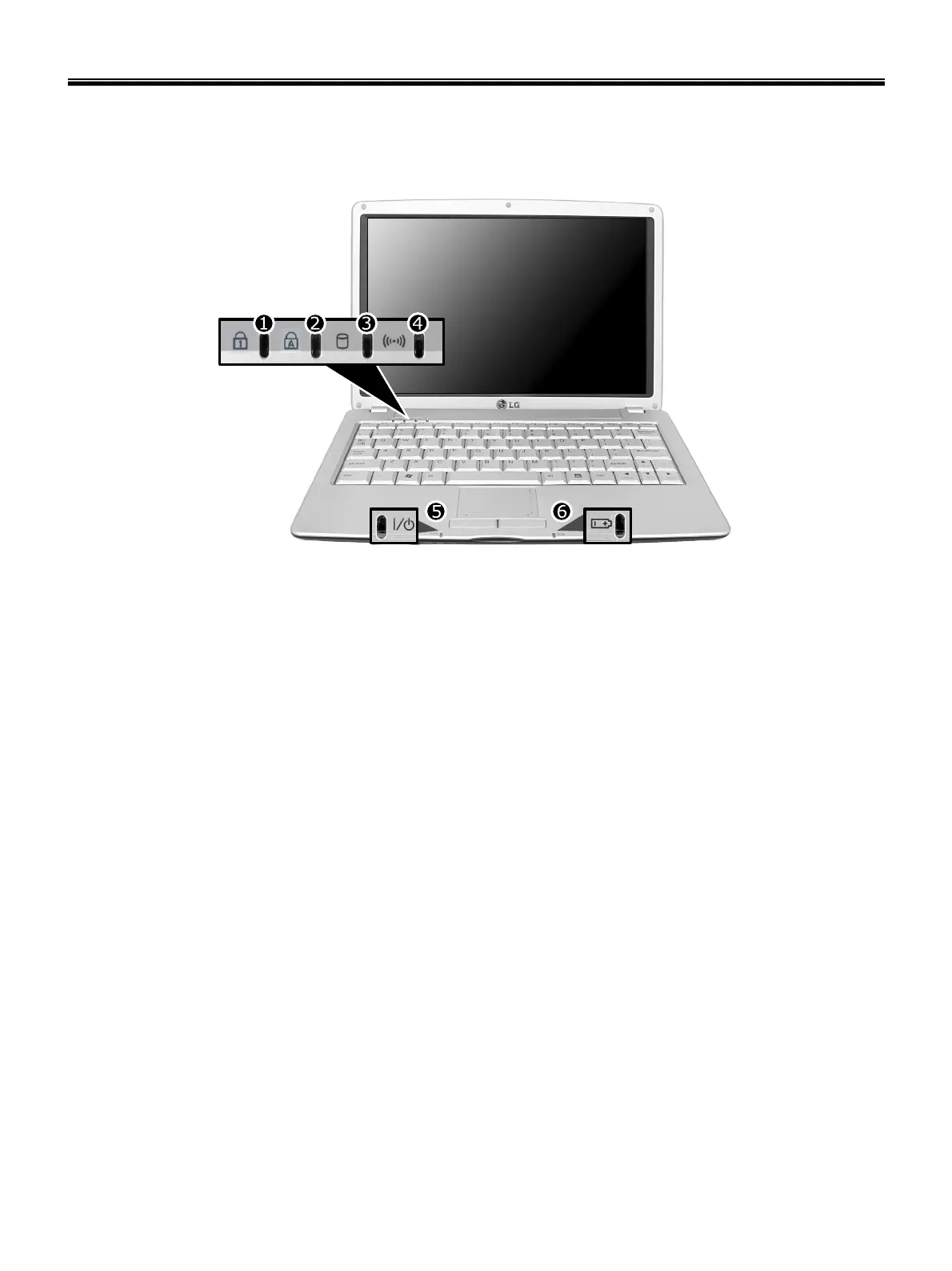
The system status indicators show the status of the computer
1. Num Lock Indicator
- By pressing [Fn]+[Num Lk] keys, you can enable the embedded numeric keypad. By pressing [Fn]+[Num Lk] keys
again, you can disable the embedded numeric keypad.
2. Caps Lock Indicator
- Caps Lock indicator lights up when Caps Lock key is pressed. When this indicator lights up, you can type capital
letters without pressing the Shift key.
3. Hard disk drive indicator
- Indicator lights up when the Notebook PC access to the hard disk drive.
※ Do not turn off the computer when the drive indicator lights up. It may cause data loss to the computer.
4. Wireless LAN/Bluetooth indicator
※ Wireless LAN/Bluetooth indicator operation may differ depending on the model.
※ Mini-PCI Wireless LAN Card/Bluetooth is optional.
- Indicator Off Wireless LAN/Bluetooth function not in use.
- Blinking: Wireless LAN/Bluetooth in connection with data transfer.
- Blinking(2 to 3 seconds): Wireless LAN/Bluetooth not in connection with Wireless Radio on.
- Blinking(3 to 4 seconds): Searching for access points to establish Wireless LAN/Bluetooth connection.
- ON : Searching for access points to establish Wireless LAN/Bluetooth connection, or already in connection.
5. Power indicator
- Power indicator lights up when the power cord is connected to the computer.
- OFF : Power is off, or it is entered system hibernation mode
- Green Notebook PC is turned on
- Blinking: Stand by mode



 To Next Page