ENGLISH
54
» If the schedule creation time overlaps, the previously created schedule is deleted.
» Schedule does not work while Scheduling list app is running.
Editor
(Editor)
The Content Manager app’s editor feature enables you to add your desired templates.
1 Select the template of your desired format.
2 Modify the template’s text.
2-1. Apply your desired font style (Size, Weight, Underline, Italic)
3 Modify the media le.
4 Save the template by clicking Save in the top right-hand corner of the screen.
5 Check that the template you saved is shown in the template list.
Supported Photo & Video Files
• Subtitles are not supported.
• The photo feature is not supported in OLED model.
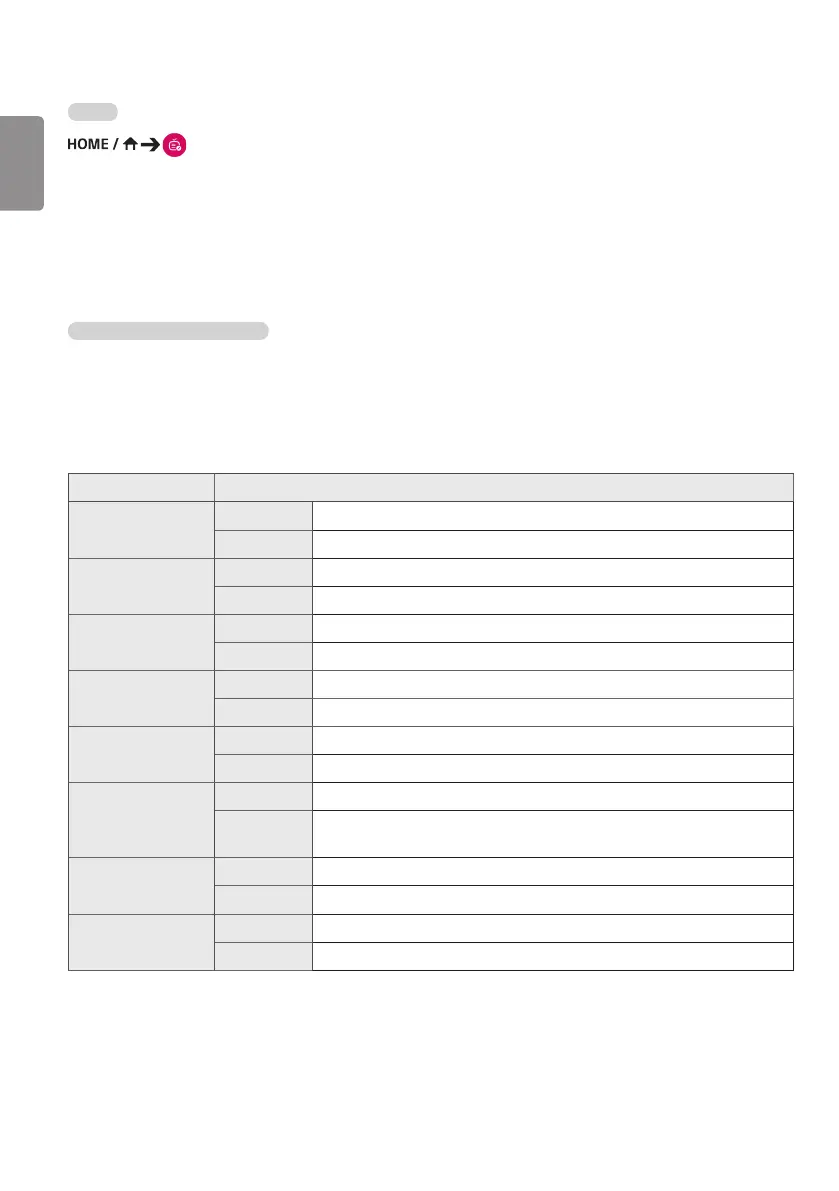
* Supported video codecs
Extension Codec
.asf, .wmv
Video
VC-1 Advanced Prole (except for WMVA), VC-1 Simple and Main Proles
Audio WMA Standard (excluding WMA v1/WMA Speech)
.avi
Video Xvid (excluding 3 warp-point GMC), H.264/AVC, Motion Jpeg, MPEG-4
Audio MPEG-1 Layer I, II, MPEG-1 Layer III (MP3), Dolby Digital, LPCM, ADPCM, DTS
.mp4, .m4v, .mov
Video H.264/AVC, MPEG-4, HEVC
Audio Dolby Digital, Dolby Digital Plus, AAC, MPEG-1 Layer III (MP3), Dolby AC-4
.3gp
.3g2
Video H.264/AVC, MPEG-4
Audio AAC, AMR-NB, AMR-WB
.mkv
Video MPEG-2, MPEG-4, H.264/AVC, VP8, VP9, HEVC
Audio Dolby Digital, Dolby Digital Plus, AAC, PCM, DTS, MPEG-1 Layer I, II, MPEG-1 Layer III (MP3)
.ts, .trp, .tp, .mts
Video
H.264/AVC, MPEG-2, HEVC
Audio
MPEG-1 Layer I, II, MPEG-1 Layer III (MP3), Dolby Digital, Dolby Digital Plus, AAC, PCM, Dolby
AC-4
.mpg, .mpeg, .dat
Video
MPEG-1, MPEG-2
Audio
MPEG-1 Layer I, II, MPEG-1 Layer III (MP3)
.vob
Video
MPEG-1, MPEG-2
Audio
Dolby Digital, MPEG-1 Layer I, II, DVD-LPCM


 To Next Page
 Loading...