15Preparation
2
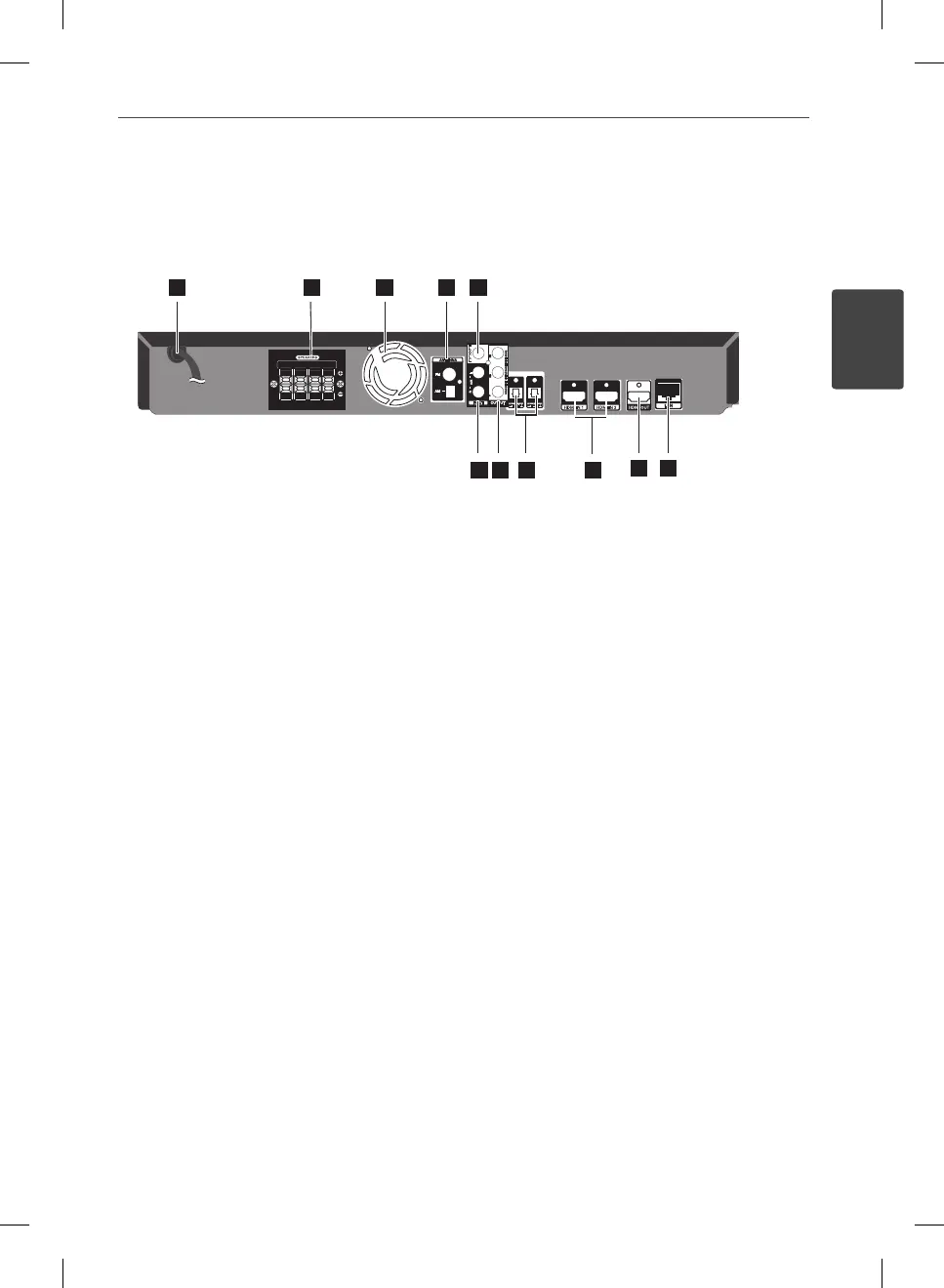
Preparation
a
AC Power cord
Plug into the power source.
b
Speakers connectors
c
Cooling Fan
d
Antenna Connector
e
VIDEO OUT
f
AUX (L/R) INPUT
g
COMPONENT VIDEO (Y P
B
P
R
)
OUTPUT (PROGRESSIVE SCAN)
h
OPTICAL IN 1(TV) / 2
i
HDMI IN (type A, Version 1.3) 1/2
j
HDMI OUT (type A, Version 1.3)
Connect to TV with HDMI inputs.
k
LAN port
Rear panel
12345
1
78 9
12345
6
78
12345
6
1
89
23 45 76
1110
1
89
23
45 76
10
2 3 4 5
6
78 9
10 11 12
6 7 8 9
10
11
HB965TXW-AD.BZAFLLK_ENG_0447.ind15 15HB965TXW-AD.BZAFLLK_ENG_0447.ind15 15 2010.3.9 6:14:57 PM2010.3.9 6:14:57 PM



 To Next Page