To Next Page
R
Ryan BlairSep 4, 2025
What does dE LID ERROR mean on my LG WT8400CB?
- TTony GriffinSep 4, 2025
If your LG Washer displays a dE LID ERROR, close the lid properly. If the error persists, it may require professional service.

What does dE LID ERROR mean on my LG WT8400CB?
If your LG Washer displays a dE LID ERROR, close the lid properly. If the error persists, it may require professional service.
What to do if my LG WT8400CB Washer shows Eb CLUTCH ERROR?
If your LG Washer displays an Eb CLUTCH ERROR, unplug the washer.
What does LE MOTOR LOCKED ERROR mean on my LG WT8400CB?
If your LG Washer displays an LE MOTOR LOCKED ERROR, allow the washer to stand for 30 minutes and then restart the cycle.
What does PE PRESSURE SENSOR ERROR mean on my LG WT8400CB Washer?
If your LG Washer displays a PE PRESSURE SENSOR ERROR, close the water faucets and unplug the washer.
What does tE TEMPERATURE SENSOR ERROR mean on my LG WT8400CB?
If your LG Washer displays a tE TEMPERATURE SENSOR ERROR, unplug the washer and wait 60 minutes. Reconnect the power and try again.
What does LE1 error mean on my LG Washer and how to fix it?
If your LG Washer displays an LE1 FOREIGN OBJECT ERROR, turn the washer off then on again. Press the Spin button without selecting a cycle to drain and spin the load. After the spin cycle, empty the tub and remove any foreign objects caught in the pulsator.
Why is bleach not dispensing in my LG Washer?
If bleach is not dispensing in your LG Washer, make sure that the bleach cover is properly installed and snapped into place before the beginning of the cycle. If the dispenser is dirty or clogged, lift out the bleach dispenser cover (if present) and clean out the reservoir.
Why is my LG WT8400CB dispensing bleach too early?
If your LG Washer is dispensing bleach prematurely, avoid storing bleach in the dispenser for future use. Also, avoid overfilling the bleach dispenser, as this will cause the bleach to dispense immediately.
What should I do if my LG WT8400CB shows FE OVERFLOW ERROR?
If your LG Washer displays an FE OVERFLOW ERROR, close the water faucets and unplug the washer.
How to fix UE UNBALANCE ERROR on LG WT8400CB Washer?
If your LG Washer displays a UE UNBALANCE ERROR, it means the load is unbalanced. This can happen if the load is too small, so add additional items to balance it. It can also occur if heavy articles are mixed with lighter ones; try to wash items of similar weight. If articles are tangled, manually redistribute the load to allow the washer to rebalance properly.
General safety notices and symbol explanations.
Critical warnings about potential hazards and precautions.
Identifies key components of the washing machine.
Essential preparatory steps and warnings before installation.
Visual guide to the installation process steps.
Steps to prepare the washer for the first wash cycle.
Guidelines for separating clothes for optimal washing.
Instructions on how to properly load laundry into the tub.
Guidance on using detergents, bleach, and softeners.
Explanation of buttons and display elements on the control panel.
Details on how to interpret the display and indicators.
Overview of available wash cycles and their default settings.
How to customize wash temperature, spin speed, and soil level.
Explains additional features to customize wash cycles.
Instructions for using the Spin Only function for draining or drying.
Overview of the app for remote control and monitoring.
Steps to set up the app and connect the washer.
Routine cleaning tasks for the washer's exterior and interior.
Regular checks and cleaning for tub and components.
Steps for storing the washer in freezing temperatures.
Initial checks and error message explanations.
Identifies common noises and their probable causes.
Troubleshooting common operational issues like leaks and suds.
Warranty terms and conditions specific to the USA.
Detailed description of warranty coverage and exclusions.
Outlines the arbitration process for resolving claims.
 General
| Type | Top Load Washer |
|---|---|
| Energy Star Certified | Yes |
| TurboWash Technology | Yes |
| Smart Diagnosis | Yes |
| Steam Technology | Yes |
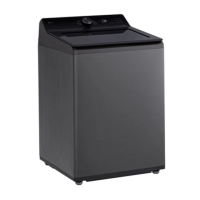
| Color | Black Steel |
| Smart Technology | Yes |
| Number of Wash Cycles | 14 |
| Washer Control Type | Electronic |
| Delay Start | Yes |
| Steam Option | Yes |
| Smart Connectivity | Wi-Fi |
| Width | 27 inches |