Getting Started 7
Getting Started
1
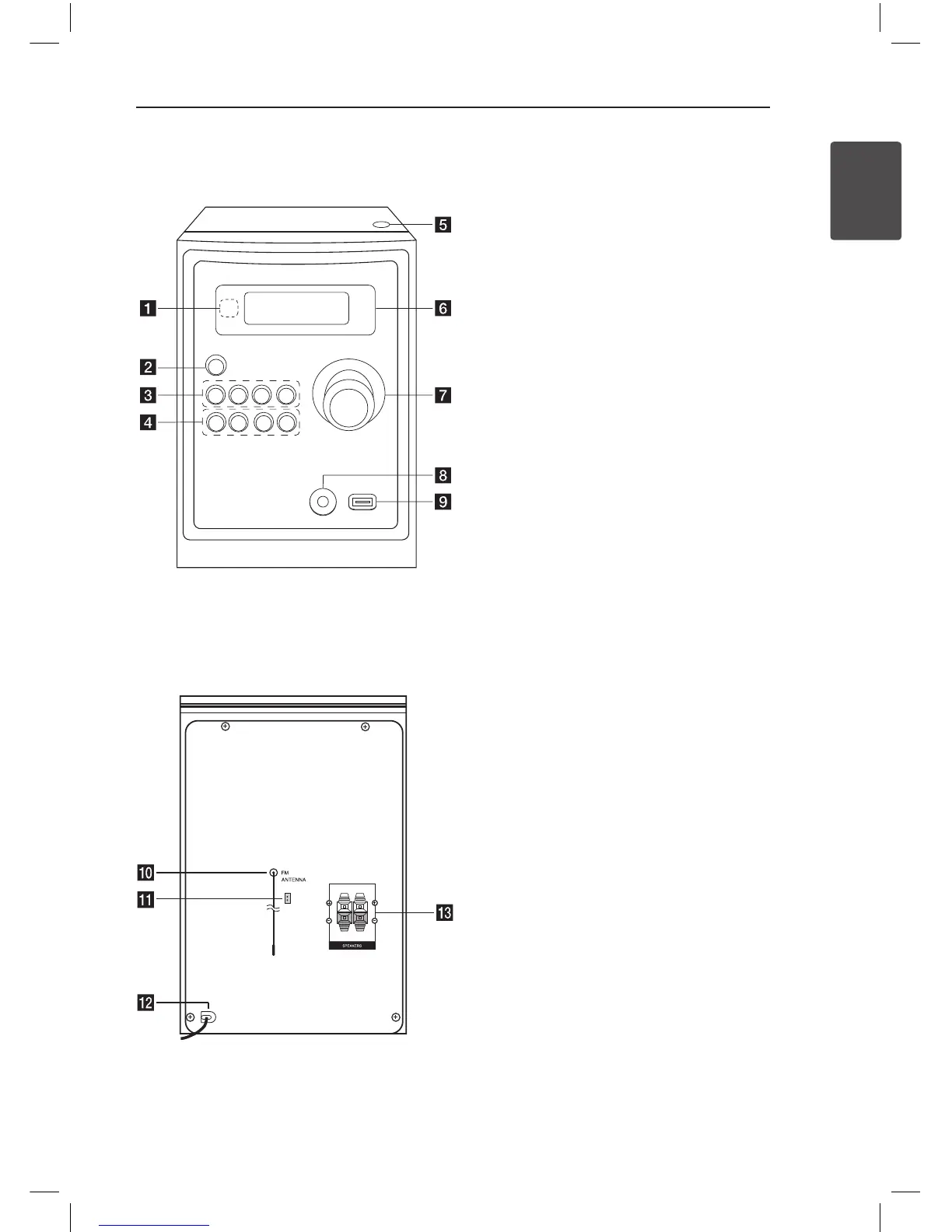
Front panel
Rear panel
a
Remote sensor
b 1
/
!
(Power ON/OFF))
c
FUNC.
Selects the function or input source.
EQ
Chooses sound impressions.
d
/
M/
PRESET -
Starts playback and pauses.
Chooses a preset number for a radio station.
Z
STOP/PRESET +
Stops playback or recording.
Chooses a preset number for a radio station.
d
PRO./MEMO.
On the CD/USB mode, you can make your own
playlist.
On FM/AM mode, you can save radio stations.
USB REC.
Recording to USB.
C
(Skip/Search)/ TUNING -
V
(Skip/Search)/ TUNING +
e
Open
You can use it when inserting or removing CDs.
f
Display window
g
VOLUME
h
PORT. IN jack
i
USB Port
You can play or recording sound les by
connecting the USB device.
j
ANTENNA (FM)
k
AM antenna (Optional)
l
Power cord
m
Speaker terminal
XA16-A0U-APANLLK-ENG.indd 7 11. 05. 23 �� 4:06



 To Next Page