EasyManua.ls Logo

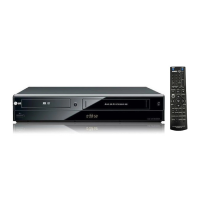
LG XBR716 - User Manual

LG XBR716
48 pages
Print Icon
To Next Page IconTo Next Page
Loading...
RC275-M_NA1ULZS_ENG
Installation and Operating Guide | Warranty
Model Number | XBR716 | DVD Recorder/Video Cassette Recorder
Call us and we will
guide you through
your first recording,
for free.
1-800-243-0000
Copyright © 2007, LG Electronics U.S.A., Inc.

Table of Contents

Questions and Answers

  • M
    Megan CookAug 16, 2025
    Why is my LG XBR716 remote control not working properly?
    • R
      Rebecca SmithAug 16, 2025
      The remote control might not be working due to several reasons. There may be an obstacle between the remote control and the unit; if so, remove it. The batteries in the remote control might be exhausted; replace them with new ones. Ensure that the remote control is pointed at the remote sensor of the recorder and that it is within 23ft (7m). Also, remember that this remote control uses the same buttons for VCR and DVD functions. When using a VCR, first press the VCR button. When using a DVD, first press the DVD button.
  • J
    Jodi TuckerAug 19, 2025
    What to do if my LG XBR716 has no power?
    • C
      Cindy LewisSep 12, 2025
      If your LG DVD VCR Combo has no power, the power cord might be disconnected. Ensure that you securely plug the power cord into the wall outlet.
  • S
    Sharon DixonAug 22, 2025
    Why does my LG XBR716 recorder not start playback?
    • E
      emily38Aug 22, 2025
      The recorder might not start playback for several reasons. Ensure a disc or tape is inserted and check that the disc or tape indicator in the display window is lit. Make sure you're using a playable disc, considering the disc type and regional code, and that the disc is placed with the playback side down, correctly within the guide on the disc tray. If the disc is dirty, clean it. Also, check if the Rating level is set, and if so, cancel the Rating function or change the rating level.
  • S
    Sandra ClineAug 25, 2025
    Why can’t I play a disc recorded on my LG XBR716 DVD VCR Combo on another DVD player?
    • G
      Gary MillerAug 26, 2025
      There are several reasons why you might not be able to play a disc recorded on your LG DVD VCR Combo on another DVD player. If the disc was recorded in Video mode, finalize the disc. Note that some players will not play even a finalized disc recorded in Video mode. If the disc was recorded in VR mode, the other player must be RW compatible to play it. Discs recorded with copy-once material cannot be played on other players.
  • K
    kvalenciaAug 27, 2025
    What to do if my LG XBR716 has abnormal or no picture?
    • C
      Christine GarciaAug 27, 2025
      If you're experiencing abnormal or no picture on your LG DVD VCR Combo, it could be due to a few reasons. First, the TV might not be set to receive the recorder's signal output; select the appropriate video input mode on the TV. Second, the video cable might not be connected securely; ensure it is firmly connected into the jacks. Lastly, check the connection to ensure it is correct.
  • M
    moralesjessicaAug 30, 2025
    What to do if my LG DVD VCR Combo has no sound?
    • C
      Carol KruegerAug 30, 2025
      If there is no sound from your LG DVD VCR Combo, the equipment connected with the audio cable might not be set to receive the audio signal output; select the correct input mode on the audio receiver. Also, the audio cables might not be connected securely, so ensure they are firmly connected into the jacks. Verify that the power of the equipment connected with the audio cable is turned on. Finally, check that the AUDIO options are set to the correct position.
  • M
    Melissa Green PhDSep 2, 2025
    Why is timer recording not possible on my LG XBR716 DVD VCR Combo?
    • S
      Stephanie MitchellSep 2, 2025
      If timer recording isn't working on your LG DVD VCR Combo, the clock in record might not be set to the correct time; set the clock to the correct time. Also, the timer might have been programmed incorrectly; reprogram the timer. If the (TIMER Record) indicator light does not appear after programming the timer, reprogram the timer and turn the Record off to enable the timer.
  • L
    Leah PerkinsSep 5, 2025
    Why is the playback picture poor on my LG XBR716 DVD VCR Combo?
    • K
      Kenneth JonesSep 5, 2025
      If the playback picture quality is poor on your LG DVD VCR Combo, the disc might be dirty; clean the disc. Alternatively, the tape heads might be dirty, so clean the video heads. If you are using a rental tape or one recorded on another VCR, use TRK (v/V) for manual tracking adjustment while the tape is playing.
  • J
    John McguireSep 7, 2025
    Why can't I record or did not record successfully on my LG DVD VCR Combo?
    • A
      anne63Sep 7, 2025
      If you cannot record or did not record successfully on your LG DVD VCR Combo, the remaining blank space on the disc might be insufficient; use another disc. Alternatively, the source you are trying to record might be copy-protected, in which case you cannot record the source. When recording to a Video mode disc, programs that are copy-once protected cannot be recorded; use a VR mode formatted disc for copy-once material.
  • J
    jhumphreySep 10, 2025
    Why can't a video tape be inserted into my LG XBR716?
    • M
      Mallory TaylorSep 10, 2025
      If a video tape cannot be inserted into your LG DVD VCR Combo, check if the cassette compartment is empty and eject the tape in.

Summary

Introduction

About the Symbol Display

Describes symbols used throughout the manual for clarity.

Symbol Used in this Manual

Explains the meaning of various icons and indicators used.

Notes on Discs

Provides guidelines for handling, storing, and cleaning discs for optimal performance.

Moisture Condensation

Advises on preventing condensation damage to the unit and discs.

Recordable and Playable Discs

Details the types of discs supported for recording and playback.

Playable Discs

Lists disc formats that the recorder can play back.

Regional Code Information

Explains DVD region coding and how it affects disc compatibility.

Remote Control Operation

Describes the basic operation and range of the remote control.

Video Recording Restrictions

Outlines limitations on recording copy-protected content.

Recording Time and Picture Quality

Explains how quality settings impact recording duration and visual fidelity.

Hookup and Settings

Front Panel Overview

Identifies buttons, ports, and indicators located on the front of the unit.

Remote Control Functions

Details the operation of each button on the supplied remote control.

Rear Panel Connections

Shows available ports for connecting external audio and video devices.

Connecting to Your TV

Guides on linking the recorder to various TV types using different connection methods.

Connecting to an Amplifier

Explains audio connection options to amplifiers or receivers.

Connecting a Digital Camcorder

Details how to connect and record from a digital camcorder via DV input.

Initial Setup Wizard

Guides through the first-time setup process for language and clock.

Using the Home Menu

Introduces navigation and options within the main Home Menu.

Initial Settings and General Options

Covers TV aspect ratio, power saving, and factory reset procedures.

Language and Audio Settings

Configures display language, disc menus, audio tracks, and subtitles.

Parental Control Settings

Manages disc rating restrictions, password setup, and area code configuration.

Recording and Disc Settings

Sets disc record modes, VCR record modes, and disc initialization/protection.

On-Screen Display Information

Explains how to view and interpret status information displayed on the screen.

Playback

Playing a Tape

Instructions for inserting and playing video cassettes.

Playing a DVD

Steps for loading and playing DVD discs.

VCR Playback Options

Describes VCR playback controls like pause, scan, and tracking.

DVD Playback Features

Details DVD playback functions such as skip, zoom, title, and subtitle selection.

Special Playback Options

Covers advanced features like camera angle, 3D surround, and last scene memory.

Playing Audio CDs and MP3;WMA Files

Guides on playing audio CDs, MP3, and WMA music files.

Viewing JPEG Files

Instructions for displaying JPEG photo files from discs.

Viewing Slide Shows

Explains how to set up and view photo slide shows with various options.

Recording

About DVD Recording

An overview of the recorder's capabilities for DVD recording.

Notes for Recording

Provides important considerations for successful DVD and VCR recording.

Disc Types and Recording Formats

Details compatible disc formats and their associated recording modes.

Recording from External Components

Connects and records audio/video from external sources like VCRs or camcorders.

Instant Timer Recording

Sets a simple recording for a preset duration without programming.

Timer Recording

Schedules recordings for specific dates, times, and programs.

Dubbing from DVD to VCR

Copies content from a DVD disc to a video tape.

Dubbing from VCR to DVD

Archives content from video tapes onto DVD discs.

Recording from DV Input

Records directly from digital camcorders using the DV input.

Editing

Title List and Chapter List Menu Overview

Introduces the interface for editing video content on VR mode discs.

VR Mode Editing (Original and Playlist)

Explains editing methods for VR mode discs, distinguishing between original and playlist content.

Adding Chapter Markers

Creates new chapter points within a title for easier navigation.

Changing Title Thumbnails

Selects custom still images to represent titles in the list view.

Making a New Playlist

Creates a sequence of titles or chapters for custom playback order.

Deleting Original Titles or Chapters

Removes titles or chapters from the original disc content.

Deleting Parts of a Title

Removes specific segments or portions from a selected title.

Naming a Title

Assigns custom names to titles for better organization and identification.

Time Search Function

Locates specific points within a title for playback or editing.

Moving Playlist Chapters

Reorders chapters within a playlist to change the playback sequence.

Hiding Chapters or Titles

Skips specific content during playback without deleting it.

Protecting Titles

Prevents accidental recording, editing, or deletion of selected titles.

Dividing a Title Into Two

Splits a single title into two separate titles.

Combining Two Chapters Into One

Merges two adjacent chapters into a single chapter.

Overwriting Recording

Records new video content over an existing recorded title.

Playing Recordings on Other DVD Players

Explains disc finalization for playback compatibility on other devices.

Reference

Controlling Your TV with Supplied Remote

Uses the remote to operate basic TV functions like power and input.

Controlling Other TVs with Remote

Operates non-LG TVs by setting appropriate manufacturer codes.

TV Code Numbers

Lists codes required to control various TV brands with the remote.

Language Code List

Provides codes for setting display and audio languages for discs.

Area Code List

Lists region codes used for DVD video discs.

Troubleshooting

Troubleshooting Common Issues

Provides solutions for common problems like no power, no picture, or no sound.

Remote Control Not Working

Addresses issues where the remote control is unresponsive or malfunctioning.

Camcorder Image Issues

Resolves problems with displaying camcorder images via AV or DV input.

Timer Recording Issues

Troubleshoots failures related to timer recording setup and execution.

Playback Compatibility Issues

Addresses problems playing discs recorded on this unit on other DVD players.

Recording Failure Issues

Resolves issues where recording fails or does not complete successfully.

Stereo Audio Issues

Troubleshoots missing or distorted stereo audio during playback or recording.

Resetting the Recorder

Restores the recorder to its factory default settings to resolve persistent issues.

Specifications

General Specifications

Lists general product details like power, dimensions, and operating conditions.

System Specifications

Details system characteristics such as signal and head system.

Recording Specifications

Provides technical details for recording formats, discs, and time.

Playback Specifications

Lists technical specifications related to disc playback performance.

Input;Output Specifications

Details the technical characteristics of the unit's input and output ports.

Accessory Specifications

Lists included accessories and their specifications.

Limited Warranty - USA

Warranty Period (Labor and Parts)

Details the duration of labor and parts coverage for the product.

How to Obtain Service

Provides instructions for obtaining warranty service and repairs.

Warranty Exclusions and Limitations

Lists conditions and damages not covered by the limited warranty.

Customer Support Information

Provides contact details for warranty service, product assistance, and sales.

LG XBR716 Specifications

General IconGeneral
BrandLG
ModelXBR716
CategoryDVD VCR Combo
Number of Discs1
Video Output SystemNTSC
Progressive ScanYes
DVD PlayerYes
VCR PlayerYes
TypeDVD/VCR Combo
Playable Disk TypesCD, DVD
Recordable Disk TypesDVD
ConnectorsComposite Video, S-Video, Component Video
Width16.9 inches
Height3.9 inches
Output Resolution480p
ConnectivityComposite, S-Video, Component
Remote ControlIncluded

Related product manuals