LGMG North America Inc. Operation and Safety Manual
81
5.2 Platform Control Station
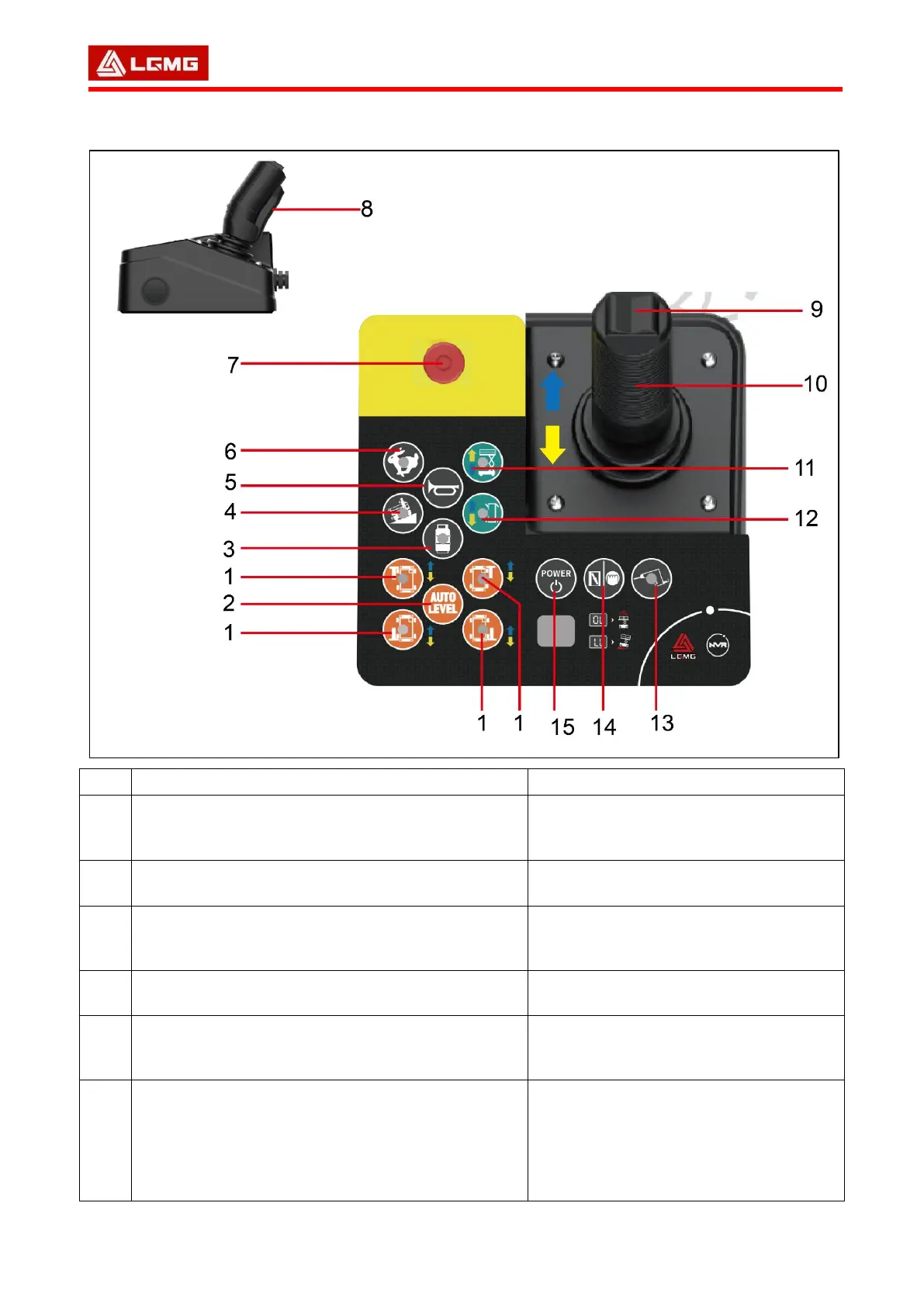
Operation function description
Functional enabling button of outrigger with indicator
Press and hold this button to activate the
ascending/descending functions of single
outrigger.
Automatic leveling button of outrigger
Press and hold this button to activate the
automatic leveling function.
Gasoline/LPG model: LPG operating button with
indicator
Press this button to select fuel. Light on
indicates that LPG is selected. Light off
indicates gasoline is selected.
Machine tilt button with indicator: Please operate it at
a low speed during tilt.
Press this button to perform operation at
a low speed during tilt.
Press this button, and the horn will sound.
Release this button, and the horn will stop
sounding.
Idling selection button of engine with indicator
Press this button to select the idling
setting of engine. The indicator is on,
indicating that the high idling has been
selected. The indicator is off, indicating
that the intermediate and low idling has
been selected.



 To Next Page