USING THE KEY-LOCK (DAY-LOCK) FEATURE (CONTINUED)
Before using the key-lock feature you will need to close the door and rotate the handle until the
bolts extend into their locked position.
Step 1.Rotate the dial counterclockwise to the number 0.
Step 2.Insert the key and turn it 180 degrees counterclockwise until it stops (the jagged edge of the
key should be facing up).
Step 3.Remove the key and verify the safe is locked by trying to turn the handle.
NOTE: If the safe is NOT locked, try rotating the dial counterclockwise to the number 4 and then
back clockwise to 0, then repeat steps 2-3.
CHANGING COMBINATIONS ON MANUAL LOCKS
It is inadvisable for anyone other than a CERTIFIED LOCKSMITH to change the combination on a
manual lock. Changing the combination by anyone other than a certified technician will void the
lock portion of your warranty. Call your dealer or Customer Service Representative at Liberty Safe
(800) 247-5625, press 0, for help locating an approved locksmith. As part of our continuing service,
a record of your combination by serial number is kept on file at Liberty Safe. If you lose your
combination it can be restored to you for a $25.00 research fee provided you have informed Liberty
of any combination changes and you have also met the documentation requirements. See the Lost
Combination and Key section of this manual for more details and information about storing your
combination.
Electronic Locks
Your safe may have one of the following two model electronic locks. Be sure to choose the correct
model instructions before attempting to use your electronic safe lock.
TITAN PIVOTBOLT ELECTRONIC LOCKS—OPENING INSTRUCTIONS
WARNING! All Electronic locks are set at the factory to
123456 #. For security purposes, you should change this
combination to your own, new combination number. (See
instructions below)
Before entering your electronic lock combination, center the handle
between left and right stop points. If the handle or locking mechanism
is putting pressure on the lock, it may not open.
Before entering your electronic lock combination, remove any static charge you may have
by touching your finger to the body of the safe. Discharging static electricity into the lock can
damage it and prevent proper operation.
Opening your PIVOTBOLT electronic lock for the first time
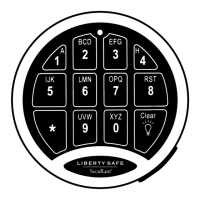
Enter the factory set 6 digit master combination (1,2,3,4,5,6 ) followed by the pound (#) sign.
When each number is pressed, the lock will chirp and the red LED on the keypad will momentarily
light up. After pressing the # sign, you should hear the lock retract inside the door, indicating the
lock has opened and it is okay to turn the handle and open the safe door. You have 6 seconds to
turn the handle. If you wait longer than 6 seconds, the lock will re-lock and you will need to enter
the code again. If you experience any problems opening your safe, refer to the Trouble Shooting
section in this manual. If you pause more than 10 seconds between each number the lock will
assume you do not wish to continue and will reset itself. If you press an incorrect button when
entering the code, press the star ( ) button and start again with the first number in the code.


 To Next Page