10 LifeSize Video Communications Systems User Guide
Answering, Ignoring, or Rejecting a Call
When receiving an incoming call:
• Press to accept the call.
• Press to ignore the call.
• If you are in another call, you can also press (Do Not Disturb) which ignores the
new caller and prevents any other calls from interrupting.
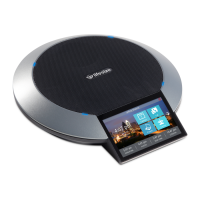
Troubleshooting LifeSize Phone
The following sections describe symptoms, possible causes, and potential solutions for
common problems you may encounter with your LifeSize Phone.
When experiencing a problem, visually inspect the unit. Ensure the system has not been
exposed to water or heat sources or appears physically damaged.
For best performance, follow these guidelines:
• Position the LifeSize Phone in the center of the room.
• Avoid moving the LifeSize Phone during a call.
• Speak at normal conversation levels and direct your voice toward the phone.
Incorrect Cabling
Improperly connected or loose cables are common causes of problems with hardware units.
When investigating a system problem, first check all the external controls and cable
connections. Check that connections are correct and secure, and that nothing is obstructing
the cables.
Verify that power is supplied correctly to the unit through PoE adapter. The LEDs illuminate
and the display becomes active with sufficient power.
If connecting your phone with PoE and your network connection does not support PoE, you
must use a PoE adapter between the network connection and the phone to supply power.
You must supply a power adapter that is IEEE 802.3af compliant. Refer to www.lifesize.com/
support for more information.
Inspect connections to any system cables and ensure there are no obstructions or loose
cables at either end. Ensure you have connected the network cable correctly to the PoE
adapter, wall port, or interface module. Although it is possible to plug in the LAN end to the
phone, the phone will not work. Correct the connection by reversing the cable to obtain
connectivity to your LifeSize Phone.


 To Next Page
 Loading...
