TROUBLE-SHOOTING AND MAINTENANCE
Inspect and tighten all parts each time you use the stepper. The stepper can be cleaned usinga soft
•cloth and mild, non-abrasive detergent. Do not allow liquidto come in contact withthe electronic
monitor.
ELECTRONIC MONITOR
If the electronic monitor displays incorrectfeedback, or if the display becomes faint, the batteries
should be replaced. See assembly step 6 on page 5 battery installation instructions.
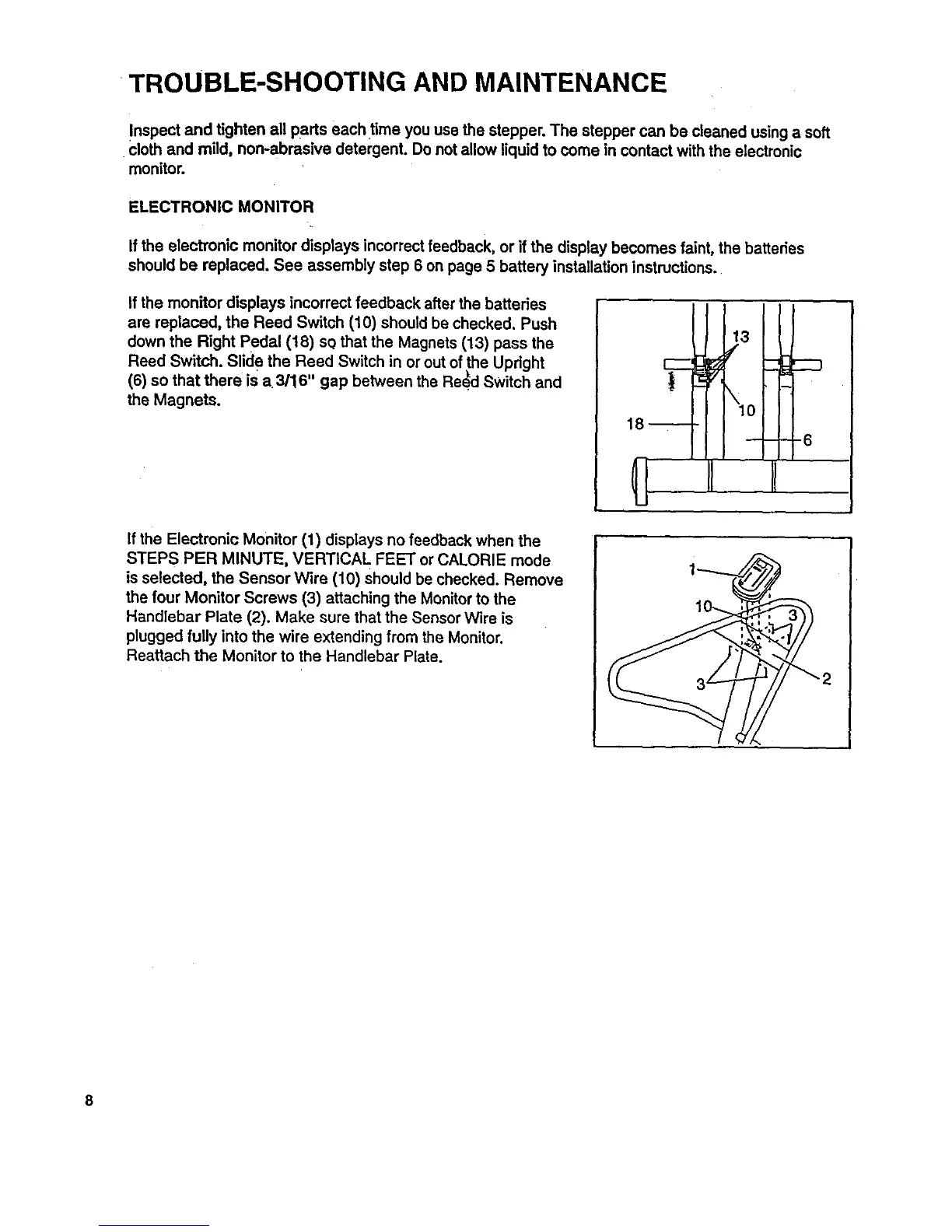
If the monitor displays incorrect feedback afterthe batteries
are replaced, the Reed Switch (10) should be checked. Push
down the Right Pedal (18) sQthat the Magnets (13) pass the
Reed Switch. Slide the Reed Switch in or out of the Upright
(6) so that there ISa 3/16" gap between the Re!d Switch and
the Magnets.
If the Electronic Monitor (1) displays no feedback when the
STEPS PER MINUTE, VERTICAL FEET or CALORIE mode
is selected, the Sensor Wire (10) should be checked. Remove
the four Monitor Screws (3) attaching the Monitorto the
Handlebar Plate (2). Make sure that the Sensor Wire is
plugged fully intothe wire extending from the Monitor.
Reattach the Monitor to the Handlebar Plate.
"2
8


 To Next Page