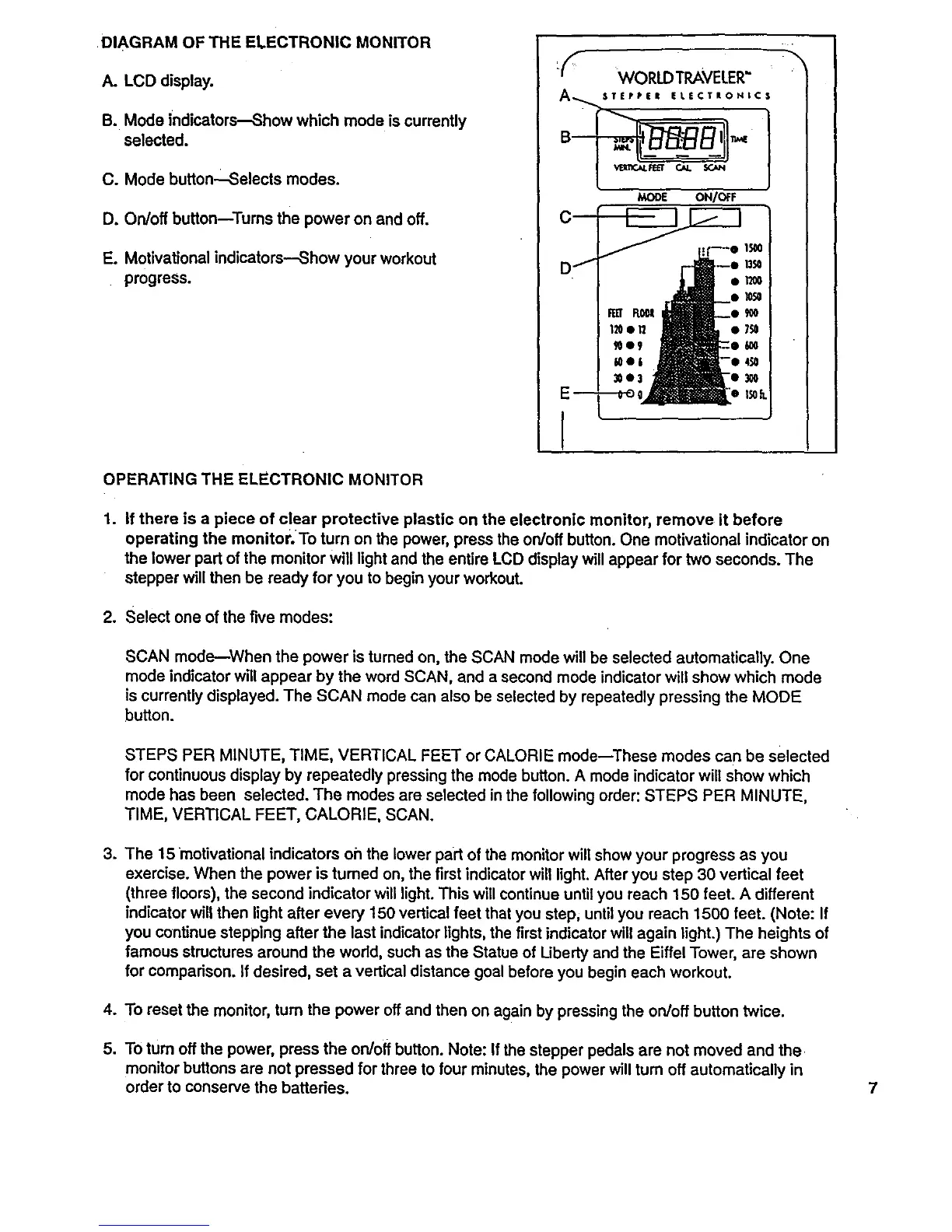
DIAGRAM OF THE ELECTRONIC MONITOR
A. LCD display.
B. Mode indicators--Show which mode is currently
selected.
C. Mode button_Selects modes.
D. On/off bufton--Tums the power on and off.
E. Motivational indicators--Show your workout
progress.
MODE ON/OFF
1
OPERATING THE ELECTRONIC MONITOR
1. If there is a piece of clear protective plastic on the electronic monitor, remove it before
operating the monitor.To turn on the power, press the on/off button. One motivational indicator on
the lower part of the monitor will light and the entire LCD displaywill appear for two seconds. The
stepper will then be ready for you to begin your workout.
2. Select one ofthe five modes:
SCAN mode-When the power is turned on, the SCAN mode will be selected automatically. One
mode indicator will appear by the word SCAN, and a second mode indicator will show which mode
is currently displayed. The SCAN mode can also be selected by repeatedly pressing the MODE
button.
STEPS PER MINUTE, TIME, VERTICAL FEET or CALORIE mode--These modes can be selected
for continuous display by repeatedly pressing the mode button. A mode indicator will show which
mode has been selected. The modes are selected inthe following order: STEPS PER MINUTE,
TIME, VERTICAL FEET, CALORIE, SCAN.
3. The 15 motivational indicators oh the lower part of the monitor will show your progress as you
exercise. When the power is turned on, the first indicatorwill light. After you step 30 vertical feet
(three floors), the second indicator will light. This will continue until you reach 150 feet. A different
indicator will then light after every 150 vertical feet that you step, until you reach 1500 feet. (Note: If
you continue stepping after the last indicator lights, the first indicator will again light.) The heights of
famous structures around the world, such as the Statue of Liberty and the Eiffel Tower, are shown
for comparison. If desired, set a vertical distance goal before you begin each workout.
4. To reset the monitor, turn the power off and then on again by pressing the on/off button twice.
5. To turn off the power, press the on/off button. Note: If the stepper pedals are not moved and the
monitor buttons are not pressed for three to four minutes, the power will turn off automatically in
order to conserve the batteries. 7


 To Next Page
 Loading...