9
9
DRIVING LIGHT FILTERS
Durable polycarbonate covers should remain tted to your HTX2 Hybrid Driving Lights at all times. They are
capable of absorbing road grime and bombardment for many years. These replaceable covers should be
renewed from time to time to protect your investment and maintain maximum beam output. Your HTX2 Hybrid
Driving Light(s) come standard with spot lters. Clear combo lters are used to change the beam output of the
HID bulb only.
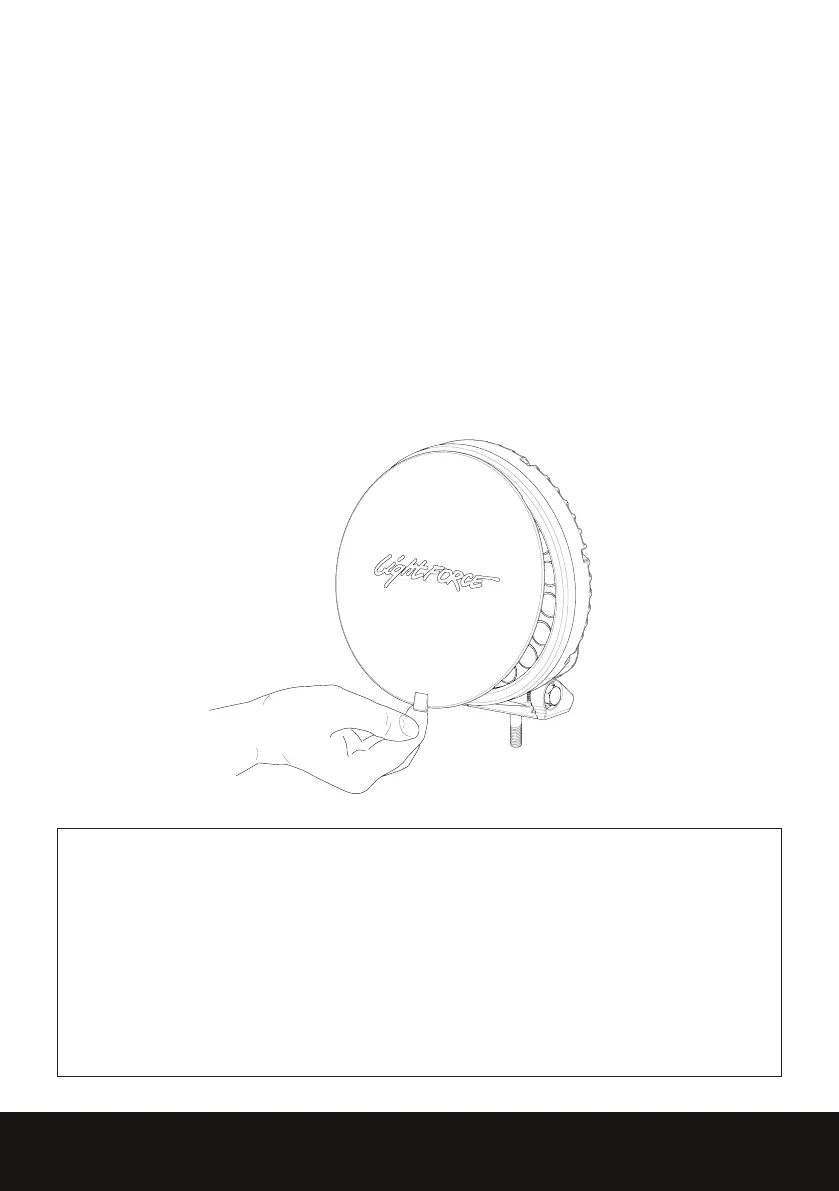
FILTER REMOVAL
• Filter is held in place by 4 clips
• Lift tab at bottom of light and pull lter away from bezel releasing the clips.
FILTER REFITTING
• Insert the lter at the top position
• Push lter onto bezel using lter tab until side clips are engaged
• Ensure lter is correctly aligned within bezel.
PLEASE NOTE
Lightforce driving lights are designed to be mounted in the horizontal/forward facing position only.
Pointing the light upwards can cause heat damage to the lens. Failure to comply with this requirement
may void warranty.
The HTX2 Black Covers should never be installed on your HTX2 Hybrid Driving Lights when they are in
operation as this can cause catastrophic failure due to overheating.
DO NOT REMOVE THE FRONT BEZEL. THIS MAY VOID WARRANTY.


 To Next Page