STANDARD REGISTRATION
MEDIA CONNECTOR REGISTRATION (OTHER REGISTERED COMPONENTS IN PLACE)
(Particularly valuable when Redcat is mounted on the wall)
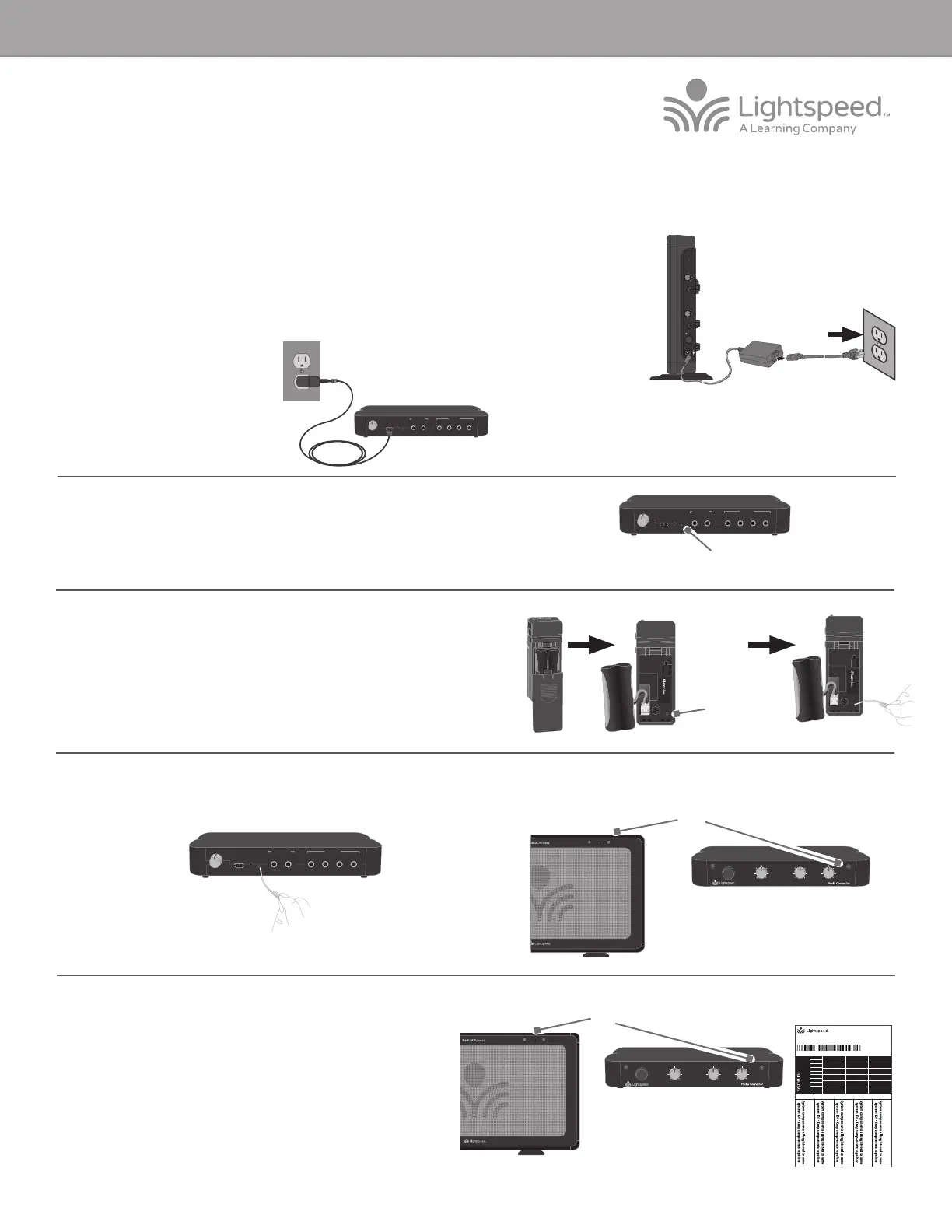
1. Start with the Redcat plugged in and powered on.
2. If replacing a Media Connector, make sure the malfunctioning Media Connector is
unplugged.
3. Plug in the new Media Connector. The blue power light will turn on.
7. Aer several seconds, the #1 light on the Redcat will turn solid. The
LINK light on front of the Media Connector will begin blinking, then
turn solid.
8. The registration is complete. You can now plug any audio source into
the Media Connector to verify there is audio.
9. Place system ID number (attached to the Redcat Quickstart Guide) on
the new Flexmike.
4. Locate the registration button on the back panel marked “REGISTER”
5. Use another registered functional component (existing Flexmike or Sharemike) to
trigger the registration function in Redcat. (For the purpose of these instructions,
it is assumed that a Flexmike is the the existing registered component.)
• Using a paperclip with the end straightened out, press and hold the
registration button for 3 seconds inside the registered Flexmike.
• The 1 and 2 amber lights will begin blinking on the Redcat.
6. Briefly press the registration button on the Media Connector. The REGISTER light will begin blinking.
NOTE: if at any point, the Redcat or Media Connector lights begin
blinking rapidly, that indicates a registration error. Unplug the Media
Connector, then repeat steps 3-8.
1POWER 2
Solid lights
1POWER 2
Blinking lights
Registration
Button
REGISTER
AUDIO IN
MIN
MAX
AUDIO
(ALD) OUT
MIN
MAX
ON/OFF
DC INPUT
16V/2.0A
1 4
322
1
AUDIO INAUDIO OUT
REGISTER
USB POWER
5V/1.5A
TONE
TREBLE BASS
1 4
322
1
AUDIO INAUDIO OUT
REGISTER
USB POWER
5V/1.5A
TONE
TREBLE BASS
1 4
322
1
AUDIO INAUDIO OUT
REGISTER
USB POWER
5V/1.5A
TONE
TREBLE BASS
Registration
Button
AUDIO INMICROPHONE AUDIO OUT
POWER
MIN
LINK
MAX MIN MAX MIN MAX
AUDIO INMICROPHONE AUDIO OUT
POWER
MIN
LINK
MAX MIN MAX MIN MAX
For users adding a Media Connector or replacing a lost or malfunctioning Media Connector.
SYSTEM ID#
SYSTEM ID#
SYSTEM ID#
SYSTEM ID#
RETAIN EXTRA LABELS IN THE EVENT A COMPONENT IS REPLACED OR ADDED.
Match components
to this system ID#
Apply to system components to indicate which parts are registered
as a system. Keep registered items together when storing away.
Registration ID Labels
00-01
00-01
00-01
00-01
00-01
00-01
00-01
00-01
00-01
00-01
00-01
00-01
00-01
00-01
00-01
00-01
00-01
00-01
00-01
00-01
00-01
00-01
00-01
00-01
00-01
00-01
00-01
00-01
00-01
00-01
00-01
00-01
334-0162-02-00-01
10101
REDCAT ACCESS REGISTRATION GUIDE
REGISTER
AUDIO IN
MIN
MAX
AUDIO
(ALD) OUT
MIN
MAX
ON/OFF
DC INPUT
16V/2.0A


 To Next Page
 Loading...






