2
English
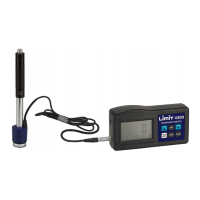
Hardness Leeb Tester Limit 4300
Portable meter for leeb hardness testing of the most common metals as steel,
stainless steel, cast iron, aluminum, brass, bronze and copper.
Measuring Rockwell B and C, Vickers and Brinell.
Easy set up and easy to use. Select stroke direction, material code and scale.
Hold the transducer firmly against the target object, releasing the spring
mechanism and read the value. The principle is that a spring-loaded body
bounces on the target object and a permanent magnet body generates a voltage
in a coil which is proportional to the speed.
Brinell HB 80-647
Rockwell HRB 38-100
Rockwell HRC 20-68
Vickers HV 80-940
Batteries 4 pc 1.5VAAA
Probediameter mm 20
Memory number 250
Important before use.
The instrument shall not be used against Tungsten
or harder material which may damage the sensor. Measurement object may
not be magnetically. The surface of object shall be smooth and have a surface
roughness max 3 Rato avoid large variations. The radius of the object should
be over 30 mm. It is important that the measurement object is stably xed and
if it is small objects that they are properly supported. See Figure 5. Measuring
objects above 5 kg needs no extra support. Measuring object under 5 kg
should be stable in contact with the underlying support surface and attached to
a workbench or similar. Measuring objects up to 100 g or thickness less than 5
mm or hardening depth below 1 mm is not suitable in this method.
RD
Read saved measurements. Scroll with the arrow keys.
DIR
Select direction. Scroll to the desired direction. See Figure 4
DEL
Press 3 seconds to delete the saved measurement.
POWER / MENU
On and Off. Press 3 seconds to shutdown.
MATE
Select Material code 1 to 10. Scroll to desired code. See Figure 2.
SCALE
Select scale. Scroll to desired scale. See Figure 1.


 To Next Page