MaxPower
Smart Power Solutions
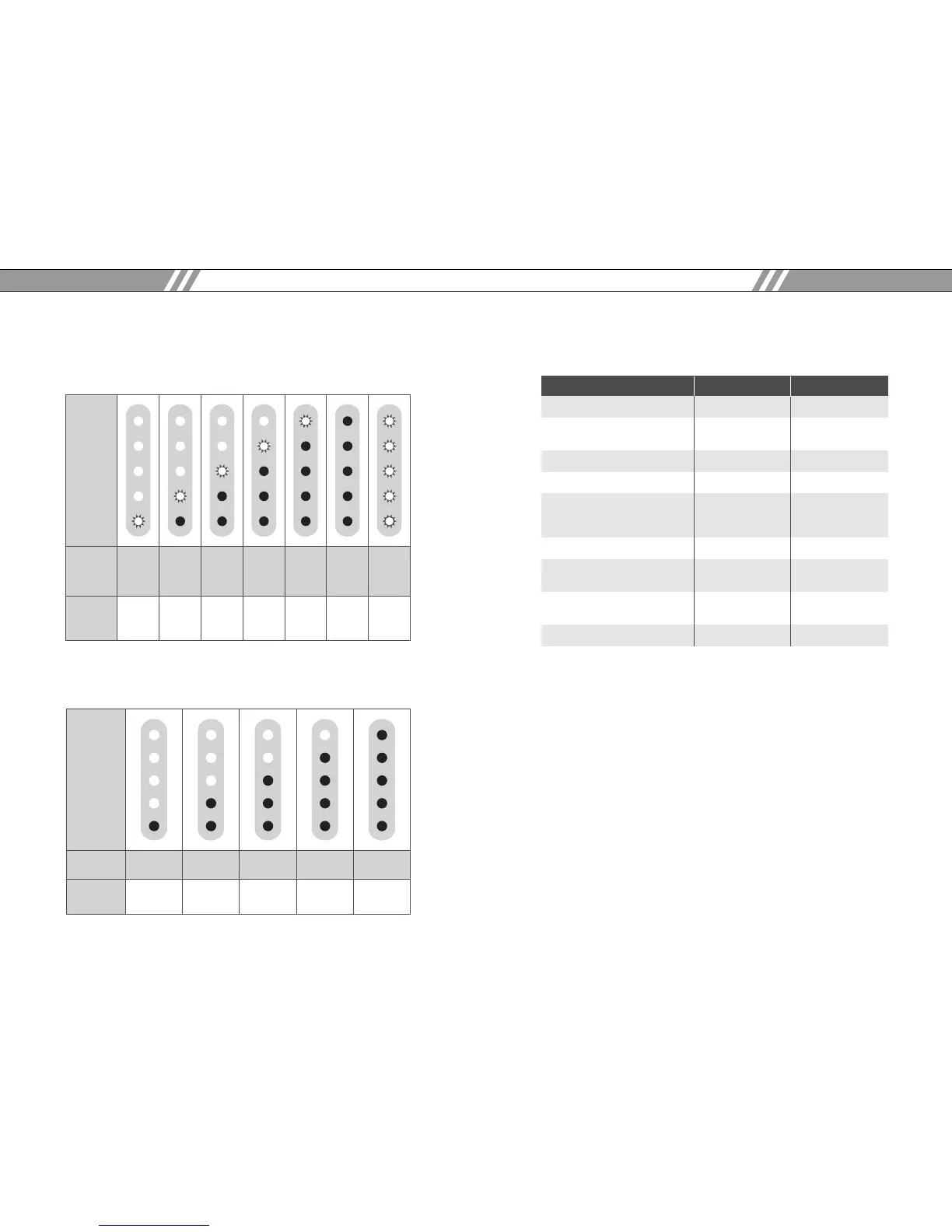
To determine the charging status of the MaxPower, see the
illustration below.
To check the remaining capacity of the MaxPower, see the
illustration below.
4. Specifications
MaxPower 60 MaxPower 90
Maximum Capacity 95Wh 140Wh
Output Voltage
16V, 20V 16V, 20V
(Automatically set by SmartTip)
Maximum Output Power 72W 72W
Fuel Gauge 5 step LED 5 step LED
Run Time (varies according
to notebook models and Approx. 6 hours Approx. 9 hours
program use)
Charging Time 3 hours 4.5 hours
Dimension
290x220x12mm 290x220x12mm
(11.25”x8.5”x 0.5”) (11.25”x8.5”x 0.5”)
Weight
Approx. 1.1kg Approx. 1.4kg
(2.4lbs) (3.0lbs)
Adapter 19V, 60W AC/DC 19V, 60W AC/DC
5. Warranty
MaxPower is warranted for six months from the date of
purchase against defects in materials and workmanship.
During this period, those defects will be repaired or the
product will be replaced with no charge. This warranty does
not cover damages caused by misuse and neglect. If you
have any problem, please contact the dealer where the
MaxPower was purchased or our customer service
department.
Smart Power Solutions
10 User’s manual
MaxPower
User’s manual 11



 To Next Page