12
2022-07-19
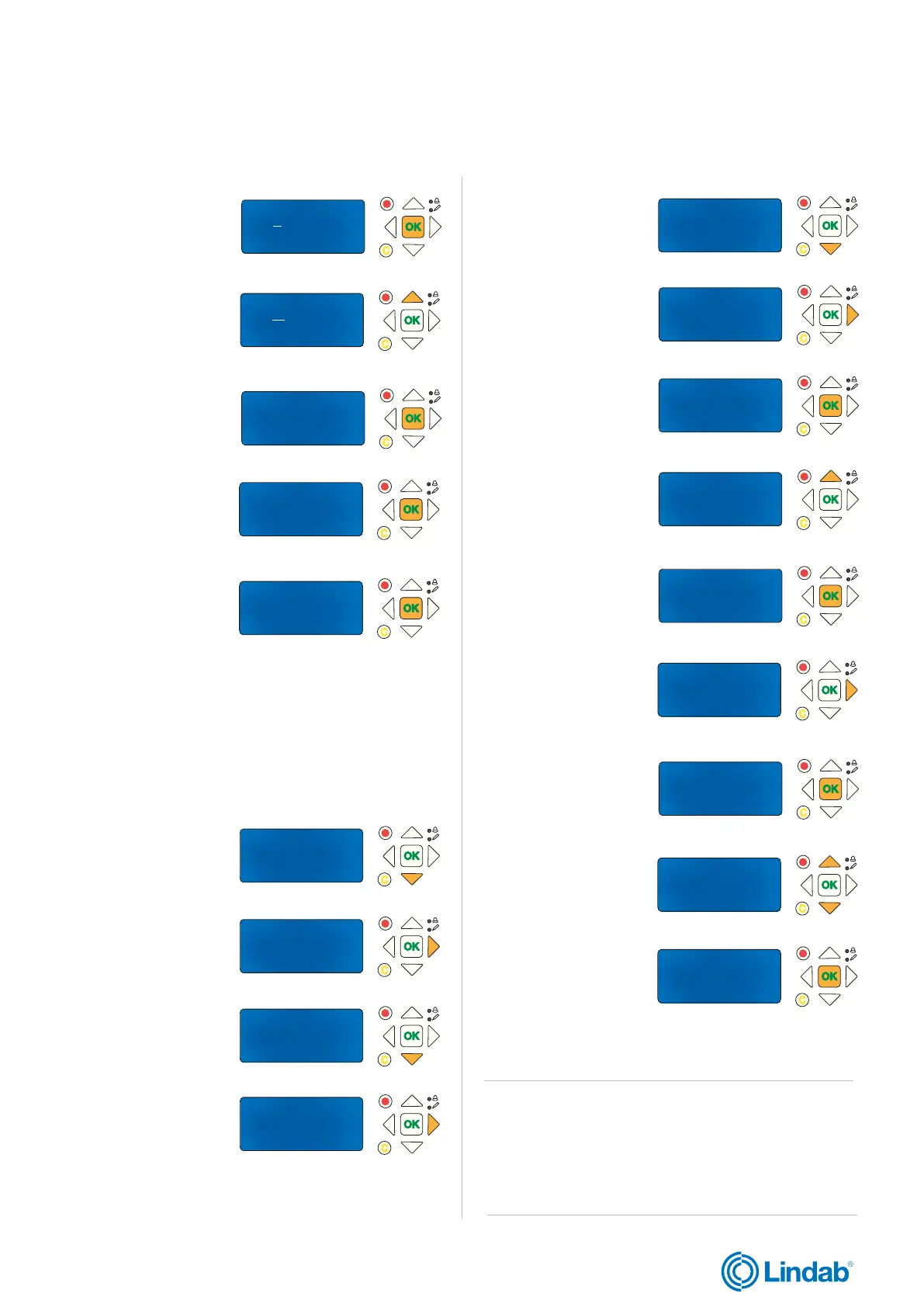
De-/Activate Damper
Detecotr/Temp AI1
Pressure sensor
-> Miscellaneous
->Adressing Slaves
SEF
Communication
De-/Activate Damper
Status Overview
-> System Setup
Settings
Manual/Auto
-> Input/Output NC/NO
Damper Time
Fire Thermostat
Temperature alarm
Fire Inspector
Section evacuation
->Section containment
Section tools
Section containment
function
No
Section containment
function
No_
Section containment
function
Yes_ ->
Section containment
function
Yes ->
Number of sections
for full alarm
1
Sections in use 0
Number of sections
for full alarm
_1
Sections in use 0
Number of sections
for full alarm
_2
Sections in use 0
Number of sections
for full alarm
2
Sections in use 0
Find addressed slave
Start: No
Status: Idle
Found 0 0 %
Find addressed slave
Start: Yes
Status: Idle
Found 0 0 %
Find addressed slave
Start: Yes
Status: Running
Found 0 0 %
Find addressed slave
Start: Yes
Status: Running
Found 26 100 %
lindab | commissioning guide
FireSystemPro
We reserve the right to make changes without prior notice
2.7 Set section funcionality in PRO-M
1. Press ”down” to find
”System Setup”
2. Press ”forward” to
access ”System setup”
3. Press ”down” to find
”Miscellaneous”
4. Press forward to enter
”Miscellaneous”
5. Press ”down” to find
”Section containment”
6. Press ”forward” to
enter ”Section contain-
ment”
7. ”OK” to start edit
value for ”Section con-
tainment”
8. Press ”up” to change
value to YES
9. Press ”OK” to confirm
value for ”Section con-
tainment”
11. Press ”OK” to edit
”Number of sections for
full alarm”
Note! ”Number of section for full alarm” indicates the
number of sections in alarm mode, in order to close the
whole system. For example, if you choose two (2) as
number of section for full alarm, and you have four (4)
sections in the system, all four sections wil close if two
sections are in alarm mode.
10. Press ”forward” to
set ”Number of
sections for full alarm”
12. Use ”up” and down”
arrows to change
”Number of sections for
full alarm”
13. Press ”OK” to
confirm
Sections are now added and function set for the system
12. Press ”OK” to edit
”Start” status (Yes/No)
13. Press ”up” to
change status to YES
14. “OK” to confirm
status
15. Wait until running
status is 100%
16. Press OK to
confirm and stop
running.
Find addressed slave
Start: No
Status: OK
Found 26 100 %
PRO-S damper units should now be identied and
addressed in the system



 To Next Page