39
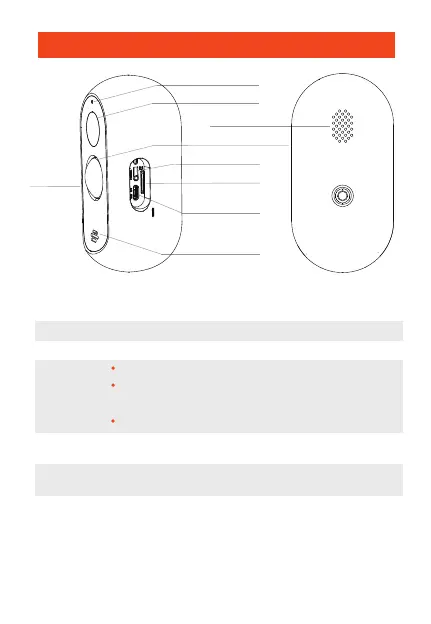
Power Supply
ON/OFF Button
Status Light
DC 5V±10%
Hold the button for 3s to turn the camera on/off
Permanent red light: camera is not correctly connected to the network
Blinking red light : waiting for wifi connection or in the process of
being connected (fast blinking)
Permanent blue light : camera is working correctly
Supports local storage on SD card (max. 128GB, not included)
RESET
Micro SD card
Batteries Rechargeable and replaceable batteries (5200mAh)
The camera can also be used without the solar panel. In that case,
the camera needs to be recharged via the USB cable.
Press and hold the button for 5s to restore the factory default settings.
Infrared Detector
Objectif
Mic
Speaker
USB Port for
charging
SD Card
RESET
Status Light
ON/OFF
Button
Description


 To Next Page