EasyManua.ls Logo

Link2Home 6824F - User Manual

Link2Home 6824F
34 pages
Go to English
Print Icon
To Next Page IconTo Next Page
Loading...
6824F
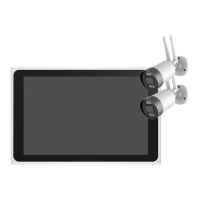
Kit 2 caméras de surveillance avec écran
de contrôle
Kit 2 surveillance cameras with control screen
2x WLAN Kameras & Überwachungsmonitor
Zestaw 2 kamer do monitoringu z ekranem
VWHUXMàF\P
Question and Answer IconNeed help?

Do you have a question about the Link2Home 6824F and is the answer not in the manual?

Summary

EU Declaration of Conformity

Whats in the box

Product Description

Wireless NVR Overview

Front View

Details the front panel of the Wireless NVR.

Back View

Details the rear panel of the Wireless NVR.

Top View

Shows the top perspective of the Wireless NVR.

Bottom View

Illustrates the bottom side of the Wireless NVR.

Power Box Details

Overall View

Provides a general view of the power box.

Port View

Details the connection ports on the power box.

Device Installation

Install HDD to NVR (Optional)

Guide for installing a hard drive into the NVR.

Connectivity and Operation

Cable Connection

Diagram illustrating cable connections for the system.

Power On and Login

Steps to power on the device and log into the system.

Hard Disk Management

Format the Hard Disk

Instructions for formatting the hard disk drive.

Network and Router Setup

Network Configuration

Guide to configuring network settings for internet access.

Set Up Router

Recommendations for router setup for 2.4GHz connectivity.

Registration Process

Getting Started

Initial steps for registering the Link2Home Pro App account.

Process

Step-by-step guide to complete the device registration.

Add a Device Manually

Getting Started

Initial instructions for manually adding a device.

Process

Detailed procedure for manually adding a device to the app.

Other Operations

Video Playback

How to view recorded video footage.

Video Backup

Steps to back up recorded video to USB.

Add Camera

Pair IPC

Process to pair wireless cameras with the NVR.

Product Details

Technical Features

Specifications of the surveillance camera kit.

Functions

Key features and capabilities of the device.

Attentions

Important notes and precautions for using the product.

WEEE Disposal Notes

Guidelines for the proper disposal of electronic equipment.

Summary

EU Declaration of Conformity

Whats in the box

Product Description

Wireless NVR Overview

Front View

Details the front panel of the Wireless NVR.

Back View

Details the rear panel of the Wireless NVR.

Top View

Shows the top perspective of the Wireless NVR.

Bottom View

Illustrates the bottom side of the Wireless NVR.

Power Box Details

Overall View

Provides a general view of the power box.

Port View

Details the connection ports on the power box.

Device Installation

Install HDD to NVR (Optional)

Guide for installing a hard drive into the NVR.

Connectivity and Operation

Cable Connection

Diagram illustrating cable connections for the system.

Power On and Login

Steps to power on the device and log into the system.

Hard Disk Management

Format the Hard Disk

Instructions for formatting the hard disk drive.

Network and Router Setup

Network Configuration

Guide to configuring network settings for internet access.

Set Up Router

Recommendations for router setup for 2.4GHz connectivity.

Registration Process

Getting Started

Initial steps for registering the Link2Home Pro App account.

Process

Step-by-step guide to complete the device registration.

Add a Device Manually

Getting Started

Initial instructions for manually adding a device.

Process

Detailed procedure for manually adding a device to the app.

Other Operations

Video Playback

How to view recorded video footage.

Video Backup

Steps to back up recorded video to USB.

Add Camera

Pair IPC

Process to pair wireless cameras with the NVR.

Product Details

Technical Features

Specifications of the surveillance camera kit.

Functions

Key features and capabilities of the device.

Attentions

Important notes and precautions for using the product.

WEEE Disposal Notes

Guidelines for the proper disposal of electronic equipment.

Link2Home 6824F Specifications

General IconGeneral
BrandLink2Home
Model6824F
CategorySecurity Camera
LanguageEnglish

Related product manuals