54 55
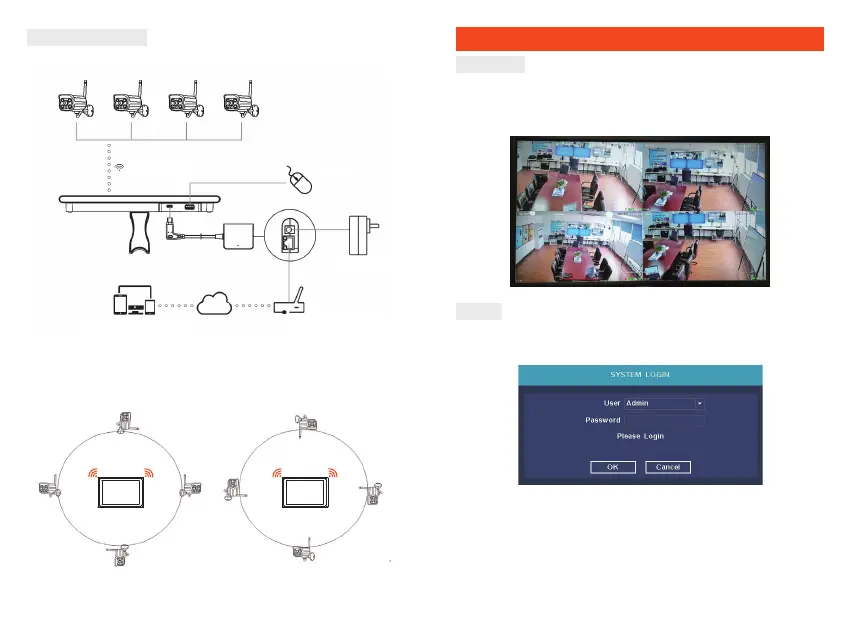
Cable Connection
Connect the wire as below diagram
Notes:
In order to guarantee the video quality, IPC antenna should try to
keep in parallel or tangent with NVR antenna. Because the signal
of surrounding antenna is much stronger, but much weaker if
DQWHQQDHQGSRLQWVEDFNRƪGLUHFWLRQ
Correct method Fault method
Local Operation
Power on
Check the power supply is plugged into an electrical outlet, and turn on
the button.Then the power LED should red, and the video will automatic
display on the monitor, after several minutes.
Login
1. Click right mouse button, log-in menu pops up.
2. Enter the correct password, default password is admin.
Note: Please modify the user password before using the product
to protect your privacy.
3DVVZRUGPRGLƬFDWLRQMain menu → The system menu → Account
→Modify Pwd
Wireless connection
Mobile phone, tablet and PC, etc.
Router
DC12V Adaper
Internet
Mouse


 To Next Page