Step 2
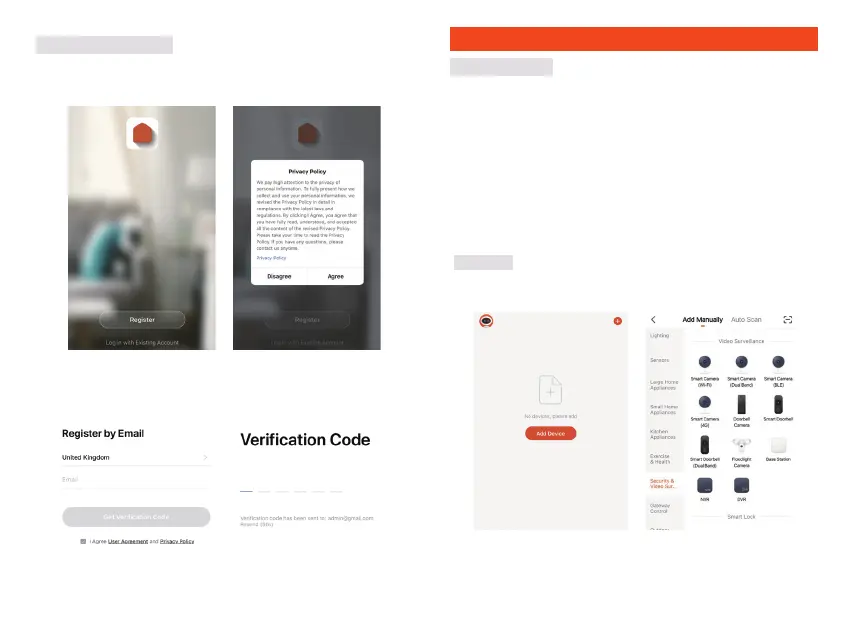
Input a valid email address and click continue. Then enter
WKHYHULƬFDWLRQFRGHIURP\RXUHPDLOEDFNLQWRWKH$SS
(check you junk folder).
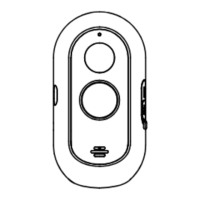
Adhesive tape
USB cable
Bracket
Power adapter
Protective strip
Adhesive tape
USB cable
Bracket
Power adapter
Protective strip
58 59
Step 1 Open the Link2Home Pro App, click "+" (in the upper right hand
corner of the screen) or "Add Device". Then select "Add Manually".
Step 2 Select "Security & Vedio Surveillance". Power the device on and
PDNHVXUHWKHLQGLFDWRULVƮDVKLQJTXLFNO\RUDSURPSWWRQHLVKHDUG
,I\RXGRQRWKHDUDSURPSWRUVHHDƮDVKLQJUHGOLJKWSUHVVDQG
hold the reset button for 5 seconds.
Registration process
Step 1 Open the Link2Home Pro App, click "Register", read the
"Privacy Policy"
and click "Agree" .
Getting started
3. If the device has been added to another account it will need to be
UHPRYHGƬUVW$IWHUWKHGHYLFHKDVEHHQUHPRYHGLWZLOOUHVHW
automatically and the status light will change from solid blue to
ƮDVKLQJUHG
1. Please follow the instructions and make sure the passwords are input
correctly.
2. One device can only be added with one App account, if the device
has been added with another account already, then it can't be added
to any other account again. Devices can be shared with other users
in the Home Management settings.
Add a device Manually
Process


 To Next Page
 Loading...