EtherFast
®
Cable/DSL Firewall Router with 4-Port Switch/VPN Endpoint
101
Instant Broadband
®
Series
100
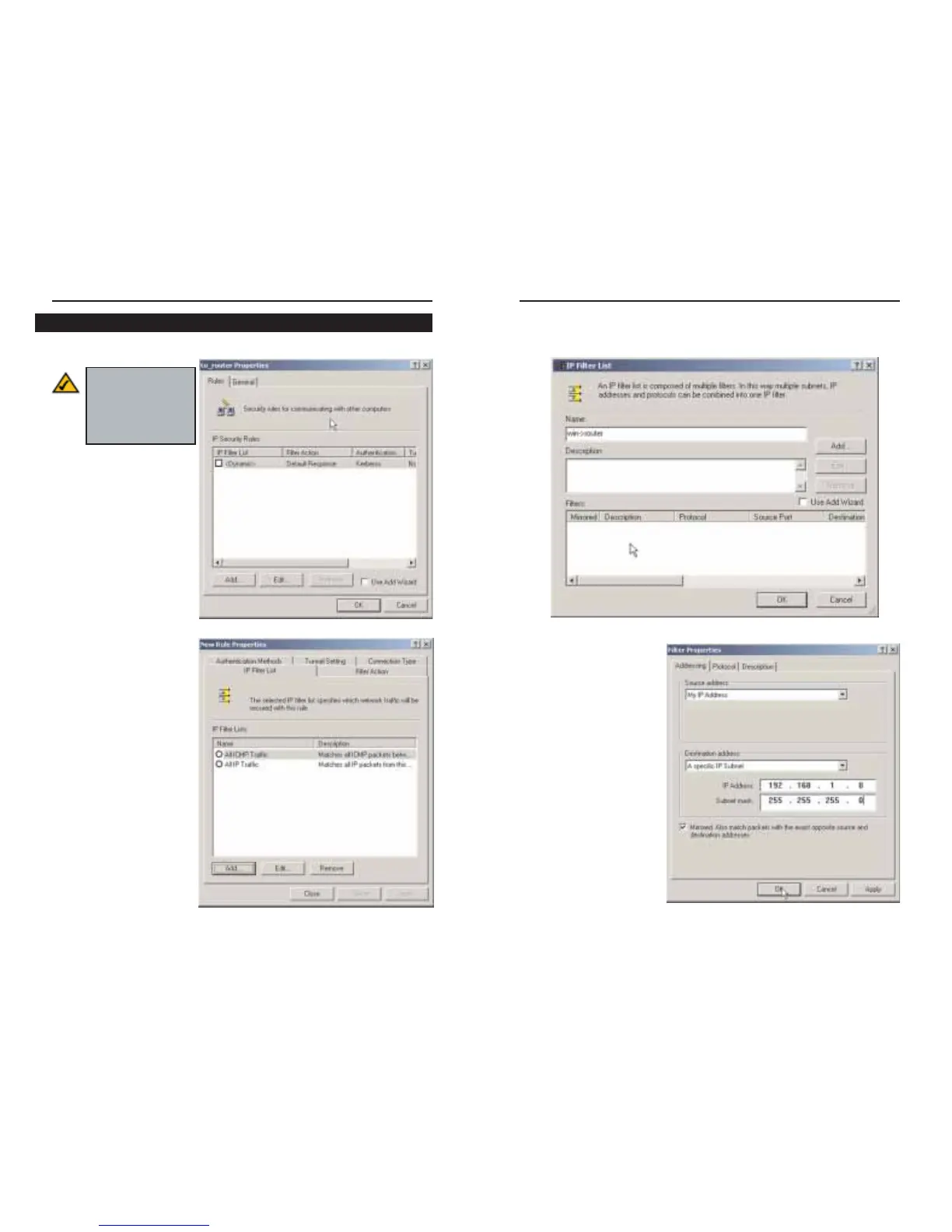
3. The IP Filter List screen should appear, as shown in Figure C-4. Enter an
appropriate name, such as win->router, for the filter list, and de-select the
Use Add Wizard check box. Then, click the Add button.
4. The Filters Properties
screen will appear, as
shown in Figure C-5.
Select the Addressing
tab. In the Source
address field, select My
IP Address. In the
Destination address
field, select A specific
IP Subnet, and fill in the
IP Address: 192.168.1.0
and Subnet mask:
255.255.255.0. (These
are the Router’s default
settings. If you have
changed these settings,
enter your new values.)
Figure C-5
Figure C-4
Filter List 1: win->router
1. In the new policy’s prop-
erties screen, verify that
the Rules tab is selected,
as shown in Figure C-2.
Deselect the Use Add
Wizard check box, and
click the Add button to
create a new rule.
2. Make sure the IP Filter
List tab is selected, and
click the Add button.
Figure C-2
Figure C-3
Note: The references
in this section to
“win” are references
to Windows 2000
and XP.
Step Two: Build Filter Lists






 To Next Page