EtherFast
®
Cable/DSL Firewall Router with 4-Port Switch/VPN Endpoint
113
Instant Broadband
®
Series
112
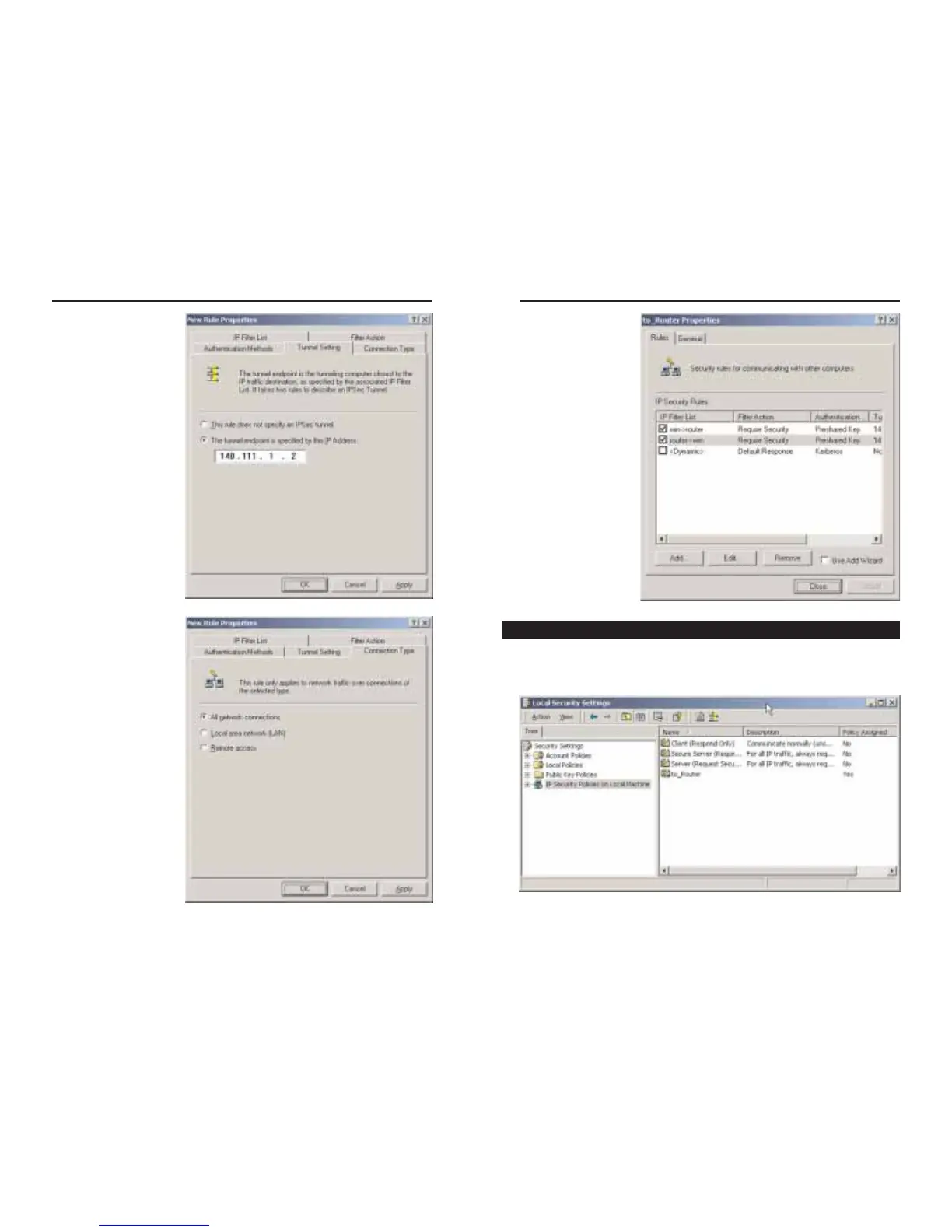
17. From the Rules tab,
shown in Figure C-
26, click the Close
button to return to
the secpol screen.
In the IP Security Policies on Local Computer window, shown in Figure C-
27, right-click the policy named to_router, and click Assign. A green arrow
appears in the folder icon.
Figure C-26
Figure C-27
Step Four: Assign New IPSec Policy
15. From the Tunnel
Setting tab, shown in
Figure C-24, click the
radio button for The
tunnel endpoint is
specified by this IP
Address, and enter
the Windows
2000/XP computer’s
IP Address.
16. Click the Connection
Type tab, shown in
Figure C-25, and
select All network
connections. Then
click the OK (for
Windows XP) or
Close (for Windows
2000) button to finish.
Figure C-24
Figure C-25






 To Next Page