5
Locomotive set operations
Locking your locomotive into forward direction only operation
W
hen the electronic E-unit Direction Lock switch is in the RUN position, your locomotive
sequences through a repeating pattern of operations: forward, neutral, reverse, neutral,
and so on.
To lock your locomotive into forward-only operation, you can deactivate the electronic E-unit’s
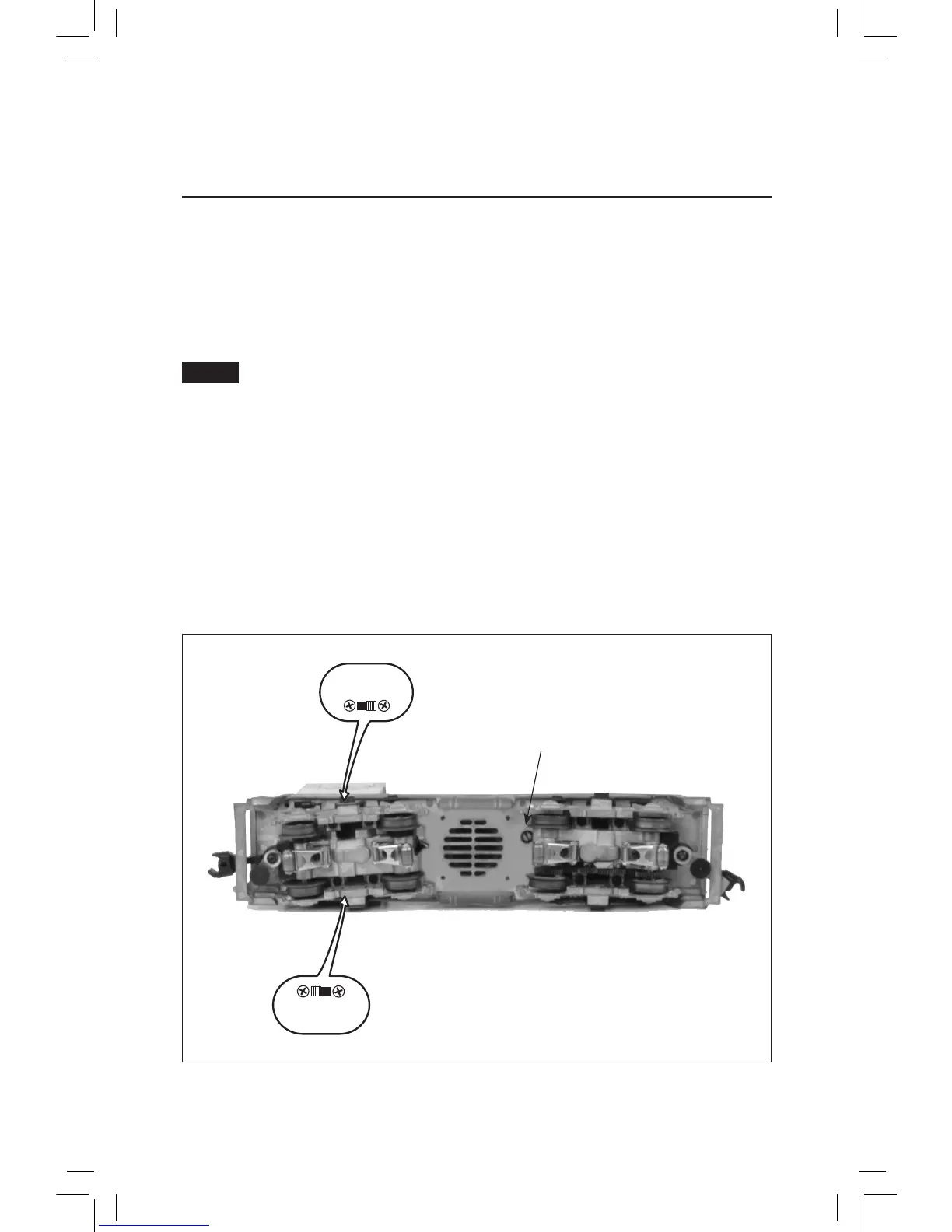
sequencing function. Follow the steps below and refer to Figure 1 for the location of the RUN/LOCK
switch.
Always turn off track power before removing the locomotive from the track.
1. Turn off track power, wait three seconds, and remove the locomotive from the track. Now slide the
electronic E-unit Direction Lock switch to the LOCK position. Your locomotive is now locked into
forward direction only operation.
2. Place your locomotive back on the track. Power up the track and press the DIRECTION button
on your transformer to confirm that the locomotive is now locked into forward direction only
operation.
To restore the forward-neutral-reverse sequence, turn off power and remove your locomotive from
the track. Slide the Directional Lock switch back to the RUN position. Place the locomotive back on
the track and restore track power.
Figure 1. Switch locations
FRONT
Volume Control Knob
Note!
LOCK
RUN
SMK
NO SMK
Directional Lock Switch
Smoke Unit Switch








 To Next Page