Rev: 08.24.21 Page 7 CCD-0004349
Pull Down Faucet
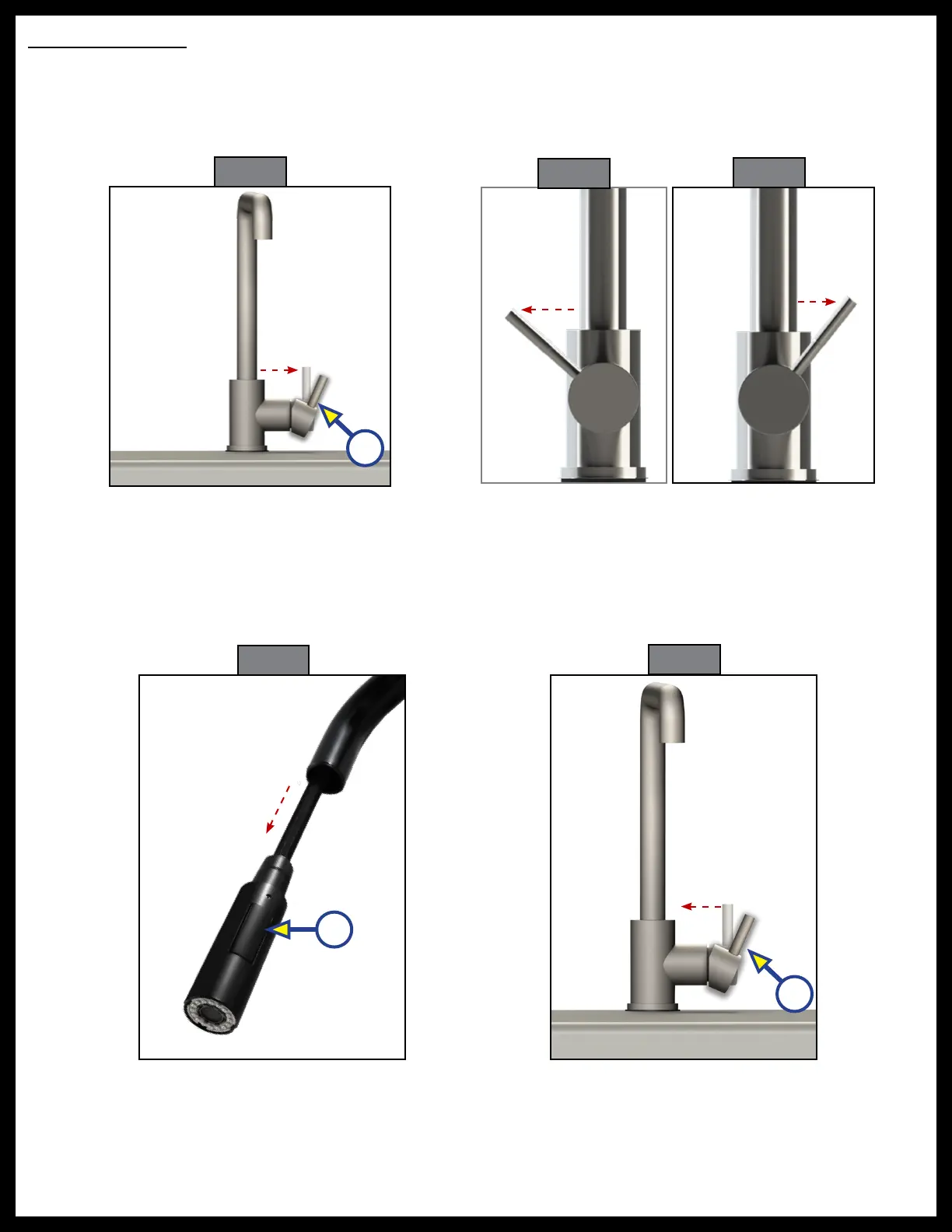
1. Pull the lever away from the faucet to turn it on (Fig. 13A).
2. Move the lever towards you for hot water (Fig. 14) and away from you for cold water (Fig. 15).
Note: Located on the front of the lever is a “H” for hot water and a “C” for cold water. Move the lever in the
direction of the desired temperature.
3. To use the spray wand pull down and out on the faucet head.
4. Press and release the button in on the lower portion of the faucet head (Fig. 16A) for spray mode. Press
and release the button again for stream mode.
5. Replace the faucet head by gently guiding the hose back into the faucet neck and insert into clip, if
applicable.
6. To shut the water off push the lever in towards the faucet (Fig. 17).
H C
H C
Fig. 13
Fig. 14
Fig. 15
Fig. 16
A
A
A
Fig. 17


 To Next Page