5
lci1.com 574-537-8900 Rev: 08.14.20
Schwintek
Motorized TV Lift
Installation and Owner’s Manual
(For Aftermarket Applications)
CCD-0002647
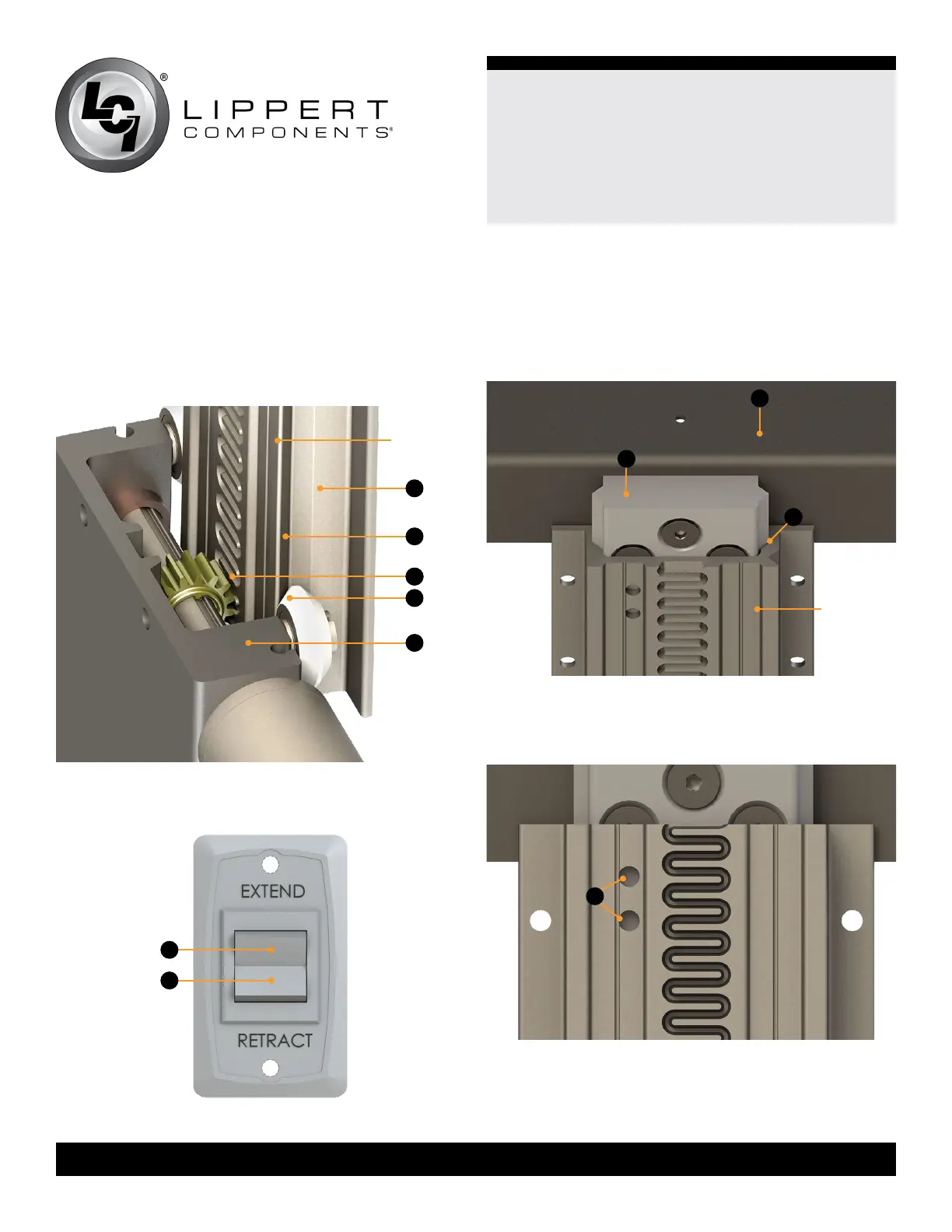
B. Press the switch’s RETRACT button (Fig.5B) until the
rack is fully inserted into the bearing block.
Fig.5
Fig.4
7. Mount the cabinet top transition piece onto
the rack.
A. Place the block (Fig.6A) of the transition piece (Fig.6B)
into the grooves of the assembled rack (Fig.6C).
Fig.7
B. Locate the two holes at the top of the assembled rack
(Fig.7A). Use two self tapping screws to secure the block
to the rack.
A
B
A
B
C
back view
of rack
A
C
6. Insert the assembled rack (Fig.4A) into the bearing block
(Fig.4E) by aligning the V-grooves (Fig.4B) in the rack to the
V-rollers (Fig.4D) in the bearing block (Fig.4E).
A. Insert the assembled rack (Fig.4A) until the gear in the
bearing block comes into contact with the serpentine
groove of the rack (Fig.4C).
Fig.6
A
E
B
D
back view
of rack



 To Next Page