EasyManua.ls Logo

Lippert Components Screen Defender - User Manual

Lippert Components Screen Defender
8 pages
Print Icon
To Next Page IconTo Next Page
Loading...
1
lci1.com 574-537-8900 Rev: 02.25.20
Screen Defender
Installation and Owners Manual
(For Aftermarket Applications)
CCD-0003487
Table of Contents
Purchase Verication .................................. 2
Introduction ............................................ 2
Safety ................................................... 2
Parts List ................................................ 3
Resources Required ................................... 4
Installation .............................................. 4
Install Extrusions and Screen Defender. ............... 5
Screen Defender
Installation and
Owners Manual
(For Aftermarket Applications)
Screen Defender KitsScreen Defender Kits
Part #Part # DescriptionDescription
859791
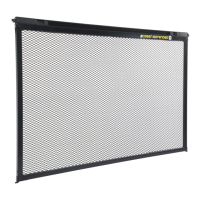
24” Screen Defender kit with extrusions;
Screen Defender 20 1/2” wide for 24” door
859792
26” Screen Defender kit with extrusions;
Screen Defender 22 1/2” wide for 26” door
859793
28” Screen Defender kit with extrusions;
Screen Defender 24 1/2” wide for 28” door
859794
30” Screen Defender kit with extrusions;
Screen Defender 26 1/2” wide for 30” door
Question and Answer IconNeed help?

Do you have a question about the Lippert Components Screen Defender and is the answer not in the manual?

Lippert Components Screen Defender Specifications

General IconGeneral
BrandLippert Components
ModelScreen Defender
CategoryProjection Screen
LanguageEnglish

Summary

Safety Information

General Warning

Signifies a safety risk that may cause death, serious personal injury, or severe property damage if not performed safely.

General Caution

Signifies a safety risk that may cause personal injury or product/property damage if not performed safely.

Moving Parts Caution

Alerts users that moving parts can pinch, crush, or cut, requiring clear space and caution during operation.

Product Components and Preparation

Parts List Overview

Details all available Screen Defender parts, including part numbers, descriptions, and identifiers for female and male extrusions.

Resources Required

Lists necessary tools and materials, such as a tape measure, for the installation process of the Screen Defender.

Screen Defender Installation Procedure

Basic Installation Steps

Guides users through the initial steps of positioning and securing the Screen Defender into the RV door frame without extrusions.

Extrusion Installation

Details the process of measuring, assembling, and installing both male and female extrusions to fill gaps in the screen door.

Finalizing Installation

Covers the final steps of seating the Screen Defender with extrusions and adjusting for a tight fit, including releasing latches.