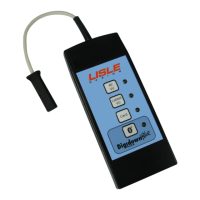
The Digidown Plus is a digital tachograph combined download device designed for efficient data acquisition from digital tachograph vehicle units (VUs) and driver cards. Manufactured by Lisle Design, this device stores downloaded data on a Secure Digital (SD) memory card, commonly referred to as an SD card.
Function Description:
The primary function of the Digidown Plus is to download data from digital tachographs and driver cards. It offers three main download types:
- ALL VU: This option downloads all available content from the Vehicle Unit.
- LATEST VU: This is a programmable option that allows for the download of specific data sets, including the last 1 or 3 months of data, a selection of events and faults, detailed speed information, and technical data. This option can also be programmed to include the download of a driver card inserted in the VU.
- CARD: This function specifically downloads data from a driver card that has been inserted into the VU. The Digidown Plus also provides the facility to read driver and workshop cards directly into the unit, and less commonly, company and control cards can also be downloaded directly.
The device is equipped with three LEDs positioned by the buttons, which indicate the download status and any potential errors.
Important Technical Specifications:
- Memory Card Compatibility: The Digidown Plus uses Secure Digital (SD) memory cards. For successful operation, SD cards must be formatted as FAT16 (which Windows refers to as 'FAT'). While the device generally works with most FAT16-formatted SD cards, Lisle Design guarantees operation with the memory cards they supply, which are selected for optimum performance. Standard supply includes 64Mbyte memory cards, which are deemed entirely adequate for the application, though larger capacity FAT16-formatted cards can also be used.
- Power Source:
- When downloading tachograph cards directly into the unit, two AA-size batteries are required. The device is designed for use with alkaline batteries, with a pair typically lasting for approximately 2000 driver card downloads before needing replacement. Other battery types, such as nickel-cadmium (Ni-Cd) or nickel-metal hydride (Ni-MH) rechargeable cells, can be used, but users should be aware of potential performance issues like self-discharge and reduced battery life due to uneven cell capacity.
- When downloading data from a VU or reading the SD card via the USB port, the internal battery is disconnected, and power is drawn from the VU or USB port connection.
- Connectivity: The Digidown Plus connects to the 6-pin Download connector on the front of the VU. It should NOT be connected to an analogue (chart-recording) tachograph. For reading the SD card or downloading driver cards while connected to a PC, it utilizes a USB port, appearing as a standard removable disk drive.
- File Naming Convention: Downloaded data files are labelled vuxxxxxx.esm for VU downloads or cdxxxxxx.crd for driver card downloads, where 'xxxxxx' is a sequential number starting from 000001. The device can also be programmed to name files as vuxxxxxx.ddd and cdxxxxxx.ddd for compatibility with software that only accepts .ddd files. The content of the downloaded files always adheres to digital tachograph regulations.
Usage Features:
- Ease of Use: Pressing the relevant button initiates the download process. The device provides clear LED indications for power status, download in progress, successful completion, and various error conditions.
- SD Card Management: To insert an SD card, it is pushed into the slot until it latches. To remove it, the protruding end is pushed back in to release it.
- VU Download Process: Before any VU download, a Company, Workshop, or Control card must be inserted into the VU. In some VUs, the vehicle ignition must also be switched on. The Digidown Plus checks the SD card presence and format upon connection, then blinks its LEDs in turn to indicate readiness. Downloads can take a considerable time (potentially over 30 minutes for a full VU download), but using the 'Latest VU' option can significantly reduce this. It is crucial not to disconnect the Digidown or remove the SD card during a download to prevent file errors.
- Driver Card Download Process: Driver cards can be downloaded either via the VU (requiring a driver card in one slot and a Company, Workshop, or Control card in another) or directly into the Digidown Plus unit. For direct download, the card is inserted chip-down into the smart card slot. Direct driver card downloads typically take about 1 minute.
- USB Connection for Driver Card Download: When connected to a PC's USB port, the Digidown Plus draws power from the USB connection, eliminating the need for internal batteries during driver card downloads.
- Mounting Bracket: A fixing bracket may be supplied to secure the unit to a counter or horizontal surface. A smaller bracket is also provided to cover the memory card slot. The brackets are designed for easy installation, allowing the Digidown Plus to be attached with screws. If a USB cable is to be permanently attached, it can be routed through holes in the bracket.
- Error Handling: The device provides specific LED patterns for various error conditions, such as no SD card, low battery, SD card problems (incorrect insertion, locked switch, full card, wrong format), and download failure. Suggested actions for each error are provided in the manual.
- 'Download Fault 12' Message: When downloading from some SiemensVDO digital tachographs, a 'Download Fault 12' message may appear on the tachograph display. This can be safely ignored; the download should be allowed to finish, and then 'OK' pressed to clear the error.
Maintenance Features:
- Battery Replacement: When the LEDs step smoothly from one to the next, it indicates that the batteries need replacing. The device uses two AA-size batteries.
- SD Card Formatting: For optimal performance, SD cards should be formatted as FAT16. When a newly formatted SD card is inserted and the unit is connected to a VU, the Digidown automatically checks the card format and creates the necessary directory structure ('DIGIDOWN' with 'VU' and 'CARD' sub-directories, and 'UPDATES').
- Software Upgrades: The software within the Digidown Plus can be upgraded without needing to return the unit to a dealer. Similarly, the programming for the 'Latest VU' button can also be updated without returning the device.

 Need help?
 General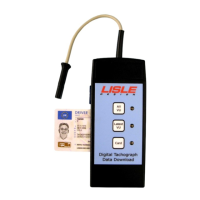

 To Next Page