6
INITIALISIERUNG CODE LOCK
INITIALISATION CODE LOCK
INIZIALIZZAZIONE CODE LOCK
INICIALIZACIÓN CODE LOCK
INITIALIZATION CODE LOCK
Lock-ID unbedingt in die freien Felder eintragen. Lock-ID kann nur mit LISTA Access Software geändert werden.
Entrez Lock-ID absolument dans les champs libres. Le Lock-ID ne peut être modifiée avec le LISTA Access Software.
Introducir Lock-ID a los campos libres. Il codice maestro può essere modificato solo con il LISTA Access Software.
Inserisci Lock-ID assolutamente nei campi liberi. El código maestro sólo puede cambiarse con el LISTA Access Software.
Insert Lock-ID necessarily into the free fields. The Lock-ID can only be changed with LISTA Access Software.
Ihre Lock-ID notieren:
Noter votre Lock-ID:
Nota il tuo Lock-ID:
Tomar nota del Lock-ID:
Note your Lock-ID:
Lock-ID
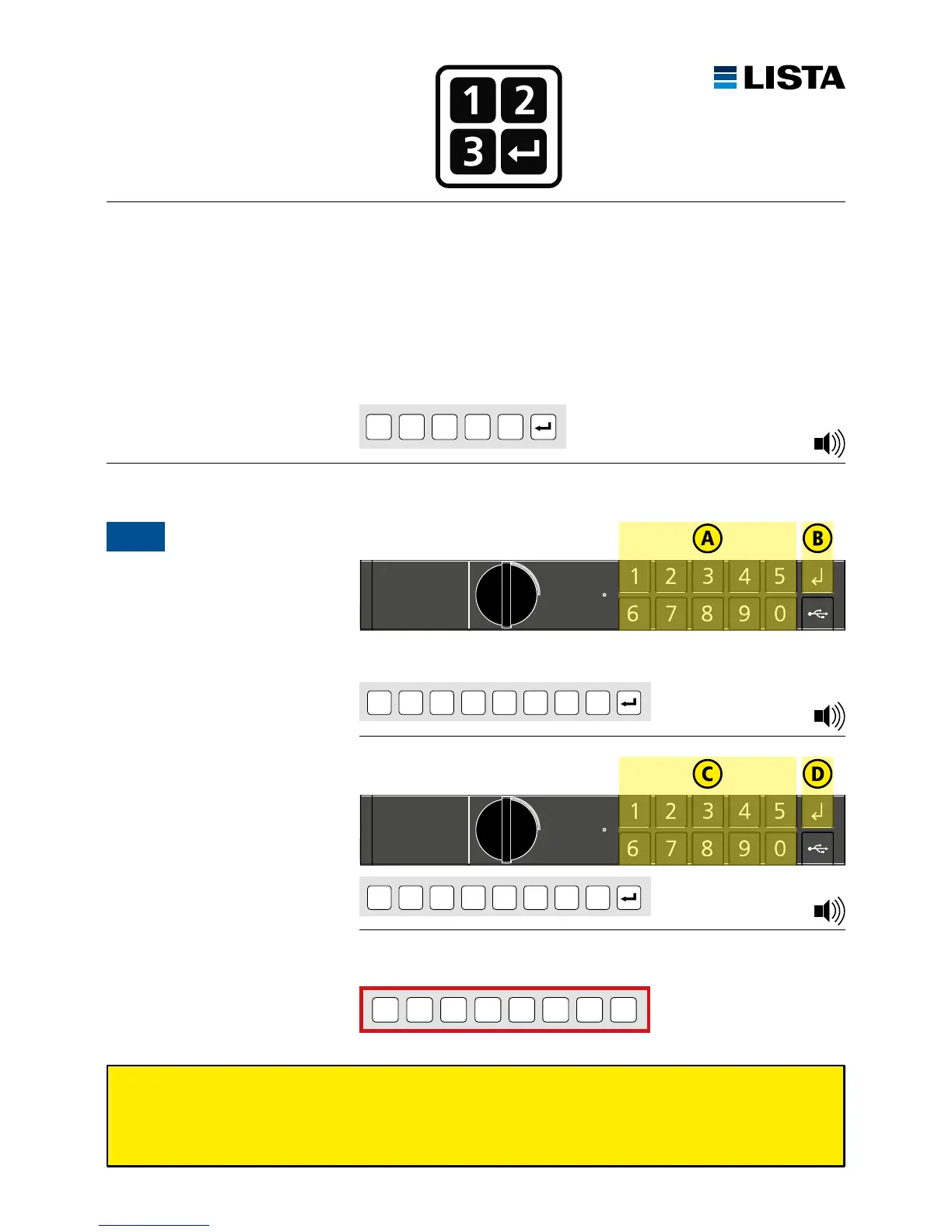
Auslieferungszustand: LISTA Werkscode 1 2 3 4 5 ist werkseitig vorinstalliert.
Etat de livraison, code LISTA 1 2 3 4 5 est préinstallé en usine.
Stato alla fornitura, codice di fabbrica LISTA 1 2 3 4 5 è preinstallato.
Código de apertura preinstalado de fábrica 1 2 3 4 5 está preinstalada de fábrica.
LISTA factory code 1 2 3 4 5 and was preset at the factory.
1 2 3 4 5
Zum ersten Mal öffnen
Premier déverrouillage
Aperto per la prima volta
Abrir por primera vez
Unlocking for the first time
1
zum Beispiel / par exemple / per esempio / por ejemplo / for example:
1 2 3 4 5 6 7 8 (8 digits)
8-stellige Lock-ID eingeben
Introduire 8 caractères de Lock-ID
Inserire 8 cifre Lock-ID
Introducir 8 dígitos Lock-ID
Enter 8 digits of Lock-ID
* * * * * *
*
*
(8 digits)
* * * * * *
*
*
(8 digits)
Lock-ID wiederholen
Répéter Lock-ID
Ripetere Lock-ID
Repetir Lock-ID
Repeat Lock-ID
1 × Beep
3 × Beep
1 × Beep



 To Next Page