26
l
LT-82 Setup and Operating Instructions
1
Unpack the Product
Remove outer packaging and plastic cover. Verify all components are
present and no physical damage has occurred to the product.
2
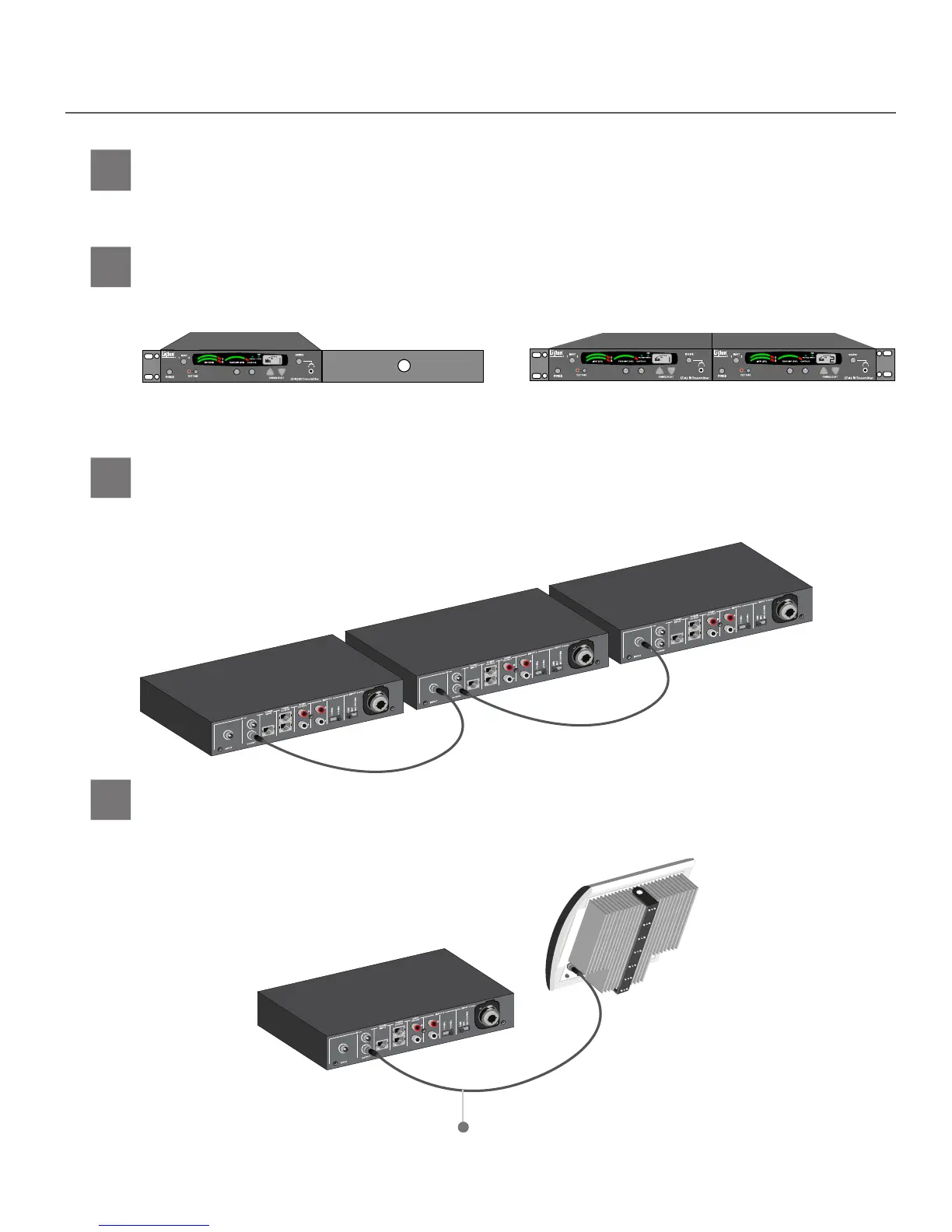
If rack mounting the transmitter(s), install the optional rack mount kit (part LA-326) according to the
instructions included with the kit.
Mount LT-82(s) in Rack (if desired)
3
If installing more than one transmitter (for multi-channel applications), it will be necessary
to daisy chain the transmitters. Connect RF output on rst transmitter to RF input on second
transmitter. Continue daisy chaining up to four transmitters (four channels).
Interconnect Multiple LT-82s (if necessary)
Rack Mount with dual units installed.Rack Mount with single unit installed.
4
Connect RF output on transmitter to RF input on radiator. In multi-channel systems con-
nect the last transmitter in the daisy chain to the radiator(s) RF input. See design guide
for more information on connecting multi-channel systems.
Connect LT-82 RF Signal to Radiator(s)
RF Signal on coaxial cable


 To Next Page