ISO9001CERTIFIED
www.liteputer.com.tw
Lite-Puter
DX-610/626[EUM-
]
6
Chapter2. Operation
2 - 1 StandardDMX512Signal
2 - 2 DMXStartAddressSetting
STEP-1holdingDMX,press▲or▼tofindthestartaddress.
▲:move1numberforward:uptoChannel512.
▼:move1numberbackward:downtoChannel1.
2 - 3 Dimming/SwitchingSetting
STEP-1pressDMXkeyintoDMXstatus.
STEP-2pressandholdtheFNCkeyfor3sec.
STEP-3pressFNCkeytoselectchannel.
STEP-4press▲or▼toselectdimmingmodeorswitchingmode.
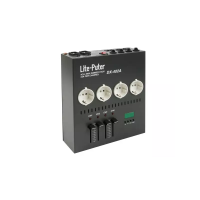
DX-626isa6channeldimmerpacksowhensettingthisunit:
1 asd.001, theoutputisfromChannel1Channel6.
2 asd.007, theoutputisfromChannel7Channel12.
3 Itisallowedforsettingmorethan1pieceofDX-626atthesamestart
address.
DefaultsettingAllchannelare
dimmingmode
Thispointisflashingwhen
receivingDMXsignal.


 To Next Page