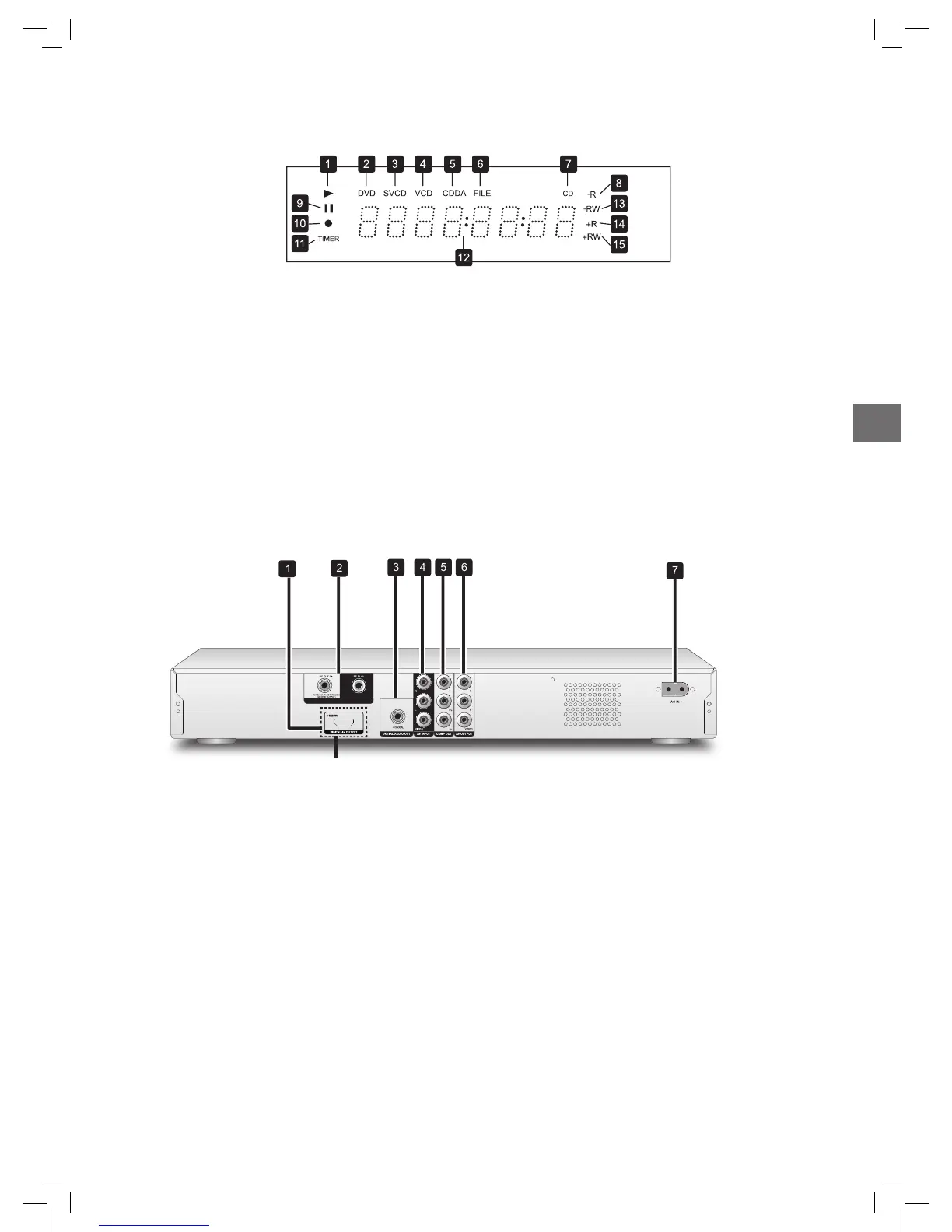
1. HDMI DIGITAL OUT jack
Connects a TV or an AV amplifier (receiver) having
HDMI input jack via HDMI cable.
Only models feature HDMI support have this
connection jack. See model comparison chart on
the back cover.
2. VHF/UHF IN/OUT jacks
Connects antenna cables
3. DIGITAL AUDIO OUT (COAXIAL) jack
Connects an amplifier or a receiver having a digital
input jack
4. AV INPUT (VIDEO/AUDIO L/R) jacks
Connects the outputs of external equipment via
composite video/audio cables
5. COMP OUT (COMPONENT) jacks
Connects the inputs of external equipment via
component video cables
6. AV OUTPUT (VIDEO/AUDIO L/R) jacks
Connects the inputs of external equipment via
composite video/audio cables
7. AC IN terminal
Connects the power cord
Please note that some models feature attached
power cords.
Select models only



 To Next Page