STEP 3/7
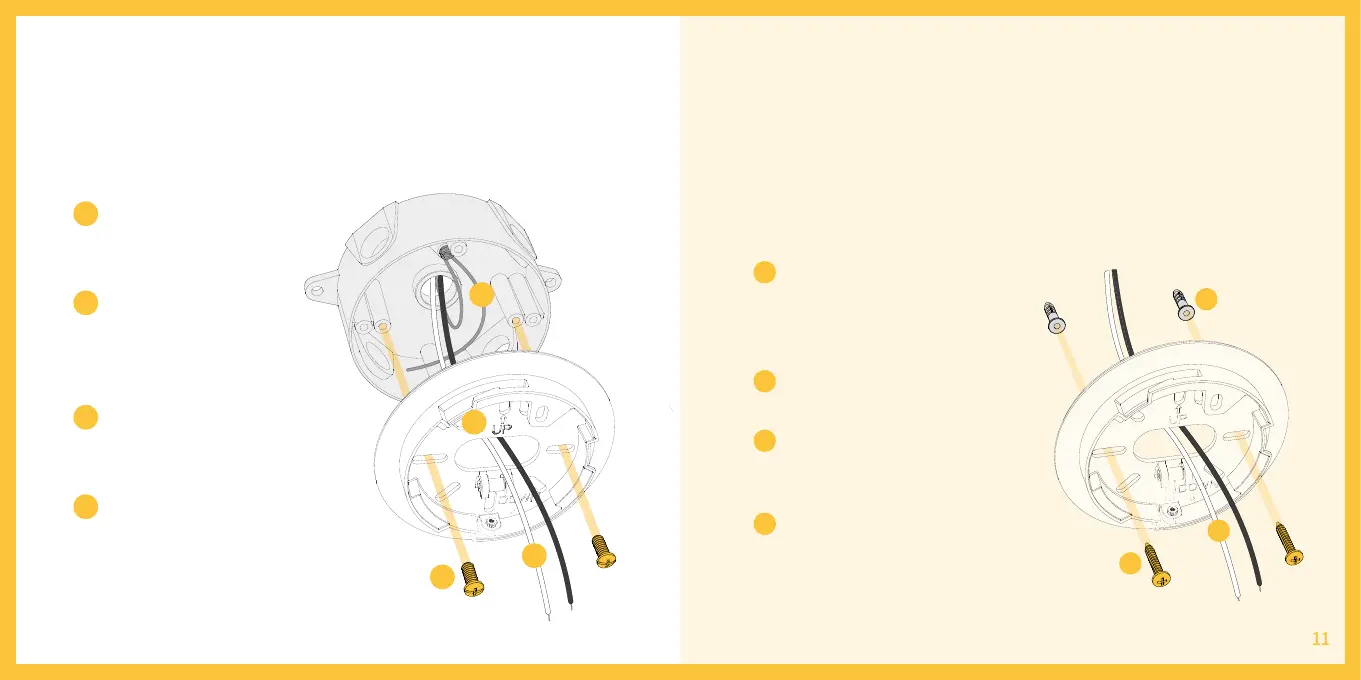
Install the mounting bracket
Without junction box
Install the mounting
bracket following the
engraved direction.
Make sure your
existing wires come
through the middle of
the bracket.
Make sure the ground
wire is securely kept
inside the junction box.
Attach the bracket to your
junction box using at least
two screws, and use the
level to adjust even.
Position the bracket at the
installation spot and mark the
spots with a pen on the wall
where you will screw.
Drill a hole in the wall, then
insert expansion nut.
Carefully push all the wires
through the large opening in
the center of the bracket.
Mount the bracket using at
least two screws and use the
level to adjust even.
1
1
2
2
2
3
3
4
4
4
4
1
2
3
If the installation spot does not have an existing junction box or requests
extra wiring, please hire a licensed electrician and use the following steps
as reference:
3



 To Next Page