STEP 4/7
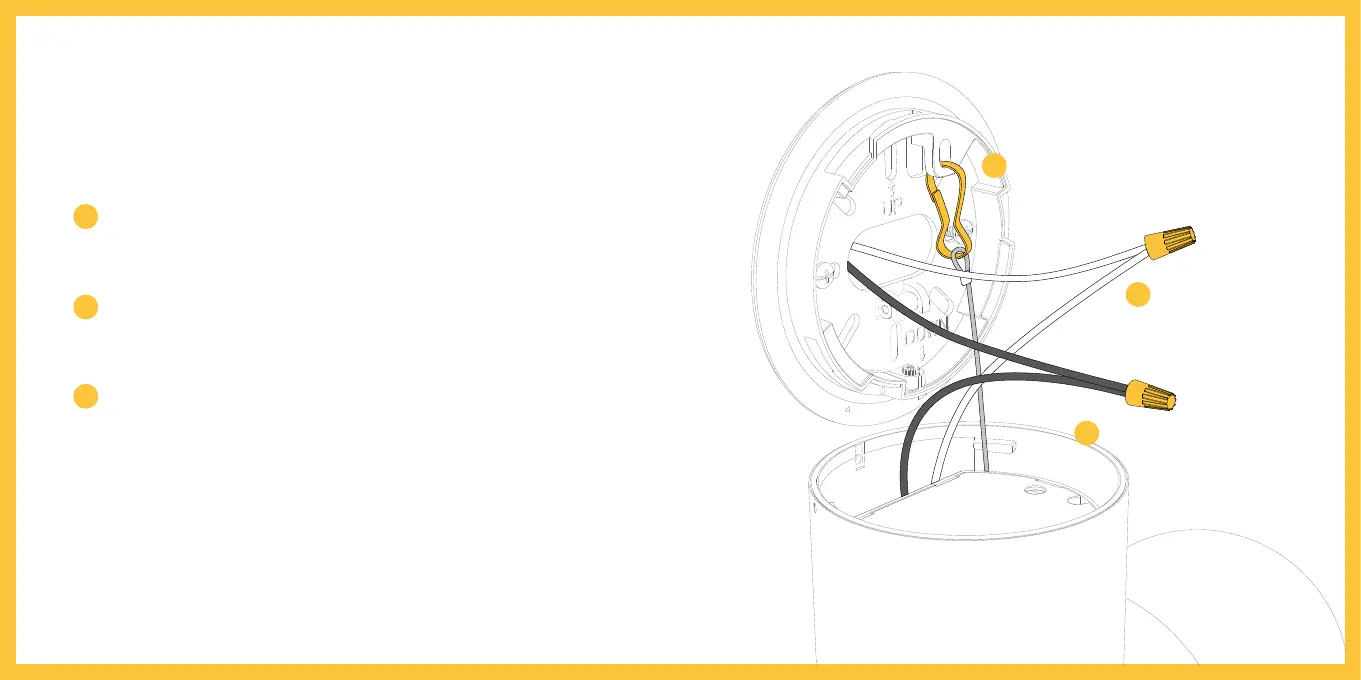
Connect the power wires
Use the built-in hook to hang Litmor
TM
Capsule
from the bracket while connecting wires. Hook
one end onto the bracket as illustrated.
Use a wire nut to connect the white wire coming
out from your junction box to the white wire on
your Litmor
TM
Capsule.
Connect the black wire from your junction box
to the black wire on your Litmor
TM
Capsule with
another wire nut.
Tips:If you don't have clearly colored black and white wires coming out
from your junction box, consult a licensed electrician.
1
3
2
Hang your Litmor
TM
Capsule
from the bracket
Connect white wires
Connect black wires
1
2
3



 To Next Page