Need help?
Do you have a question about the LIVA MINI PC and is the answer not in the manual?
Instructions on proper system setup, ventilation, and environmental conditions.
Important cautions regarding power cords, liquid spills, and unplugging the system.
Details procedures for refreshing, resetting, or restoring the Windows 8.1 operating system.
Steps to refresh the PC, reinstalling Windows while keeping personal files.
Steps to reset the PC, deleting personal files and reinstalling Windows.
Instructions on using System Restore to revert the PC to a previous state.
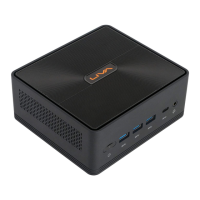
Provides an introduction to the LIVA Mini PC's platform, processor, and design.
Details the technical specifications of the LIVA Mini PC, including CPU, memory, and I/O.
Lists the input/output ports available on the rear of the LIVA Mini PC.
Information about the system's BIOS, including version and dual display support.
Describes the physical ports and connectors on the front and rear of the LIVA Mini PC.
Provides information on navigating and utilizing the BIOS Setup Utility.
Explains the purpose and functions of the BIOS Setup Utility.
Instructions on how to access the BIOS Setup Utility by pressing the DEL key.
Explains how to reset BIOS settings to factory defaults using Load Default Settings.
Lists the keyboard keys used for navigating the BIOS setup menus.
Describes the main menu interface of the BIOS Setup Utility.
Details the options available within the Advanced BIOS menu for system configuration.
Configures parameters for system power management operations like wake-up functions.
Configures the highest ACPI sleep state for system suspend.
Displays and allows modification of CPU-specific settings and features.
Shows information and settings for USB configuration, including device and XHCI mode.
Allows configuration of settings related to the System on Chip (SoC).
Enables adjustment of CPU clock speed and system bus settings.
Allows configuration of boot settings, including OS selection and boot priorities.
Enables setting up administrator and user passwords for system security.
Provides options for saving changes, discarding changes, and exiting the BIOS setup.
Provides instructions on downloading and installing updated BIOS for the motherboard.
Details on installing drivers and software using the provided DVD or website.
Describes the automatic driver installation process when using the support DVD-ROM.

 To Next Page
 General