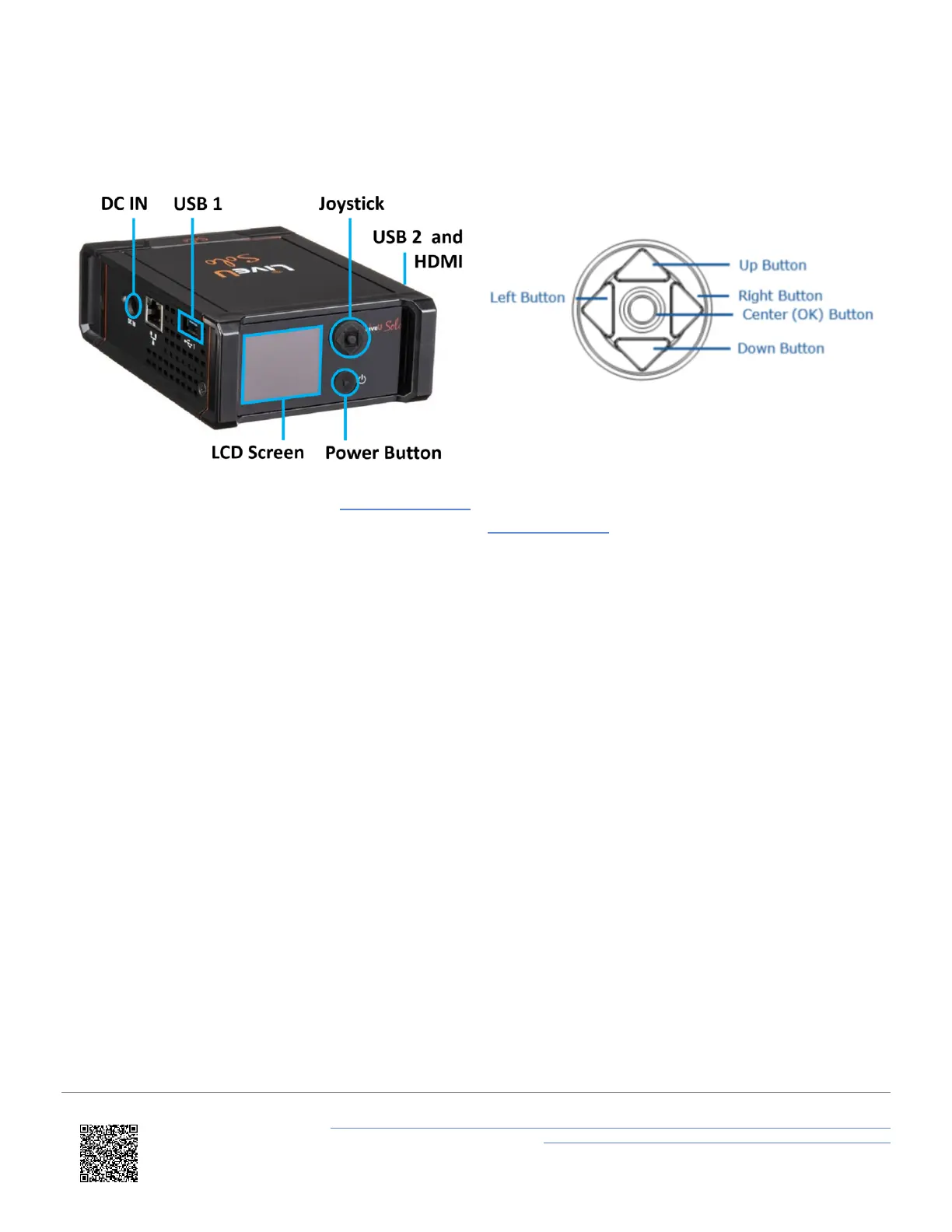
The input ports, such as USB and HDMI are situated on the sides of the unit. The front panel consists of an LCD display
screen used for configuration, a joystick for navigating the screen and the Power button, which can also be used to start
and stop live streaming.
Joystick
LiveU Solo tutorials are available on the VBOX Motorpsort website. For full LiveU Solo HDMI specifications and
manual information, consult the LiveU Solo literature from the https://gosolo.tv website.
Features
• Start streaming within seconds - just connect to VBOX Video HD2 HDMI and go live at the push of a button
(once configured).
• Keep more viewers engaged with a reliable, high-quality stream.
• Send a high-quality stream from remote locations or in congested network environments such as heavy crowds.
• Deliver HD live videos to all popular online platforms such as Facebook Live, YouTube and Twitch.
• LiveU Solo can incorporate LiveU’s patented video protocol LRT™ (LiveU Reliable Transport), a unique video
transmission method. It deploys smart algorithms like adaptive bit rate adjustment and automated error
correction to deliver rock-solid live streams with superior video quality. LRT™ combines the bandwidths of up to
four internet sources (2 x cellular networks, 1 x WiFi, 1 x Ethernet) to create a single, strong upstream line.
• Stop/start, preview video, monitor connectivity status and battery life on both unit and in web-based portal.
Specifications
• Bit rate: Up to 8 Mbit/s based on resolution and destination.
• Internal battery: Lithium ion providing a minimum of 2 hours of streaming.
• Size: 95 mm x 132 mm x 43 mm.
• Weight: 518 g.
• Operating temperature: -5 to +45°C.
IMPORTANT - Do not immerse the unit in water!
https://en.racelogic.support//Product_Info/Video_Data_Loggers/VBOX_Video_HD2/Knowledge_Base/
Live_Streaming_VBOX_Video_HD2_Using_LiveU_Solo_HDMI
2



 To Next Page