
 Need help?
Do you have a question about the LIVOLTEK GT1 Series and is the answer not in the manual?
Mark drilling locations on the wall, ensure holes are deep enough (at least 50mm) for inverter support.
Insert expansion tubes into wall holes, hang the back plate, and tighten screws to secure the inverter.
Verify the inverter is securely hung on the back panel and locked with side screws.
Prepare a 12AWG wire, pass through heat-shrink tube and ground terminal, crimp securely, and fasten to inverter.
Prepare cables (12/10/8AWG) per model, strip insulation, pass through terminals, and tighten connections.
Strip 12AWG wire (5-7mm), insert PV+/PV- pins, and crimp using MC4 tool for secure connection.
Insert prepared PV connectors into the inverter's PV ports and measure PV voltage (<600V).
Prepare and connect communication cables (RS485, DRM, Meter) to the inverter's ports.
Insert Wi-Fi dongle, then use the 'My Livoltek' App to connect it to your home Wi-Fi router.
Turn on AC breaker, then DC breaker. Switch loads ON, and observe LED indicators for status.
Set Date/Time, Grid Standards, and other parameters using the 'My Livoltek' App.
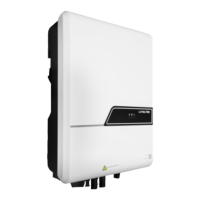
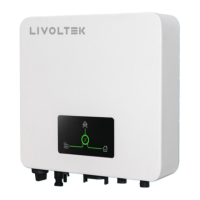
This document provides a comprehensive guide for the installation, operation, and maintenance of the LIVOLTEK GT1 Series Solar Hybrid Expert, covering models from 1.6KW to 10.0KW. It is designed to assist users in setting up and managing their solar hybrid inverter system effectively.
The primary function of the LIVOLTEK GT1 Series inverter is to convert direct current (DC) generated by solar panels into alternating current (AC) for household or grid consumption. As a solar hybrid expert, it integrates solar power generation with grid interaction, potentially including battery storage (though not explicitly detailed in the provided excerpts, it's implied by "hybrid expert"). This allows for optimized energy usage, reducing reliance on the grid and maximizing self-consumption of solar energy. The system is designed for both residential and commercial applications, offering a range of power outputs to suit various needs.
The installation process is broken down into several key stages, starting with the preparation of necessary tools, including a hammer drill, rubber hammer, tape ruler, spirit level/marker, protective glasses, dustproof cover, wire crimpers, wire stripper, DC voltage multimeter, Euro terminal crimping tool, heat gun, and a multifunction terminal crimping tool (RJ45).
The inverter installation involves drilling holes on the wall to specific dimensions based on the inverter model (1.6~3.3kW, 1.6~6kW, 7~10kW), inserting expansion tubes, and securely hanging the inverter onto the back plate. A self-check step ensures the inverter is properly mounted and locked with screws.
Ground connection is a critical safety feature. It involves preparing a 12AWG wire, stripping it, passing it through a heat-shrink tube and the ground terminal, crimping the terminal, tightening the heat-shrink tube, and finally fastening it to the inverter with screws at a specified torque (1.5±0.2N·m).
Grid connection varies slightly depending on the inverter model. For GT1(1.6~6.0kW) models, it involves preparing 12AWG or 10AWG cables, removing the cable jacket, stripping wire insulation, passing it through the terminal, inserting it into the L/N/PE ports, locking and tightening it, and then inserting it into the inverter. For GT1(7.0~10.0kW) models, 8AWG cables are used, with a similar process of stripping, inserting into the terminal, pressing tightly, and then inserting into the inverter and locking the waterproof cover.
PV connection involves preparing 12AWG wires, stripping them, inserting PV+/PV- pins, crimping them with a crimping tool, and then passing them through the PV terminal. A crucial step is to measure the PV+/PV- voltage to ensure it's below 600V before plugging the connections into the inverter's PV port.
Communication connection is facilitated via an RJ45 terminal. This involves unscrewing a cover, passing the wire harness through a waterproof plug, stripping the wire, preparing the connector and communication cable according to the PIN definition (DRM1/5, DRM2/6, DRM3/7, DRM4/8, 3.3V, DRM0, 485A2, 485B2, GND), inserting the cable into the RS485 port, and tightening the waterproof connector. This enables communication with DRM (Demand Response Management) and smart meter ports.
Wi-Fi Dongle connection allows for local monitoring and management via Bluetooth and Wi-Fi. The process involves removing the waterproof lid from the Wi-Fi/4G terminal, inserting the Wi-Fi Dongle into the communication port, and building a connection between the dongle and the home Wi-Fi router using the "My Livoltek" app. The app is available on Apple App Store and Google Play, and web portals are provided for broader access.
Powering on/off the inverter follows a specific sequence. Before commissioning, an inspection checklist ensures all switches are off, the inverter and cables are correctly installed, unused cable holes are fitted with waterproof nuts, the Wi-Fi Dongle is installed, conduit holes are sealed, and the smart meter is connected. To power on, the AC breaker on the grid side is turned on, followed by the DC breaker, then the DC switch of the inverter, and finally, the loads are switched on. The LED indicator provides status feedback: Green indicates normal operation, Red indicates a fault, and blinking indicates system updating.
Initial parameter setting is done via the "My Livoltek" app. After powering on the inverter and connecting the Wi-Fi dongle, users create a site (plant), add the device, and then proceed with initial parameter settings. This includes setting date and time, selecting grid standards (country safety standards), and optionally setting feed-in limitations. Advanced settings, protected by a password, allow for grid protection parameters, active power adjustment, and reactive power adjustment. A "Set Self test" option is available for specific regional requirements (e.g., Italy).
The document emphasizes safety during maintenance. Before maintaining and commissioning the inverter and its peripheral distribution unit, all charged terminals of the inverter must be switched off. A waiting period of at least 10 minutes after powering off the inverter is required to ensure safety. This precaution is crucial to prevent electrical shock or damage to the equipment.
The LED indicators provide immediate visual feedback on the inverter's status, aiding in quick diagnosis of operational issues or faults. A green light indicates normal operation, while a red light signals a fault, prompting the user to investigate further. A blinking light suggests a system update is in progress.
While the provided excerpts do not detail specific periodic maintenance tasks like cleaning or component checks, the structured installation and commissioning process, along with the safety warnings, imply a design focused on reliability and ease of troubleshooting. The availability of a user manual and quick installation guide, along with app-based monitoring and parameter setting, supports ongoing management and potential remote diagnostics, which are key aspects of modern inverter maintenance. The modular nature of connections (PV, Grid, Communication, Wi-Fi Dongle) suggests that individual components can be accessed and serviced if needed, though specific repair procedures are not outlined here.
 General
| Start Voltage | 150V |
|---|---|
| THDi | <3% |
| DC Switch | Yes |
| Cooling Method | Natural convection |
| Protection Degree | IP65 |
| Model | GT1 Series |
| Output Power | 3.6 kW - 6 kW |
| Rated AC Output Power | 3.6 kW - 6 kW |
| Rated AC Voltage | 230 V |
| AC Voltage Range | 180 V - 280 V |
| Rated Grid Frequency | 50 Hz / 60 Hz |
| Protection | AC short circuit |
| Operating Temperature Range | -25°C to 60°C |
| Communication | Wi-Fi / GPRS |


 To Next Page