Instruction manual
5
Be careful not to place the appliance on the edge of a table or worktop to prevent it from tipping over.
Never place your appliance directly on a fragile surface, such as a glass table, cloth or plastic tablecloth, or
varnished furniture.
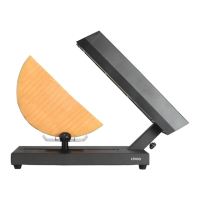
Never place aluminium foil or any other object under the stone or the hob, and between the reflector and
the heating element.
1. Carefully unwind the power cable and plug in the unit.
2. If the appliance is equipped with an ON/OFF button or a thermostat, switch it on.
3. Allow the appliance to preheat for 15 minutes.
4. If your appliance is equipped with a thermostat, you can adjust the temperature during cooking by
turning the knob from Max to Min as desired.
5. After use, turn the thermostat to the Min position or turn the switch to OFF (depending on the model)
to turn off the appliance, unplug the cord from the mains and allow to cool for 1 hour before moving
or cleaning.
NOTE:
Do not leave empty pans in the appliance while it is on.
Do not cut your food on the plate.
To avoid damaging the cooktop coating, always use a plastic or wooden spatula.
CLEANING AND STORAGE
Maintenance and cleaning should be done when the appliance is unplugged and completely cool. Always
clean your appliance after each use to avoid the accumulation of cooked and annealed food. Clean the
accessories and the cooking plate in hot soapy water with a non-abrasive sponge or nylon brush.
Do not put the appliance in the dishwasher.
The appliance body can be cleaned with a soft, slightly damp cloth.
The heating element cannot be cleaned. If it is really dirty, wait until it has cooled down completely and
wipe it with a dry cloth.
Store your appliance in a cool, dry place, away from moisture or the elements.


 To Next Page